Home
NewLine
Monitor
TRUTOUCH
Page 40
NewLine TRUTOUCH - Page 40
50 pages
Manual
Save Page as PDF
To Next Page
To Next Page
To Previous Page
To Previous Page
Loading...
3
7
Under
OPS
,
HDMI 1-HDMI 4
and
DP
signal source.
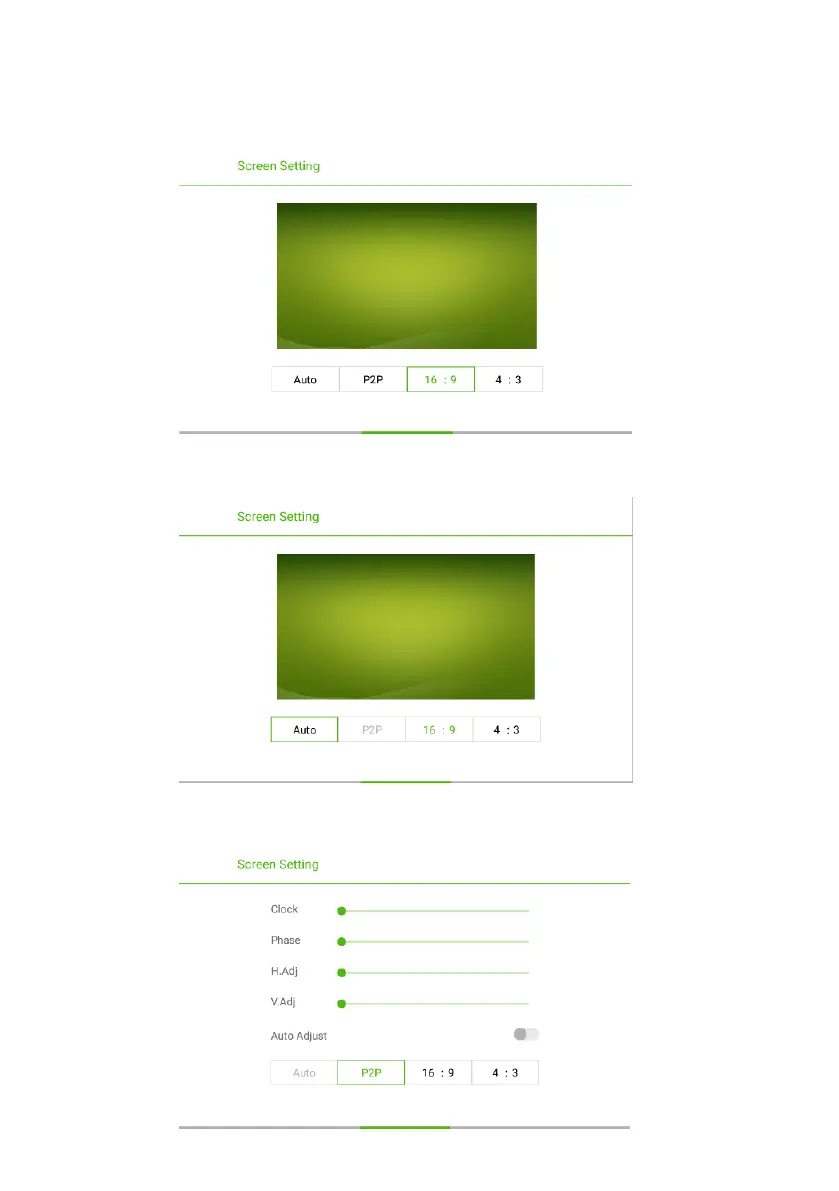
Under different input sources, the screen settings could be dif
ferent.
●
●
Under
AV
signal source, the
P2P
mode cannot
be
use
d
.
●
Under
VGA
signal source,
Auto
mode cannot
be
use
d
.
39
41
Table of Contents
Main Page
Default Chapter
1
User Manual
1
Table of Contents
3
1 Safety Instructions
4
2 Installation Requirements
7
3 Introduction
9
Outer Appearance
10
Control Panel
11
Connection Panel
12
Using the Remote Control
16
4 Basic Operation
17
Power on
17
Power off
19
Software Installation
19
Software Uninstall
20
Software Calibration
20
Calibration Method for Windows 10
22
OPS Installation
24
5 Toolbar Introduction
25
Task Manager
26
Whiteboard
27
Screen Capture
29
Gallery
30
File Manager
31
System Settings
31
Browser
32
Audio Only
32
Child Lock Setting
33
USB Lock
34
Temperature Status
34
Remote Boot
35
Applications
37
6 Signal Source Selection
38
7 Menu
39
Sound Mode
39
Screen Setting
39
Display Setting
41
8 ECO Mode
42
9 VGA Signal Input
43
10 Multimedia Format Support
44
11 Common Faults and Solutions
45
12 Care and Maintenance
48
Maintenance Tips
48
Cleaning Infrared Sensors
48
13 Technical Parameters
49
Related product manuals
NewLine TT-6522Q
103 pages
NewLine TT-7522Q
103 pages
NewLine TT-8622Q
103 pages
NewLine TT-6519VNC
105 pages
NewLine TT-7523QCA
96 pages
NewLine TT-6519RSC
106 pages
NewLine FLEX TT-2721AIO
24 pages
NewLine Lyra Pro TT-8623QA
40 pages
NewLine Lyra Pro TT-7523QA
40 pages
NewLine Trutouch X5
56 pages
NewLine TRUTOUCH UB Series
50 pages
NewLine TRUTOUCH RS Series
88 pages








 To Next Page