36
Menu
After switching to selected signal source, press MENU on the remote control. A
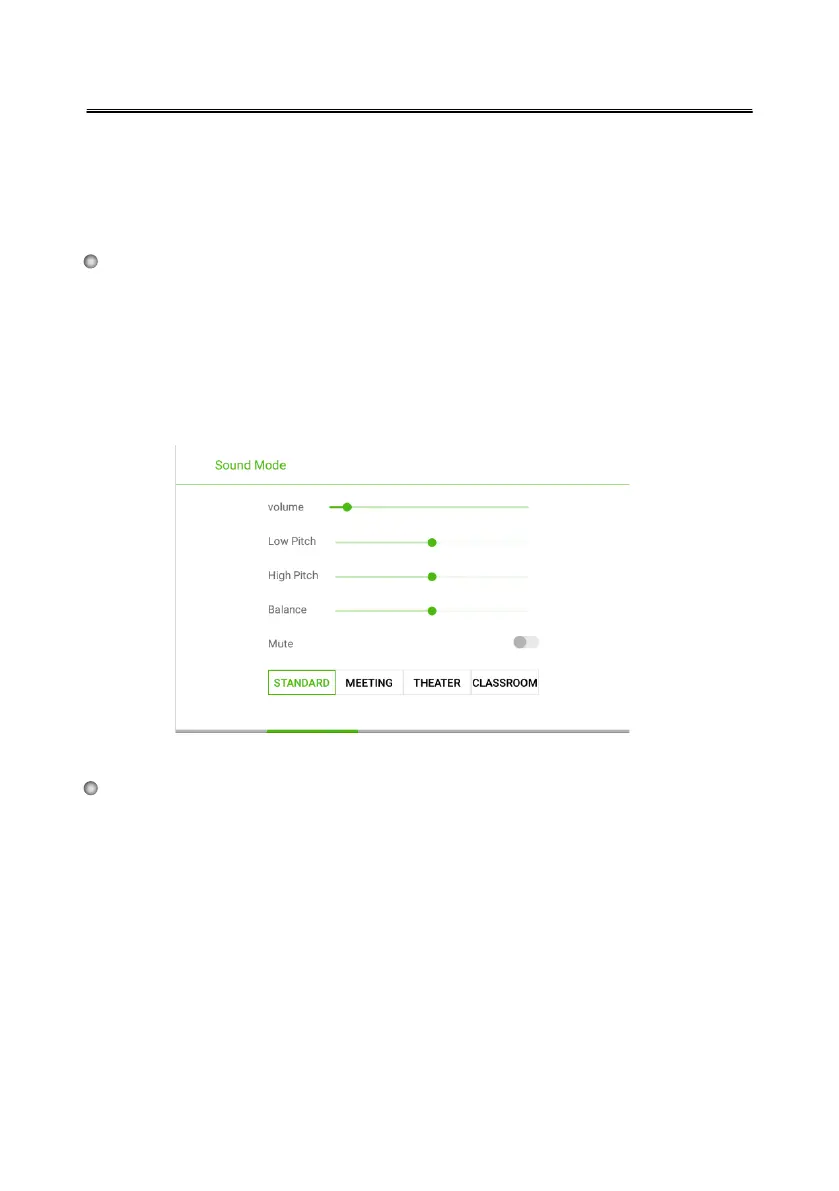
menu is displayed, including Sound Mode, Screen Setting, and Display
Setting. Scroll left and right on the screen or press ◄ or ► to switch between
entries.
The Sound Mode page displays the following options: STANDARD, MEETING,
THEATER, and
CLASSROOM.
The Screen Setting page displays options including Auto, P2P, 16:9 and 4:3.
You can change these options in two ways:
Sound Settings
Screen Setting
●
●
●
●
Click an icon and set the option.
Press ◄ or ► and press OK to modify the option. Press RETURN to exit
out of the menu.
●
Drag the volume key bar directly or press the ◄ or ►button to change volume.
Pr
ess Mute to silence the speakers.
Press RETURN to exit the menu.








 To Next Page