16
Power off
Software Installation
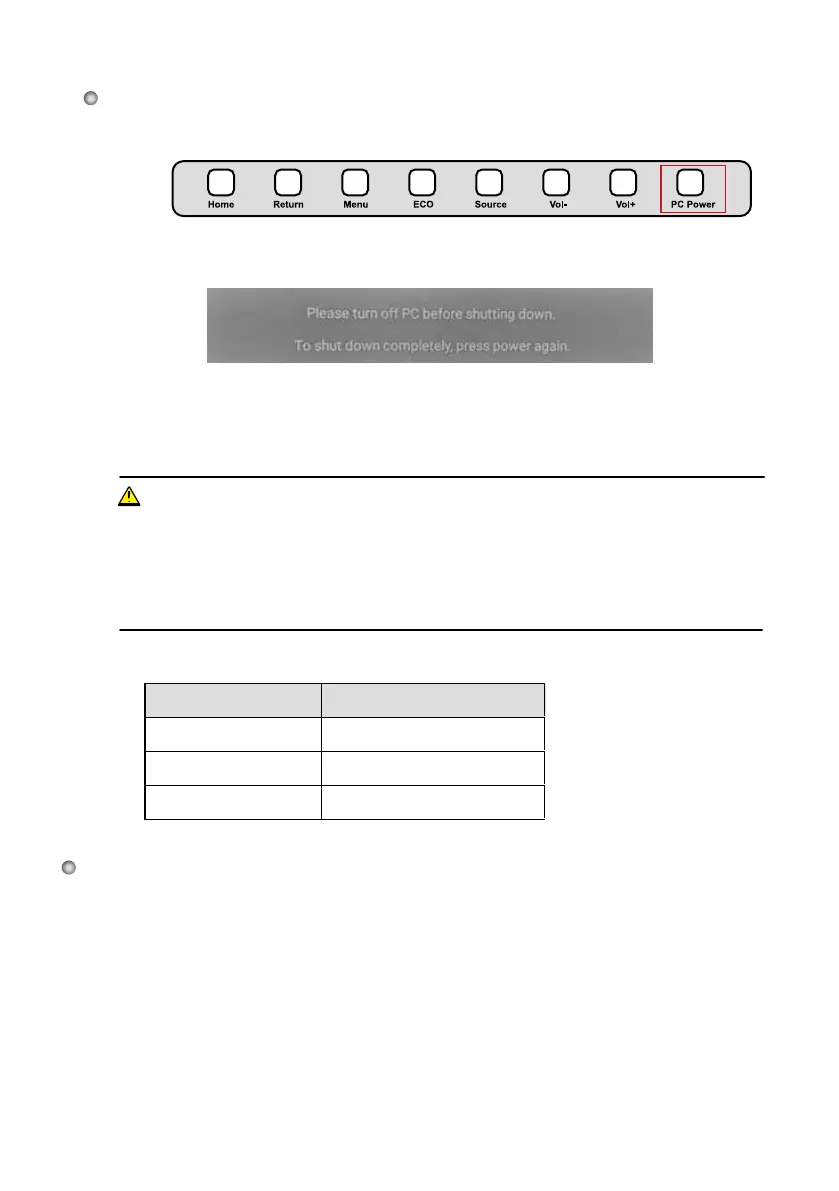
Press PC Power to turn off the OPS (for all-in-one models only).
Press Power on the control panel or on the remote control to enter the standby
mode. The screen will show the following information:
Step 1:
● Recommended configuration:
− CPU: Inter (R) Core i3 2.27GHz or AMD CPU with equivalent performance and above−
Memory: 1GB
− Hard drive: 1GB
− Graphics card: supports DirectX 9 or above
● If the latest version of IdeaMax
software was installed on the PC before delivery, please skip
this step.
● HID driver-free multi-touch functions only applies for Vista, Windows 7 or higher versions. The
touch LED display with Windows XP version should install/run the software for normal use.
Step 2:
Status of the power indicator is as follows:
Power Indicator Status
No light Powered off
Red Standby
Green Powered on
WARNING
● Please turn off the OPS before you turn off the interactive
display
. Otherwise, the computer may
be damaged.
● Disconnect the interactive
display
from power after the display enters standby mode. Otherwise,
the display may be damaged. A sudden power failure may damage the interactive
display
.
● Frequently powering on and off in a short time may cause faults.
Press Power on the control panel or on the remote control to confirm and
switch the display into the standby mode. The power indicator will turn red.
In the standby mode, flip the power rocker switch to "off" to turn off the display.
Step 3:
Step 4:








 To Next Page