42
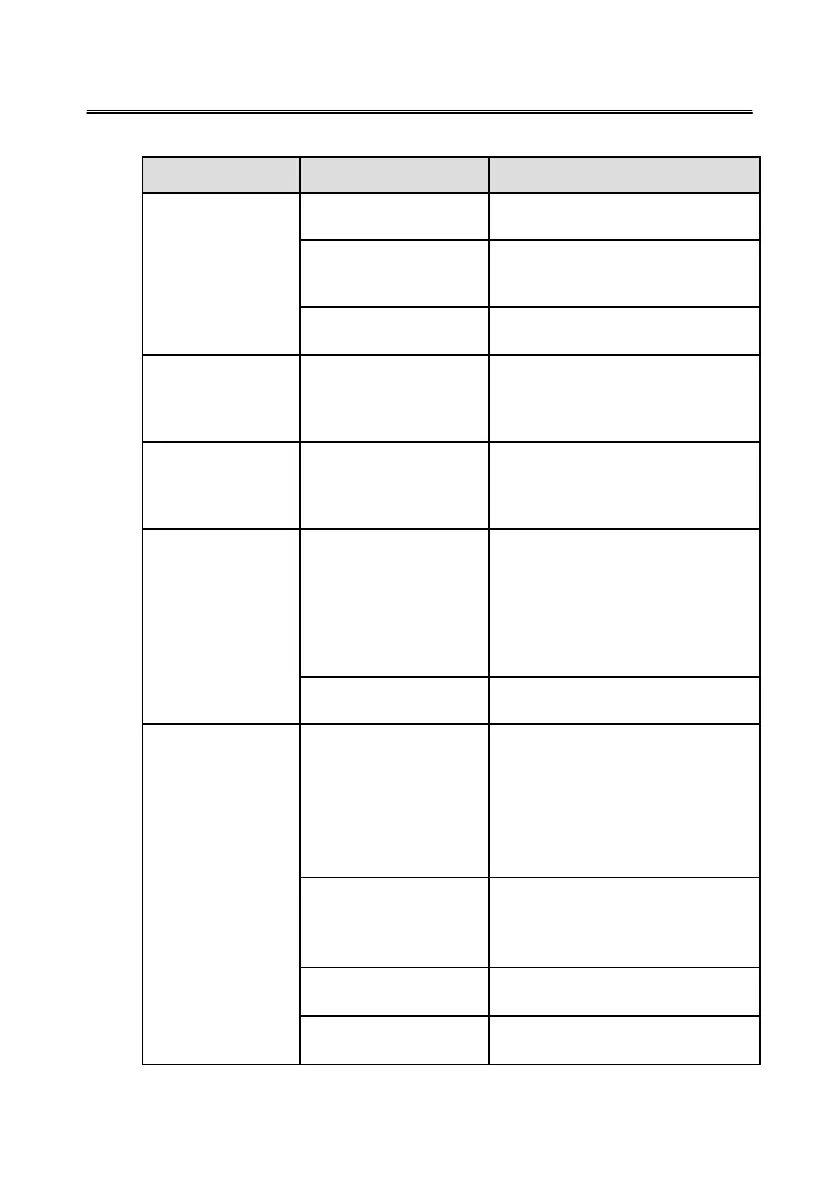
Common Faults and Solutions
Symptom Possible Cause Solution
An application
fails to be load.
The application is not
correctly installed.
Install the application correctly.
The USB port is not
connected or is
faulty.
Change the USB lead or check if the
USB port is faulty.
The infrared
sensor is blocked.
Ensure that the surrounding
infrared sensors are not blocked.
Recalibration is
required every
time the display
is switched on.
The computer is
equipped with a recovery
card.
Disable computer protection
and recalibrate again.
Calibration is
inaccurate.
The calibration is not
setup properly.
Press
AUTO
on the remote control
to show the full screen, and use the
pen provided with the display to
recalibrate again.
The cursor of the
pen is unstable
when the pen is
used.
The writing method is
incorrect.
Y
ou are advised to use the pen
rather than a finger to write. Hold
the
pen as far
from
the nib as possible.
The angle between the pen and
display needs to be greater than 60
degrees. Do not touch the display
with your sleeve or wrist.
Strong light or infrared
interference exists.
Remove the interference source
or change the room environment.
Handwriting is
discontinuous. (Part
of the handwriting
cannot be
displayed.)
The writing method is
incorrect.
Y
ou are advised to use the pen
rather than a finger to write. Hold
the
pen as far
from
the nib as possible.
The angle between the pen and
display needs to be greater than 60
degrees. Do not touch the display
with your sleeve or wrist.
The covering area of
the nib does not meet
requirements
or the nib
is too small.
Change the nib or use a pen
with a larger covering area.
The infrared
sensor is blocked.
Check if infrared sensors are blocked.
Strong light or infrared
interference exists.
Remove the interference source or
change the using environment.








 To Next Page