EasyManua.ls Logo

Nikon CoolPix S60 - Playing and Deleting Voice Memos

Nikon CoolPix S60
210 pages
Print Icon
To Next Page IconTo Next Page
To Previous Page IconTo Previous Page
Loading...
Voice
Memos:
Recording
and
Playback
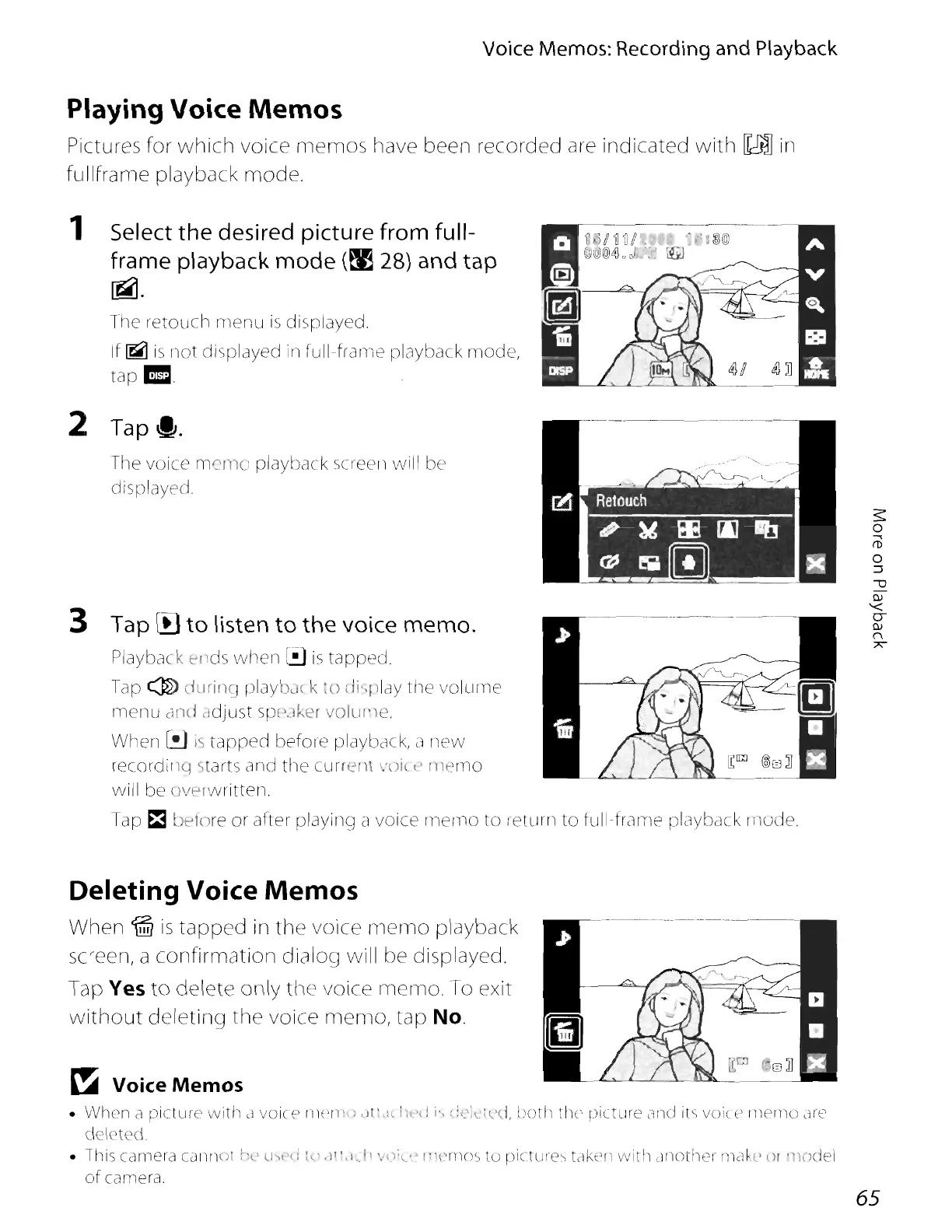
Playing Voice Memos
Pictures for
which
voice
memos
have been recorded are indicated
with
IkmJ
in
fullframe playback mode.
1 Select
the
desired picture
from
full-
frame
playback
mode
(~
28)
and
tap
~.
The
retouch
menu
is
displayed.
If
~
is
not
displayed in
full-franw
playback
mode,
tap
•.
The
voice
m rno playback
sneerl
will be
displayed.
3 Tap
III
to
listen
to
the
voice
memo.
Playback
t'llds
when
[!)
is
tapped.
Tap @ d,lrif'CJ playb':H k
'0
eli
play
the
volume
menu
dnd
,ldjust
spc'Jker
Vo1UI'1e.
When
f.!.l
is
tapped
befme
playback, a
new
recmdilKI
s arts and
the
currl"nl
'(jl~t>
I1k)nlO
[Q;J
®C=3]
will be oVf'rwritten.
Tap
~
before
m after playing a voice mer
no
to
rewrn
to
full-frcllT1e fJlayback
mode.
2
Tap~.
Deleting Voice Memos
When
till
is
tapped
in
the
voice
memo
playback
screen, a
confirmatiorl
dialog will be displayed.
Tap
Yes
to
delete
only
the voice
memo.
To exit
without
deleting
the
voice
memo,
tap
No.
~
Voice
Memos
When
a picture
with
c1
voic(:"
rW'Ih;
dl~,;,
h"d
j"
;:l';\·i~'c.i,
both
the
picture
M1cl its
voice
rneniO
.11'12
deleted
lhis
camera
CJriIH>
~~t
ll)l'r)
l,'
,l",I.
h
VI);L'>
1~1('rn(),:>
to
picture"
tdkerl
with
drlothel' rndKl'
III
'nodel
of
camera.
65

Table of Contents

Other manuals for Nikon CoolPix S60

Related product manuals