Playing
back
pictures
Besides being able to playback exposed images
on
a
TV
monitor through a video output connector, exposed image data
can easily be downloaded to a personal computer using
Nikon's
PC
Card Drive
ED
-10 or other digital processing
equipment.
In t
hi
s manual
we
will
ex
plain how to playback pictur
es
on
a
TV
monitor
on
l
y.
- For details on other systems, refer
to
the instruction manuals for the relevant
equipment.
Playback on a TV monitor
1
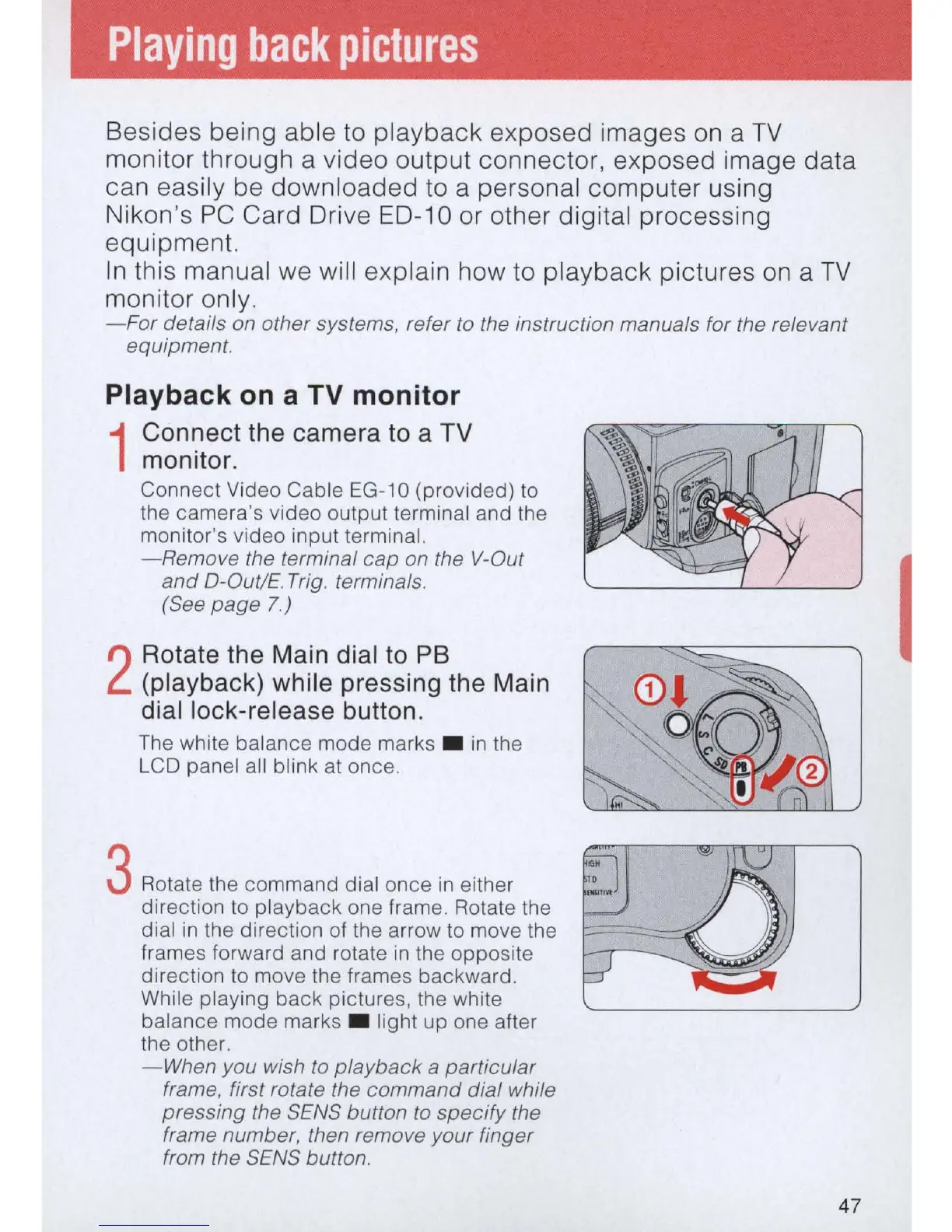
Connect the camera to a TV
monitor.
Connect Video Cable
EG-1
0 (provided)
to
the camera's video output terminal and the
monitor's video input terminal.
- Remove the terminal cap
on
the V-Out
and
O-Out/E. Trig. terminals.
(See
page
7)
2
Rotate the Main dial to
PB
(playback) while pressing the Main
dial lock-release button.
The white balance mode marks .
in
the
LCD panel all blink at once.
3 Rotate the command dial once
in
either
direction to playback one frame. Rotate the
dial
in
th
e direction of the arrow
to
move the
frames forward and rotate
in
th
e opposite
direction to move the fram
es
backward.
While playing back pictures, the white
balance mode marks . light up one after
the other.
-When
you wish
to
playback
a particular
frame, first rotate the command dial while
pressing the SENS button
to
specify the
frame number, then remove your finger
from the SENS button.
47



 To Next Page