I
Fl
ash photography in TTL auto flash mode with
88-26
and
88
-25 Nikon
8p
eedlights.
-For
more details, read the instruction manual provided with each Speedlight
model before use.
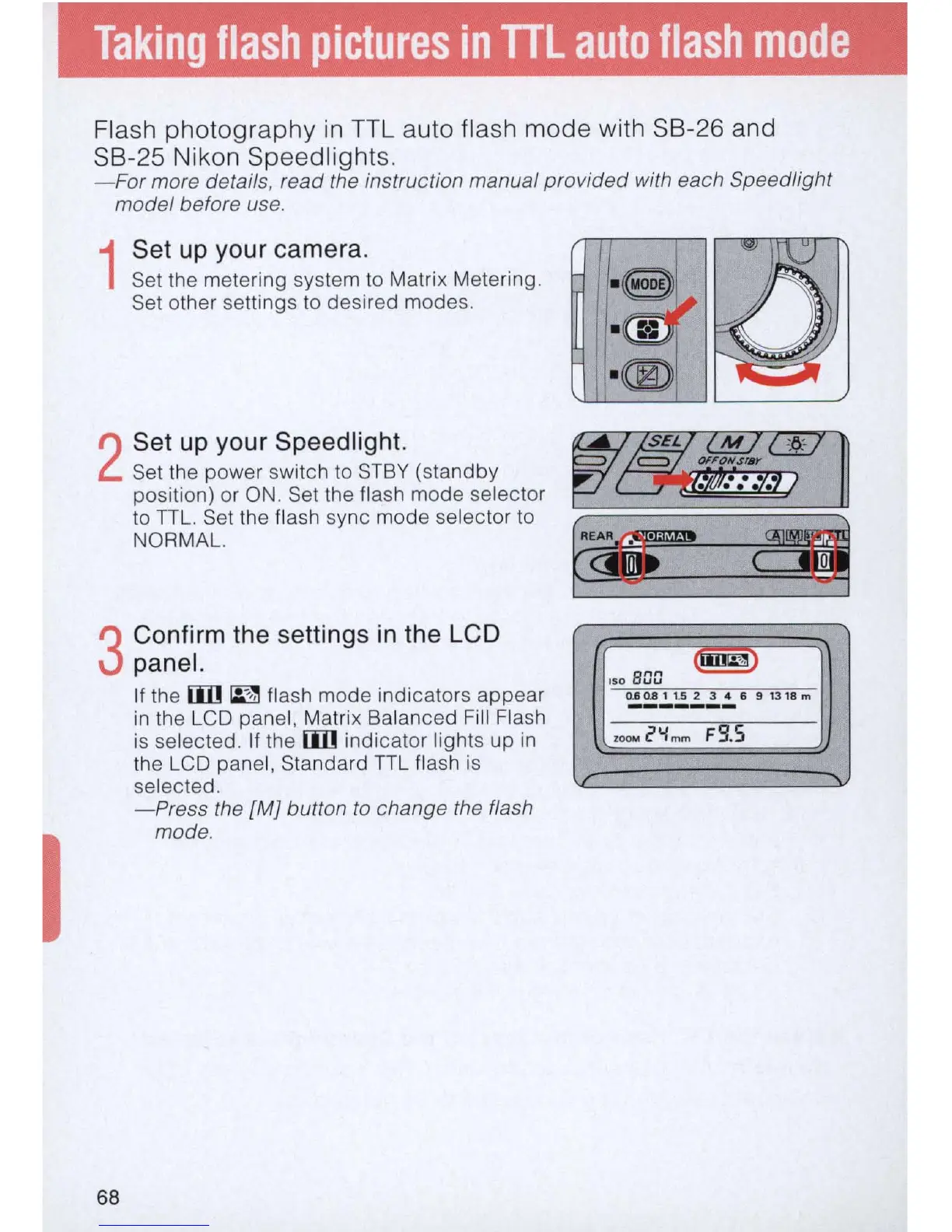
1
Set up your camera.
Set the metering system
to
Matrix Metering.
Set other settings to desired modes.
2
Set
up
your Speedlight.
Set
th
e power switch to S
TBY
(standby
position) or
ON
. Set the flash mode selector
to
TTL. Set the flash sync mode selector to
NORMAL.
3
Confirm the settings in the LCD
panel.
68
If the
[j]]
~
flash mode indicators appear
in
the LCD panel, Matrix Balanced Fill
Fl
ash
is selected.
If
the
[j]]
indicator lights up
in
the LCD panel, Standard
TTL
flash
is
selected.
- Press the
[MJ
button
to
change the flash
mode.
ISO
scm
~
O.so.alt.S2
3 4 6
9131Sm
-------
ZOOM
2"i
mm
FS
.S
J
......



 To Next Page