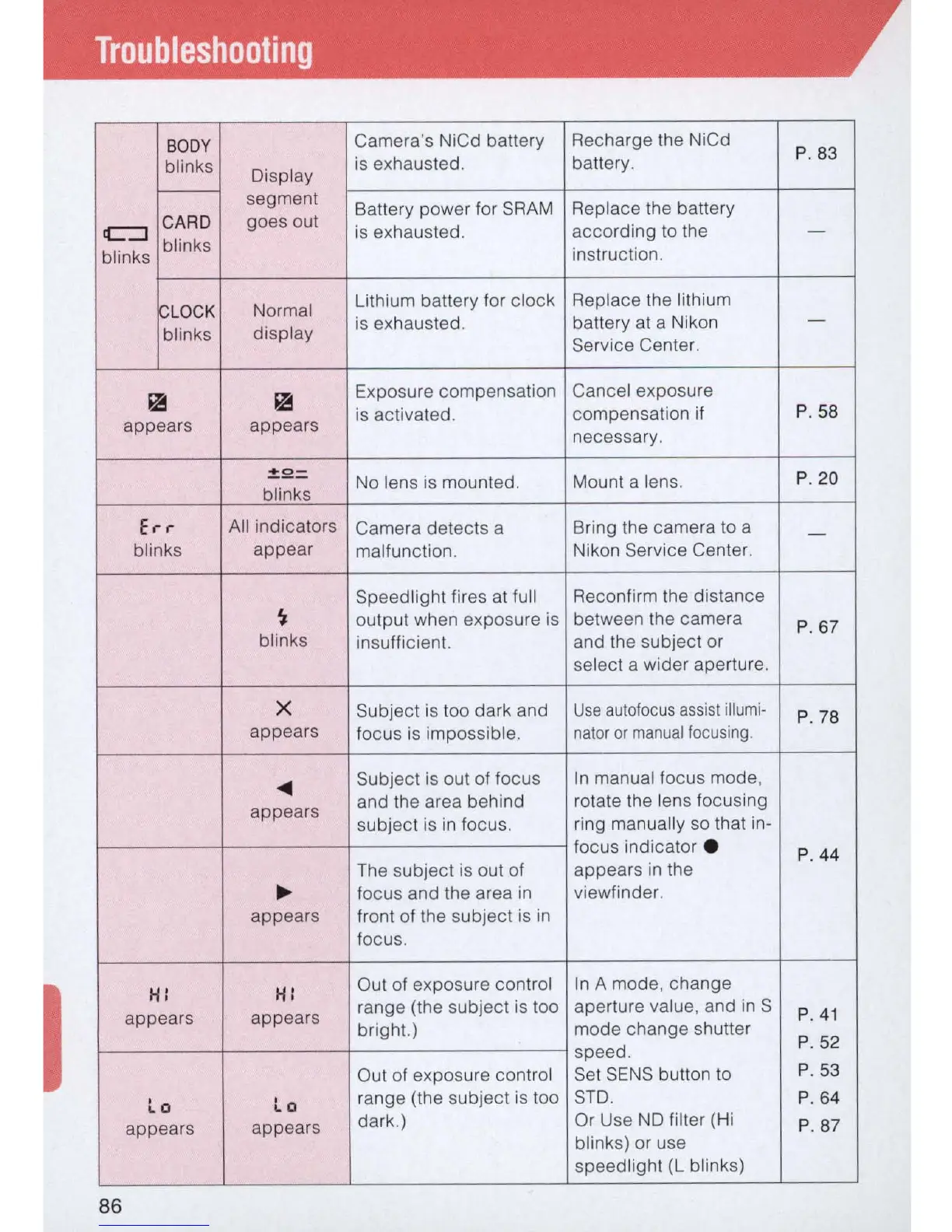
Troubleshooting
BOD
Y
Camera's NiCd battery Recharge the NiCd
P. 83
blinks
Dispt
ay
is
exhausted. battery.
f----
segment
Battery power for
SRAM
Replace the battery
c:J
CARD
goes out
is
exhausted. according
to
the
blinks
-
blinks
instruction.
~
LOCK
Normal
Lithium battery for clock Replace the lithium
is
exhausted. battery at a Nikon
-
blinks
display
Service Center.
~
~
Exposure compensation Cancel exposure
is activated.
compensation if
P.
58
appears appears
necessary.
~2=
No
lens
is
mounted.
blinks
Mount a lens.
P.
20
Err
All indicators
Camera detects a Bring the camera
to
a
-
blinks
appear
malfunction. Nikon Service Center.
Speedlight fires at full Reconfirm the distance
~
output when exposure
is
between the camera
P. 67
blinks
insufficient. and the subject or
select a wider aperture.
X
Subject
is
too dark and
Use
autofocus
assist
illumi-
P. 78
appears
focus
is
impossible.
nator
or
manual
focusing
.
<III!
Subject
is
out of focus
In
manual focus mode,
appears
and the area behind rotate the lens focusing
subject
is
in
focus.
ring manually
so
that in-
focus indicator •
P. 44
The subject
is
out of appears
in
the
~ focus and the area
in
viewfinder.
appears
front of the subject
is
in
focus.
I
H: H:
Out of exposure control
In
A mode, change
appears appears
range (the subject
is
too aperture value, and
in
S
P
.4
1
bright.) mode change shutter
P.
52
speed.
Out of exposure contr
ol
Set
SENS
button
to
P.
53
La
La
range (the subject
is
too
STD
.
P.
64
appears
appears
dark.) Or Use
NO
filter (Hi
P.8
7
blinks) or use
speed light (L blinks)
86



 To Next Page