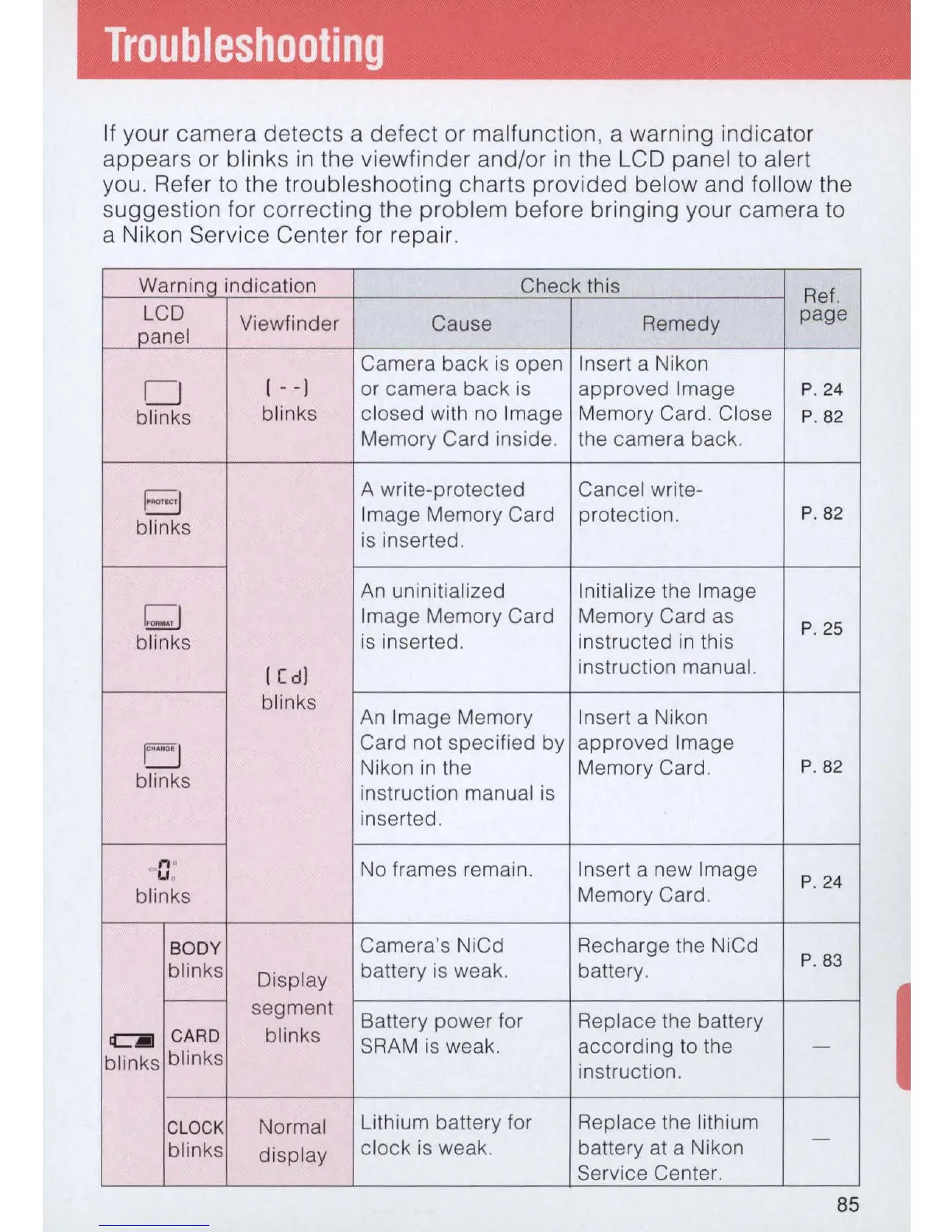
If
your camera detects a defect or malfunction, a warning indicator
appears or blinks
in
the viewfinder and/or
in
the LCD panel to alert
you. Refer to the troubleshooting charts provided below and fol low the
suggestion for correcting the problem before bringing your camera to
a Nikon Service Center for repair.
Warninq indication Check this
Ref.
LCD
Viewfinder
Cause
Remedy
page
panel
Camera
back
is
open
Insert a Nikon
0
I - -]
or camera back is approved Image
P.
24
blinks
blinks
closed with no Image Memory Card. Close
P. 82
Memory Card inside. the camera back.
EJ
A write-protected Cancel write-
Image Memory Card protection.
P
.82
blinks
is
inserted.
An
uninitialized
Initialize the Image
bJ
Image Memory Card Memory Card
as
P
.2S
blinks
is
inserted. instructed
in
this
I
[d
]
instruction manual.
blinks
An
Image Memory Insert a Nikon
U
Card not specified by approved Image
Nikon
in
the Memory Card.
P
.82
blinks
instruction manual
is
inserted.
n o
No frames remain. Insert a new Image
" Uo
P.
24
blinks
Memory Card.
BODY
Camera's NiCd Recharge the NiCd
blinks battery
is
weak. battery.
P
.83
Display
I---
segment
Battery power for Replace the battery
C]I
CA
RD
blinks
SRAM is weak. according
to
the
-
blinks
blinks
instruction.
CL
OCK
Normal
Lithium battery for Replace the lithium
blinks
cl
ock
is
weak. battery at a Nikon
-
display
Service Center.
85



 To Next Page