8 2 x analog inputs
9 2 x analog outputs
10 Conveyor control interface
11 Conveyor control interface
12 Infrared sensor interface
13 Vacuum pump control interface
14 On/off button
15 General power input
Warning
Take great care in following the safety guidelines in the next section to avoid damaging the
robot.
Be sure to respect the order of connection and the characteristics of the robot’s inputs/outputs.
Make sure all the equipment and cables are dry. If water gets into the equipment, unplug the power
cable.
Do not unplug or turn o the robot while it is in use, as this could damage the robot’s Raspberry Pi 4 or
the micro SD card inside.
Before plugging in or unplugging the power supply, be sure to turn off the robot.
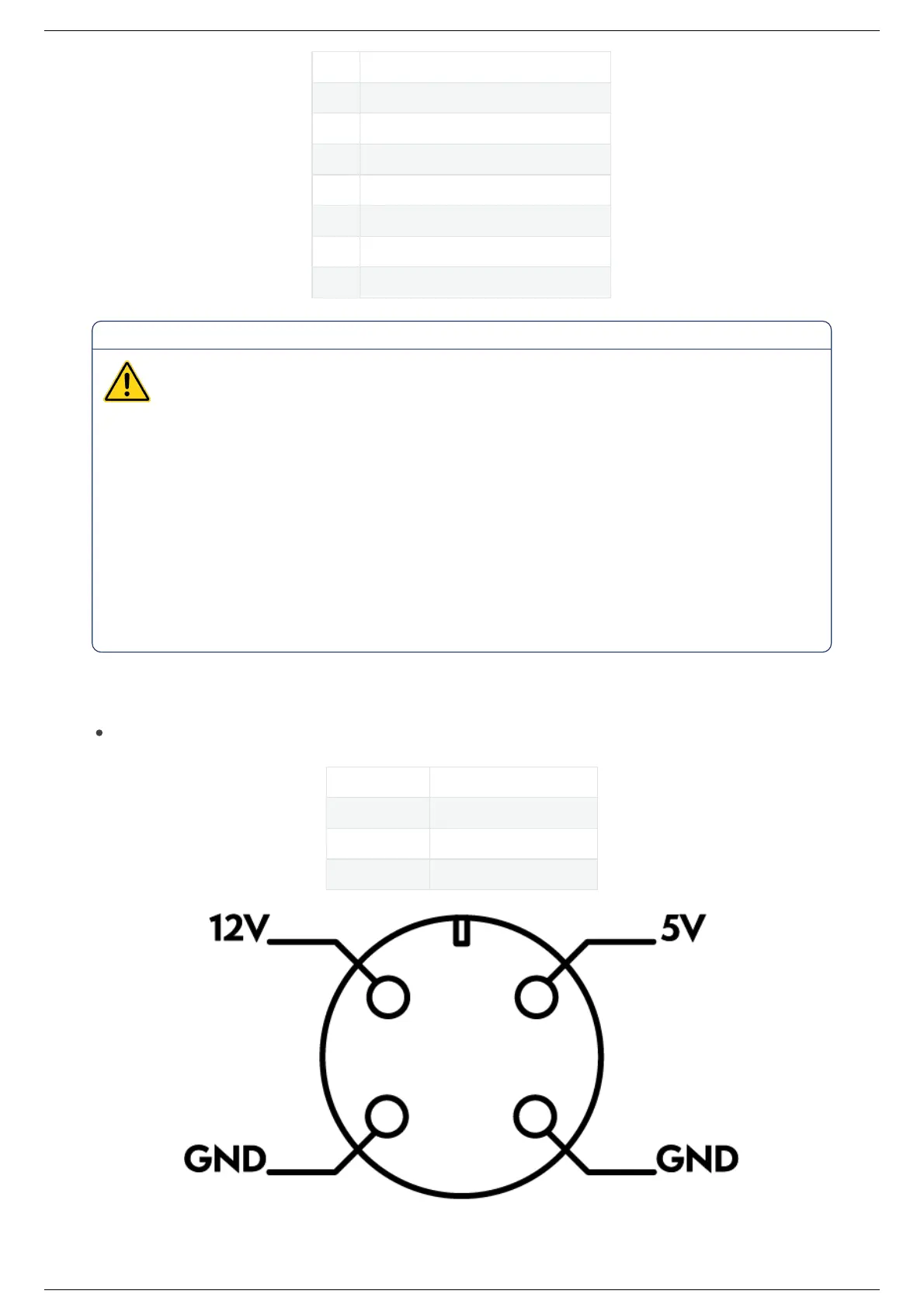
General power input
Ned2 is powered with AC/DC adapter with two output ratings: 12V and 5V
Settings Value
Frequency 50/60 Hz
Input AC 100-240 V , 2.5 A
Output 12 V – 7 A; 5 V – 7 A
On/Off button
Ned2 User Manual (v1.0.0)Ned2 User Manual (v1.0.0)
2022, Niryo All rights reserved. No part of this document may be reproduced or transmitted in any form or by any means without prior written consent of Niryo SAS



 To Next Page