49
Connecting the laser to a PC with CONTROL
Procedure 1 Connecting CONTROL to the laser
Action
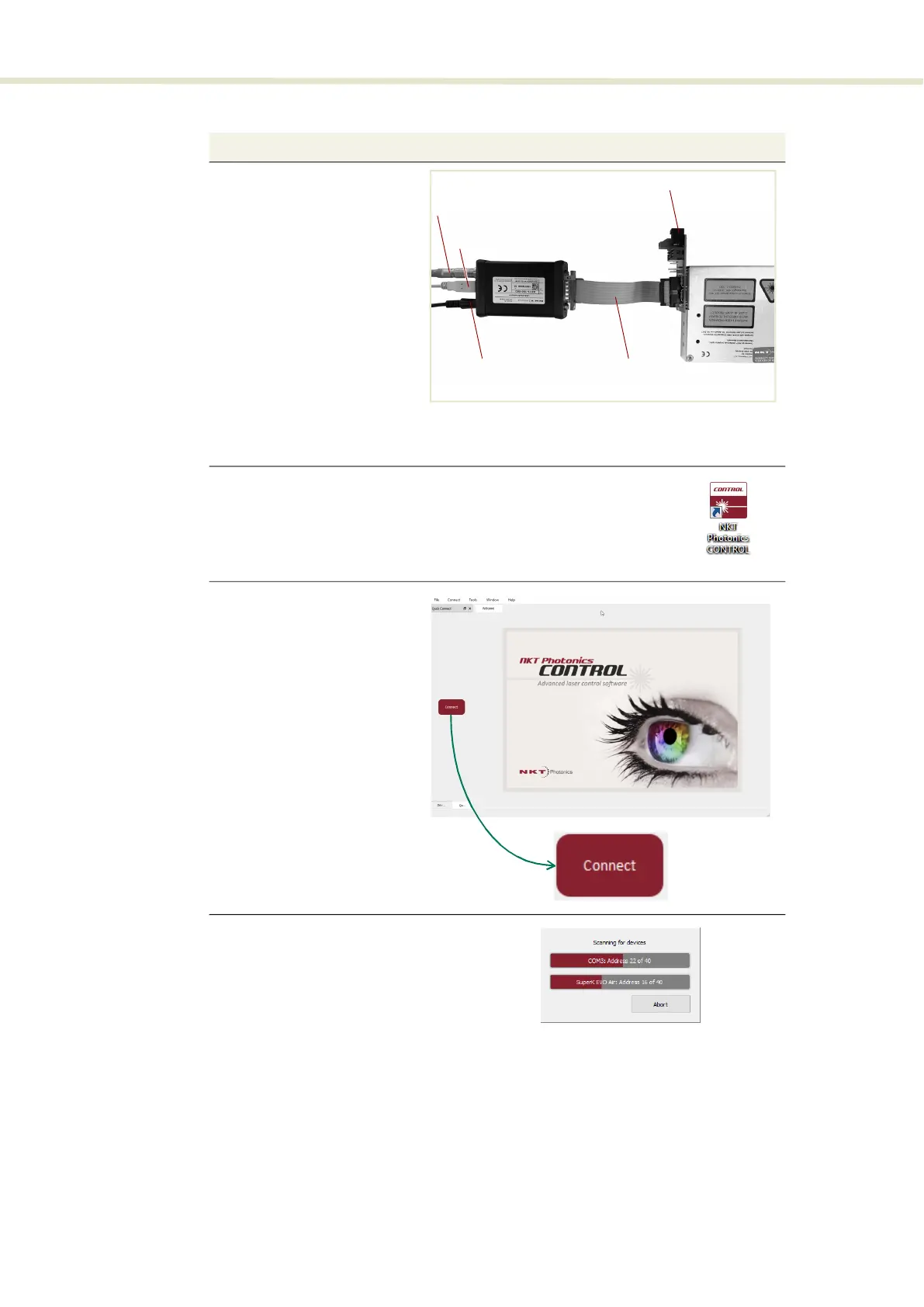
1 a. Connect a BASIK interface
board to the main interface
of the laser.
b. Using an IDC 16 pin to DB-
15 ribbon cable, connect an
NKT Photonics RS-485
adapter to the 16 pin main
interface connector on the
BASIK interface board.
c. Connect an RS-485 adapter
to your PC using the USB-A
to USB-B cable.
d. To power on the laser,
connect the power supply
to the RS-485 adapter
power jack and AC mains.
Note: Connect either a door safety switch circuit to the LEMO connection of the adapter
or use the adapter defeater shown in Figure 72.
2 Launch CONTROL by either:
•
clicking on Windows – Start – Programs – NKT Photonics – CONTROL
– or –
•
double clicking the CONTROL shortcut on the desktop
3 The CONTROL window opens.
Click on the “Connect” button
in the upper left region of the
window.
4 CONTROL automatically scans
for any connect lasers and
accessories available on both
COM and configured Ethernet
ports.
Ribbon cable
USB to PC
12 VDC input
Interlock
BASIK interface board


 To Next Page