E Series Automated Dispensing System
22 www.nordsonefd.com info@nordsonefd.com 800-556-3484 Sales and service of Nordson EFD dispensing systems are available worldwide.
Navigating the Menus
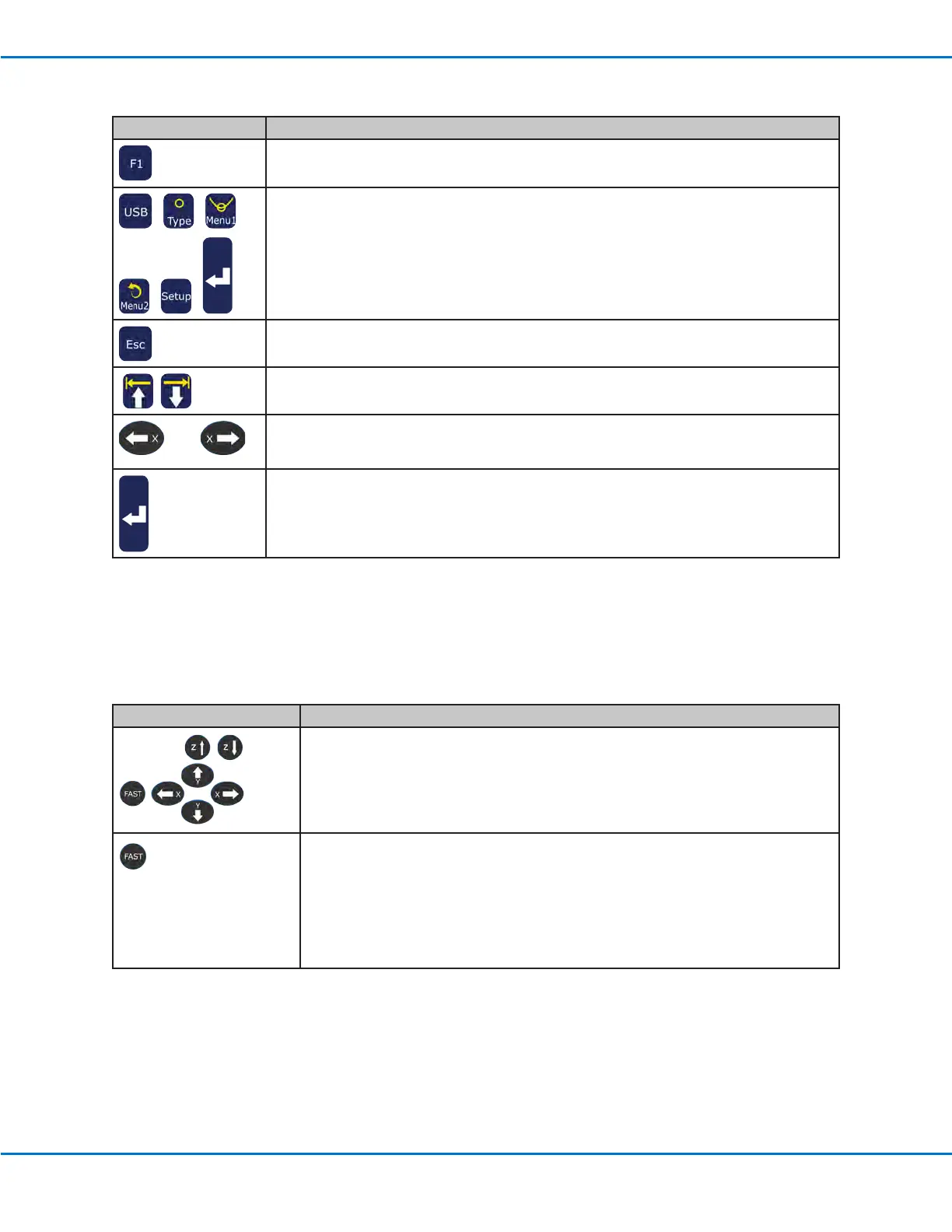
TP Key Function
Press F1 to open the Program Menu.
In the Teach Mode, press the USB, TYPE, MENU1, MENU2, or SETUP key to open the
corresponding menu. The ENTER key opens the Type menu.
Press ESC to exit out of any menu.
Within a menu, use the MOVE UP and MOVE DOWN arrow keys to move either vertically
or horizontally through menu items.
Use the left and right X jog keys to go to the next page or to the previous page of a menu.
Press ENTER to select the current item.
Jogging the Dispensing Tip
TP Key Function
Jog (move) the dispensing tip by pressing the X, Y, or Z ARROW keys. A single
press steps the tip in the direction indicated on the key. Pressing and holding jogs
the tip at slow speed.
Press and hold the FAST key while simultaneously pressing any X, Y, or Z jog key to
move the robot at full speed.
To accelerate the jog speed of the robot, press and hold any X, Y, or Z jog key to
start robot movement. While the robot is moving, press and hold the FAST key to
begin ramping up the speed.
To decelerate the jog speed of the robot, release the FAST key while still pressing
and holding any X, Y, or Z jog key. The robot speed will begin to ramp down.



 To Next Page