SUB–123 OWNER'S MANUAL RECEIPT, INSTALLATION AND START-UP
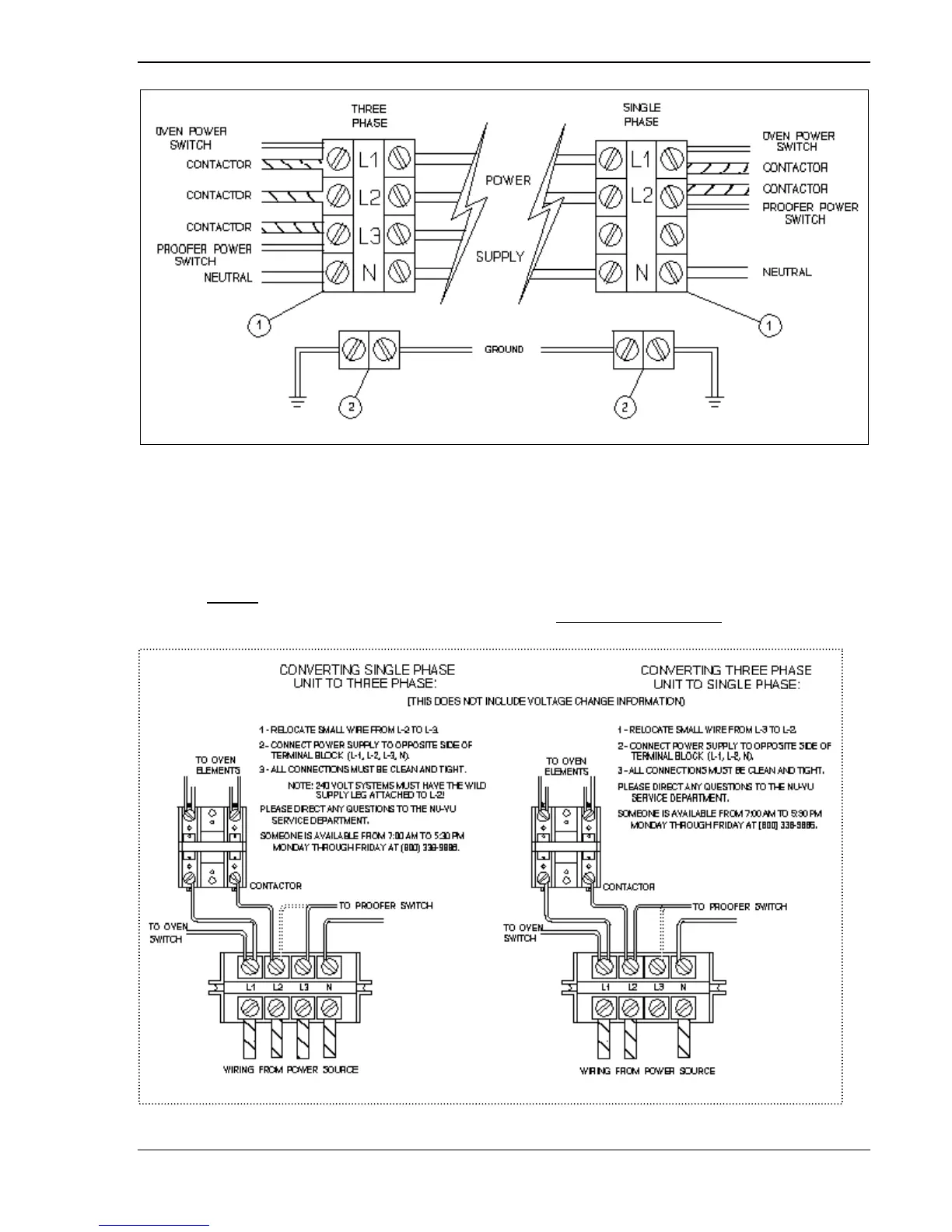
Fig. #2 – Power Supply Connections
E. Carefully set all switches and controls on the front of the unit to their
OFF
positions and engage
the main power supply.
F. Check the voltage at the terminals on the Power Terminal Block with a voltmeter and compare the
readings with the label listings on the side of the unit. If the readings match, the unit is ready for its
initial START-UP. If the readings
DO NOT
coincide you must call the NU-VU
®
Service
Department for instructions on changing the voltage and/or the phase.
NOTE:
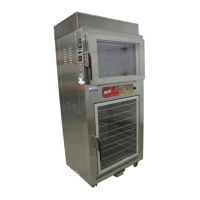
Diagrams and abbreviated instructions for phase-changing can be found in Fig. #3 below,
but only to help you understand the procedure that we will explain to you!!!
DO NOT
change the
phase of your equipment without first calling the NU-VU
®
Service Department!
Fig. #3 – Changing Electrical Phases
NU-VU
®
FOOD SERVICE SYSTEMS MENOMINEE MICHIGAN 49858-0035
(800) 338-9886 Sales Fax (906) 863-5889 ♦ Service Fax (906) 863-6322 page
5



 To Next Page