32
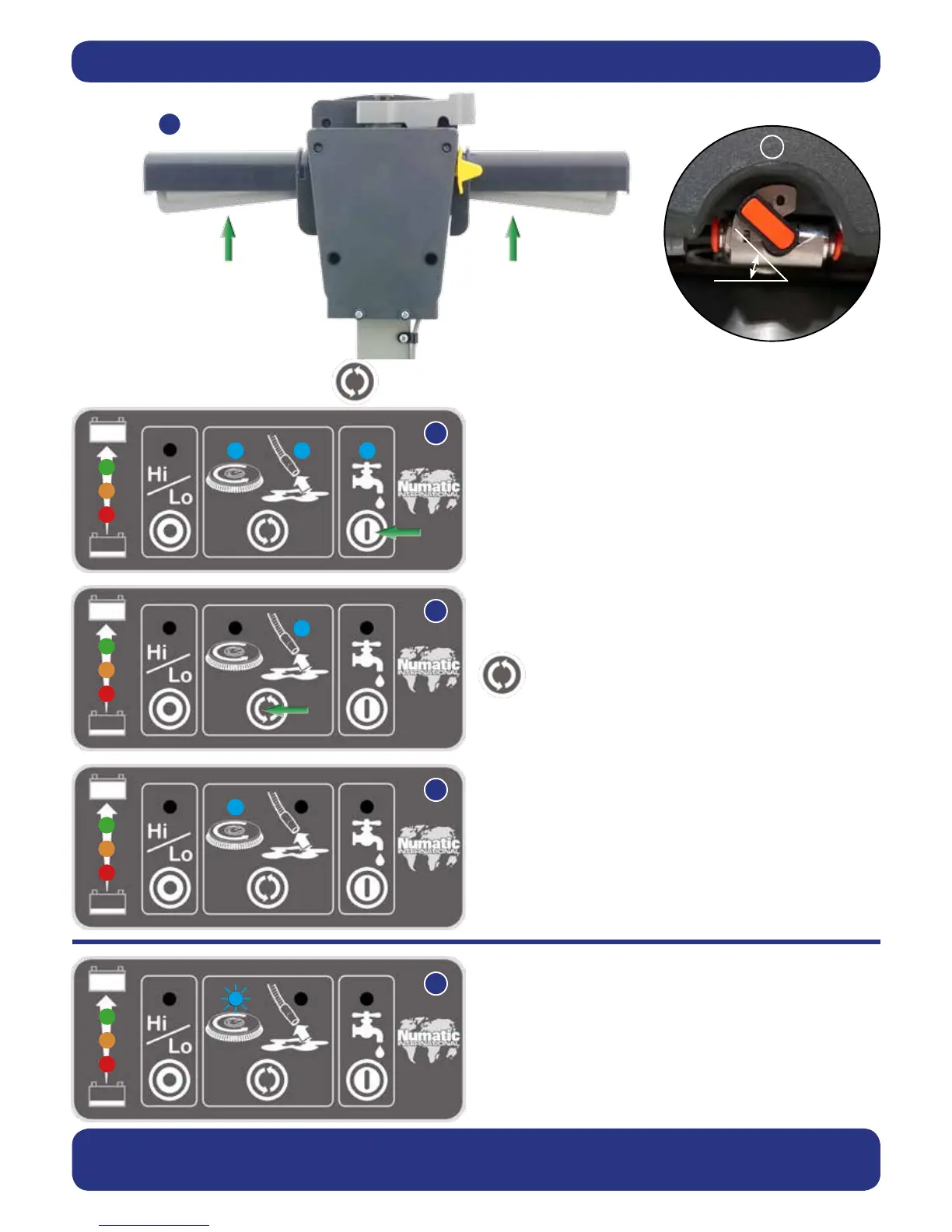
To start: hold down either Trigger and press the On / Off
Switch once (Fig.26).
Whilst the brush motor is running press the water ow On /
Off Button for uid control (Fig.27a), the clean water On / Off
tap must be open.
Ideally set the tap to 45
0
(Fig.27) this enables the cleaning
solution to last the same time as a fully-charged battery.
When the Triggers are released the brush motor and the
cleaning solution pump will switch off, the vacuum motor will
continue for 10 seconds.
Press the mode select button to operate the brush
only (Fig.27b).
The start sequence is required in this mode.
The water ow On / Off button will operate in this mode.
Press the mode select button again to get vacuum only.
The On / Off Switch and triggers are not required in this
mode. (Fig.27c)
Press the mode select button to switch this mode off and
return to default mode.
The panel if unused will automatically turn off after 60
seconds.
To activate the control panel: press the Mode select button or press a trigger (Fig.26).
If the brush motor keeps overloading consider using a different type of brush.
Heavy brush load decreases the available battery run time.
45
0
Setting the cleaning controls
Brush overload
The brush motor will cut out and the brush load light will ash
if the brush motor has been overloaded (Fig.27d).
Releasing the handle triggers will allow the machine to reset.





 To Next Page