Instruction Manual PCD 650
9
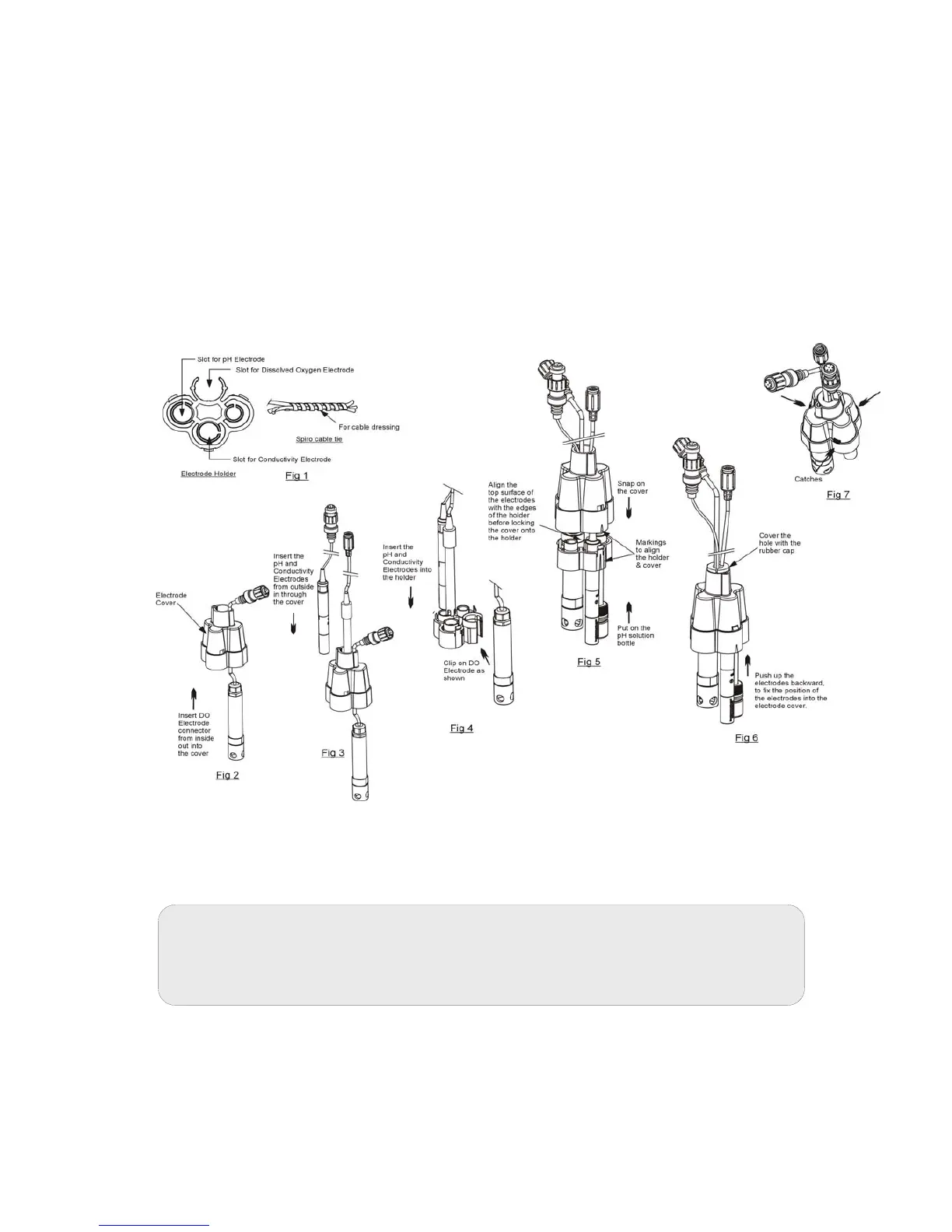
3. Insert the probes into the multi probe holder as shown in Figure 9. After
assembling the electrodes into the electrode holder, ensure that the electrode
top surfaces are almost level to the edges of the holder.
4. Align the markings on the holder and the cover before locking the cover onto
the holder as shown in the diagram.
5. Push up the electrodes backwards to fix the vertical position of the electrodes
into the electrode cover. Note: For pH electrode, the storage solution has to
put back after assembling the electrodes.
6. To remove the cover, hold onto the electrodes with one hand and release any
two catches from the side of the cover with the other hand as indicated in
figure.
Figure 9: Using multi probe holder
Note: All our conductivity probes have built-in ATC probes. It can also be used
for temperature readout and compensation of the pH values. Therefore, there
is no need to install a separate ATC probe for pH.



 To Next Page