Instruction Manual PCD 650
30
2.11 Percentage Saturation (%) Measurement Mode
In percentage saturation measurement mode, the meter displays % saturation and
temperature reading. The LCD shows related information for the saturation
measurement such as temperature compensation mode, stable indicator, barometric
pressure, calibration points, probe condition, response time of the DO probe and
alarm conditions. You can customize or enable/disable some of these indicators in
the Setup mode.
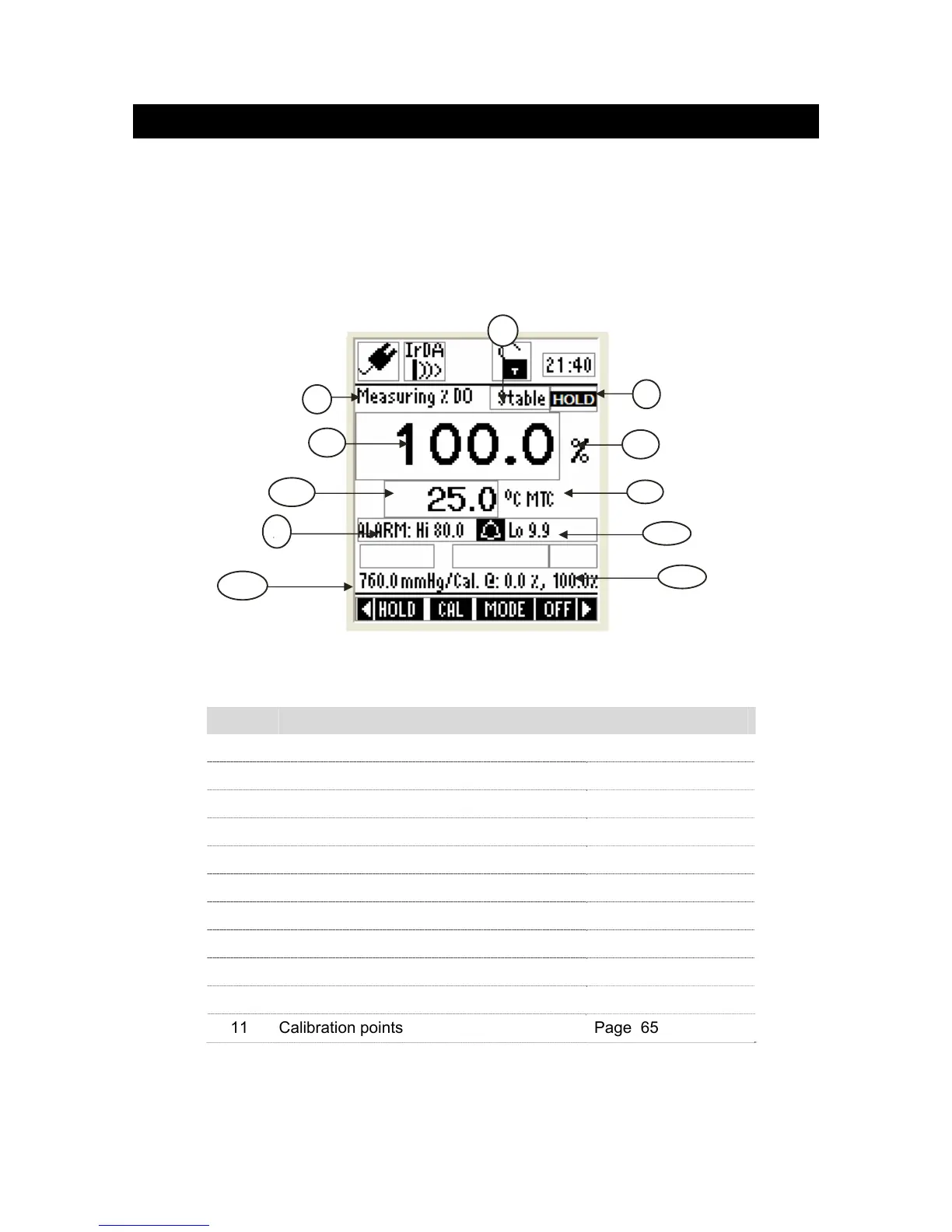
2.11.1 Indicators in percentage saturation measurement mode
Figure 29 : Percentage saturation measurement screen
Refer item numbers indicated in Figure 29.
Item Description More Details On
1 Measurement mode indicator -
2 Appears when the reading is stable Page 17, 75
3 Appears when the reading is on hold Page 17, 75
4 Saturation reading -
5 Units of measurement -
6 Temperature reading & units Page 98
7 Temperature compensation mode Page 18, 98
8 Saturation HI & LO Alarm limits Page 18, 95
9 Alarm indicator Page 18, 95
10 Barometric pressure Page 20, 94
11 Calibration points Page 65
1
4
5
8
3
2
7
9
6
10
11



 To Next Page