Instruction Manual PCD 650
80
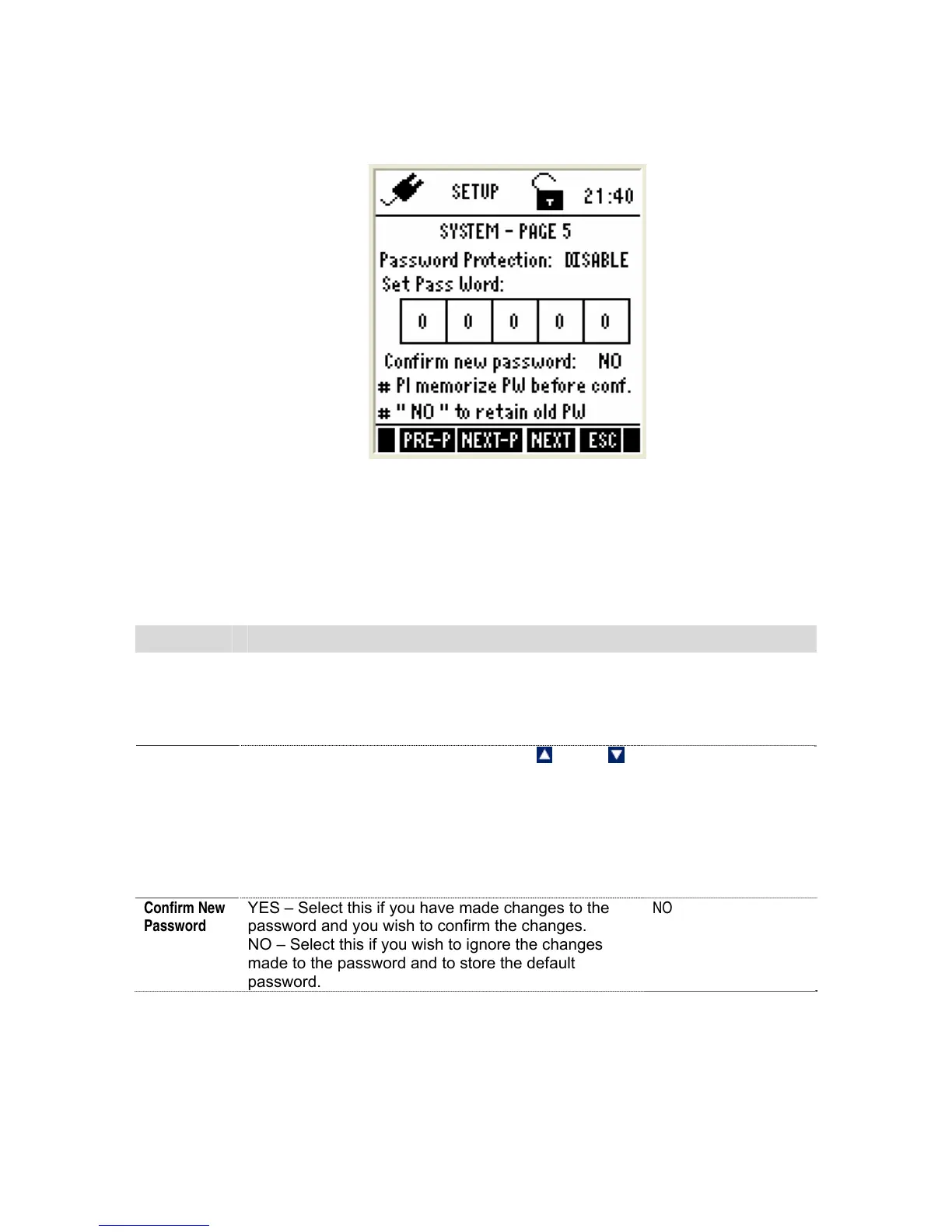
4.2.5 System Settings – Page 5
This page allows you to enable password protection for the setup mode &
calibration mode.
Figure 72 : System Settings - Page 5
When you enable password protection, the meter prompts to enter the password
whenever you try to access the Setup or Calibration mode. (See Figure 67: Login
password screen).The meter does not allow you to edit setup parameters or perform
a new calibration unless you enter the correct password. If an incorrect password is
entered for 3 consecutive times, the meter goes to measurement mode.
Parameter Description Factory Default
Password
Protection
ENABLE – Sets password protection for the setup &
calibration mode. If this is enable you need to specify
a 5-digit password in the ‘SET PASSWORD’
parameter below
DISABLE – Disable password protection of the meter
DISABLE
Set Pass
Word
Specify your 5-digit password here. Use
(Up) &
(
Down) key to select a number and then press ENTER
key to confirm and move to the next digit.
Do not set your password to ‘00000’ as this is
reserved for ‘read-only’ password.
(This parameter is not editable when ‘PASSWORD
PROTECT’ is disabled)
88888
Confirm New
Password
YES – Select this if you have made changes to the
password and you wish to confirm the changes.
NO – Select this if you wish to ignore the changes
made to the password and to store the default
password.
NO



 To Next Page