Operating & Maintaining the Connex500/350 3-D Printer
7–58
DOC-13000 Rev. E
Accessing
Built-in Tests
To open the Built-in Tests screen, do one of the following:
• FromtheOptionsmenu,selectBuilt-In Tests.
• PressCtrl+Alt+B.
Figure 7-95: Selecting Built-In Tests from the Options Menu
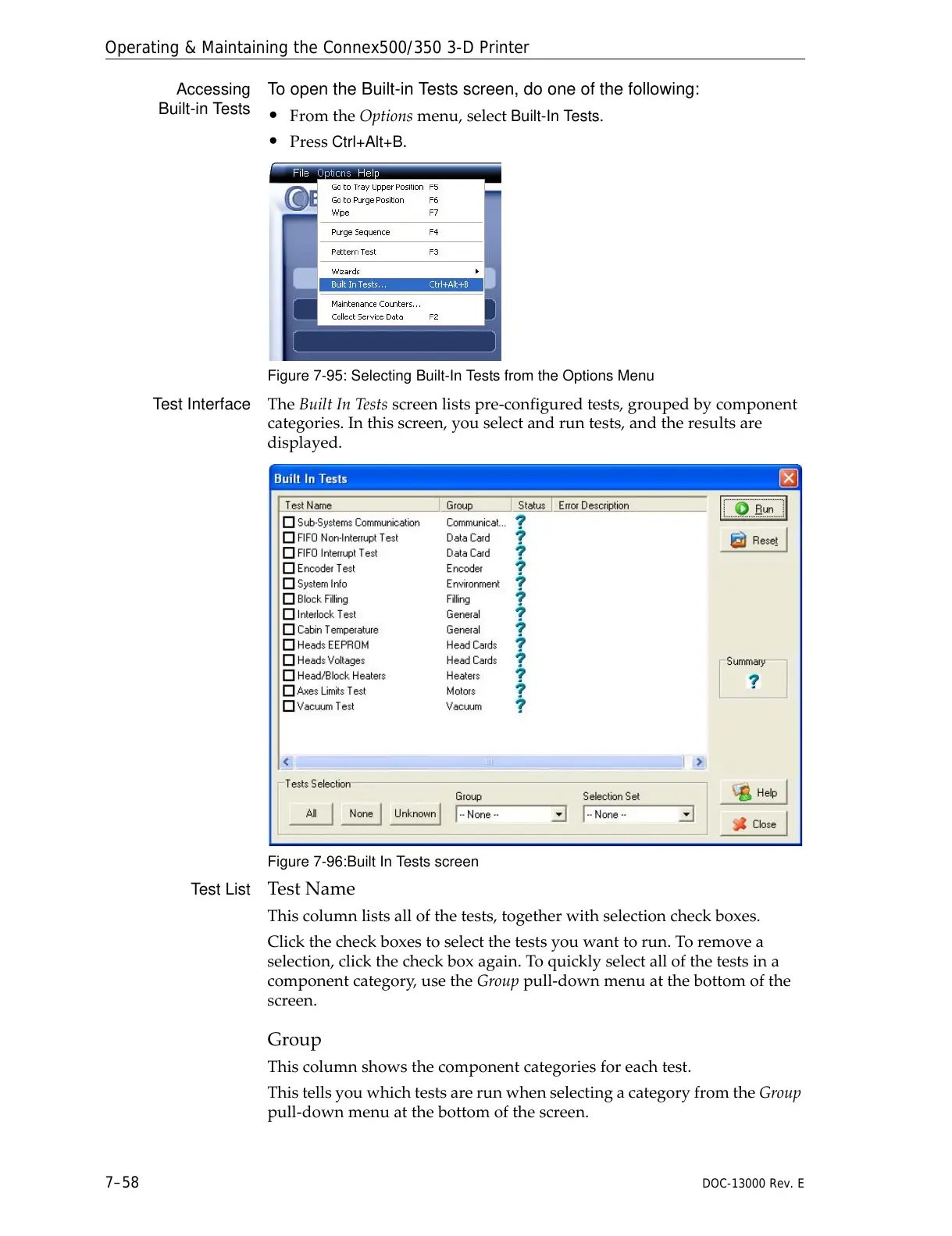
Test Interface TheBuiltInTestsscreenlistspre‐configuredtests,groupedbycomponent
categories.Inthisscreen,youselectandruntests,andtheresultsare
displayed.
Figure 7-96:Built In Tests screen
Test List TestName
Thiscolumnlistsallofthetests,togetherwithselectioncheckboxes.
Clickthecheckboxestoselectthetestsyouwanttorun.Toremovea
selection,clickthecheckboxagain.Toquicklyselectallofthetestsina
componentcategory,usetheGrouppull‐downmenuatthebottomofthe
screen.
Group
Thiscolumnshowsthecomponentcategoriesforeachtest.
ThistellsyouwhichtestsarerunwhenselectingacategoryfromtheGroup
pull‐downmenuatthebottomofthescreen.



 To Next Page