46
®
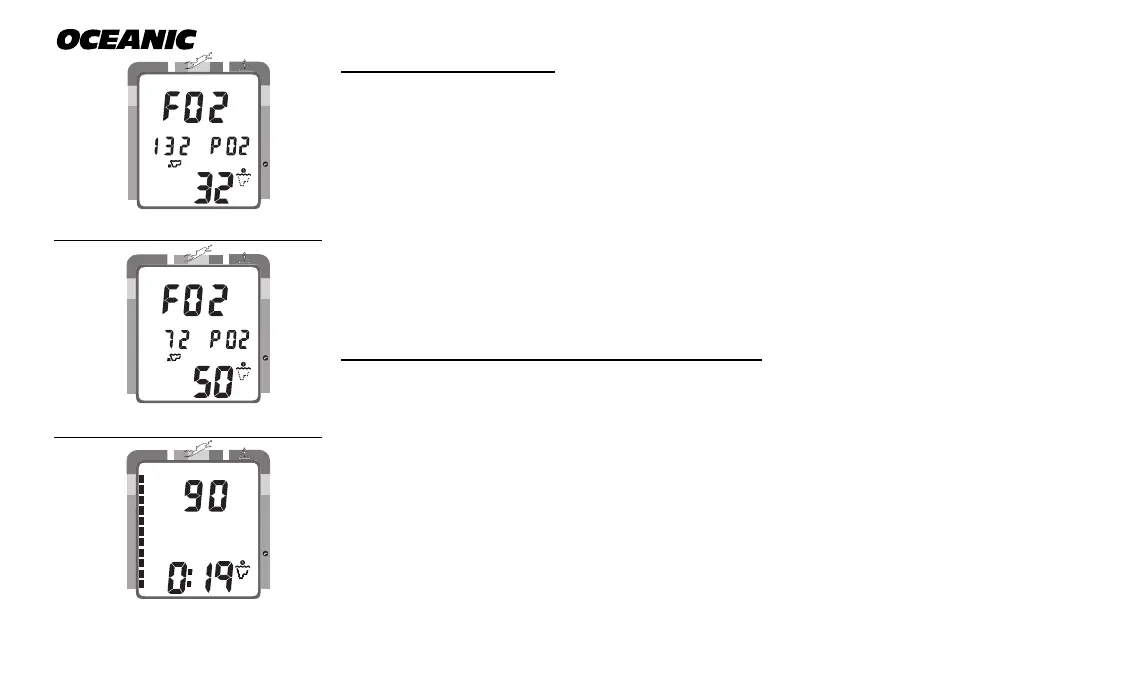
To access FO2 Mode:
• press the Advance (Left) button 2 times (while in Surface Mode)
• If the FO2 Default was set OFF, the FO2 setting displayed will be the
same value previously set (Fig. 48).
• If the FO2 Default was set ON, the FO2 value displayed (Fig. 49) will be
the 'default value' of 50 (%) and will have to be set for the breathing gas
used for the next dive.
• press the Select (Right) button to alter the setting, if required.
• the unit reverts to Surface Mode after 2 minutes, unless the Advance
(Left) button is pressed to access the Pre Dive Planning Sequence.
To access Pre Dive Planning Sequence™:
• press the Advance (Left) button 3 times (while in Surface Mode)
• press the Select (Right) button to scroll through the sequence
• The unit reverts to Surface Mode after 2 minutes, unless the Advance
(Left) button is pressed to access the Fly Mode.
The Pre Dive Planning Sequence will now show 'adjusted' No Decompression
Limits (Fig. 50) based on residual nitrogen calculated to be remaining from the
previous dives. Calculated dive times and the maximum allowed depth dis-
played will increase as the real time surface interval increases after completion
of a dive.
Fig. 48 - FO2 (Default OFF)
Fig. 50 - Adjusted NDLs
Fig. 49 - FO2 (Default ON)
NO DECO
C Z
DECO
C Z O
2
FT
MAX
2
O
NO DECO
C Z
DECO
C Z O
2
FT
NO DECO
C Z
DECO
C Z O
2
FT
MAX
2
O



 To Next Page