49
Datamax Pro Plus
To access a specific dive's log, press the Advance (Left) button repeatedly.
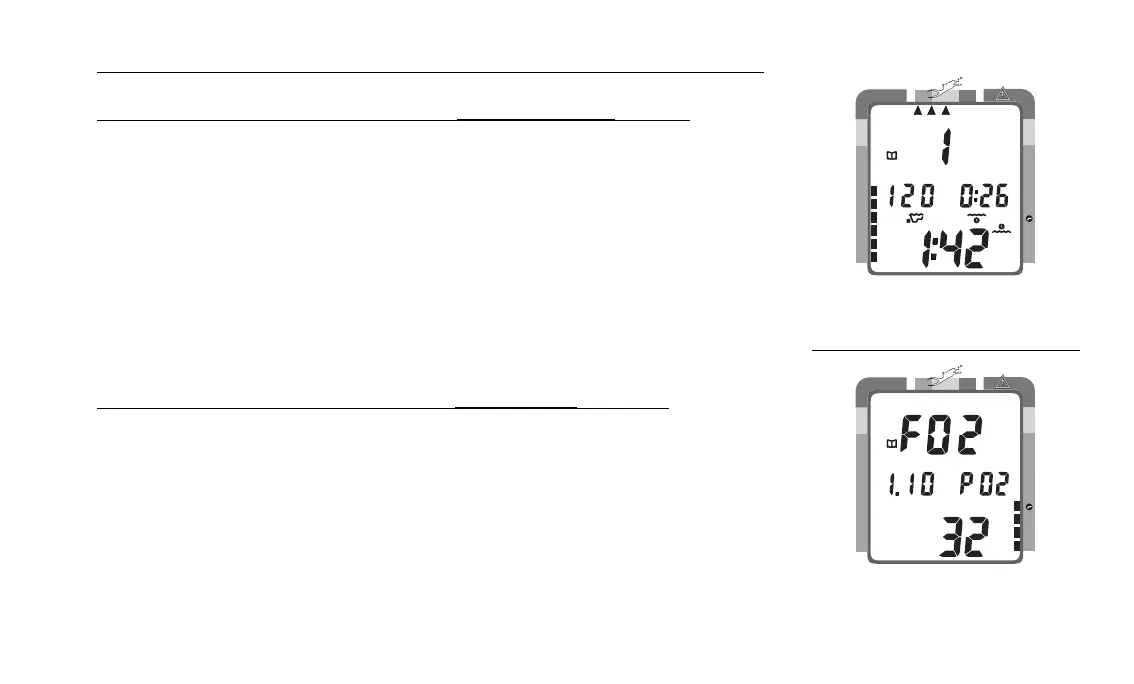
To view the second screen for that dive (Nitrogen Log- Fig. 55):
• press the Select (Right) button 1 time
• Log Mode icon
• Dive number
• Maximum Depth reached for the dive (and icon)
• Elapsed Dive Time (and icon)
• Surface Interval prior to that dive (and icon)
• Variable Ascent Rate Indicator - showing the maximum ascent rate
maintained for 4 consecutive seconds during the dive
• Tissue Loading Bar Graph - showing tissue nitrogen loading at the
end of the dive
To view the third screen for that dive (Oxygen Log - Fig. 56):
• press the Select (Right) button 1 time
• Log Mode icon
• FO2 value - set for that dive (and 'FO2' symbol)
• Maximum PO2 level - reached during that dive (and 'PO2' symbol)
• O2 bar graph - showing oxygen loading at the time you surfaced.
• If FO2 was set for 'Air' for that dive, the O2 screen will only display 'FO2'
and 'Air'.
• press the Advance (Left) button 1 time to view the first screen of the pre-
vious dive's log.
Fig. 55 - Log Mode
(second screen - nitrogen)
Fig. 56 - Log Mode
(third screen - oxygen)
NO DECO
C Z
DECO
C Z O
2
FT
NO DECO
C Z
DECO
C Z O
2
2
O



 To Next Page