Setting up your receiver
OCEASOFT LoRaWAN Receiver User Guide Page 32
2.7 LoRaWAN settings
After configuring your receiver’s TCP/IP network settings (Ethernet, Wi-Fi, or
cellular), the next step is to set up and verify LoRaWAN networking settings.
1. Click on
LoRaWAN (Network Settings)
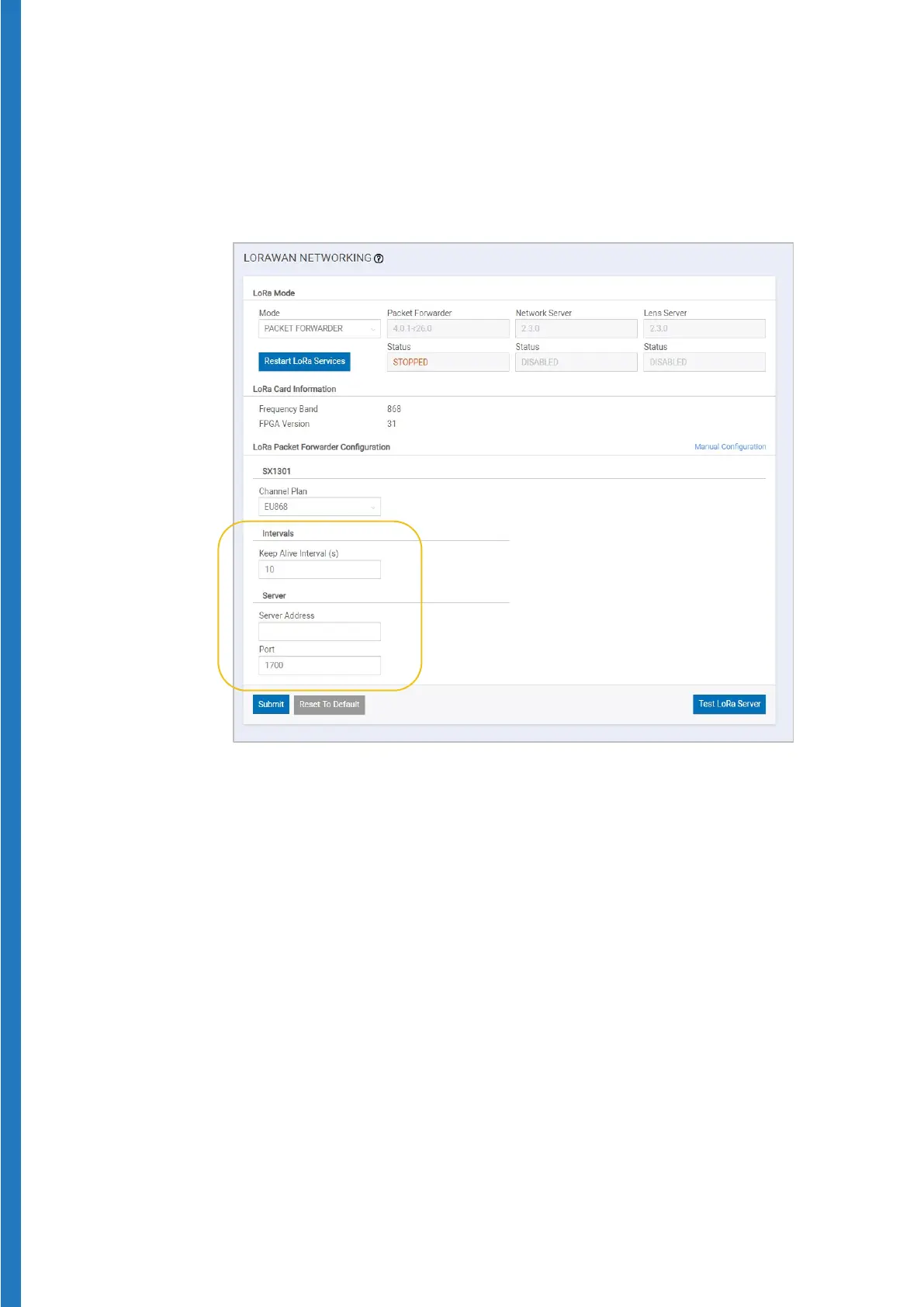
Figure 30 – LoRaWAN configuration screen
2. Enter or make sure the following default values are present.
a. For Cobalt X / L3 / ML3 data loggers on OCEAView platform only
- Server Address: enter the URL that corresponds to your
geographic region:
Americas:
connect-us.oceaview.com
Europe:
connect-eu.oceaview.com
Asia:
connect-asia.oceaview.com
- Port (up & down):
1700
- Keep Alive Interval:
o If you are using 4G connectivity, set this to
1 second
o If you are not using 4G connectivity, set this to
10 seconds
b. For Cobalt L3/ML3 data loggers on CobaltView platform only:
- Server Address: www.cobaltview.com
- Port (up & down):
1700
- Keep Alive Interval: 10 (unit expressed in seconds)


 To Next Page