Firmware upgrade from version 1.4.17 to 5.x.x
OCEASOFT LoRaWAN Receiver User Guide Page 36
4 Firmware upgrade from version 1.4.17 to 5.x.x
This section provides specific information when upgrading your receiver’s firmware
from version 1.4.17 to version 5.x.x.
To upgrade the firmware in your gateway, typically following notification from
OCEASOFT or contact with our technical support team, follow these steps:
1. Connect to your gateway with your login name and password.
2. Select
Administration Firmware upgrade
3. Select
Choose Firmware Upgrade File and browse your computer to
locate the firmware file provided to you by OCEASOFT.
Only use official firmware files provided by OCEASOFT.
4. Select
Start upgrade and continue the process as directed on the screen.
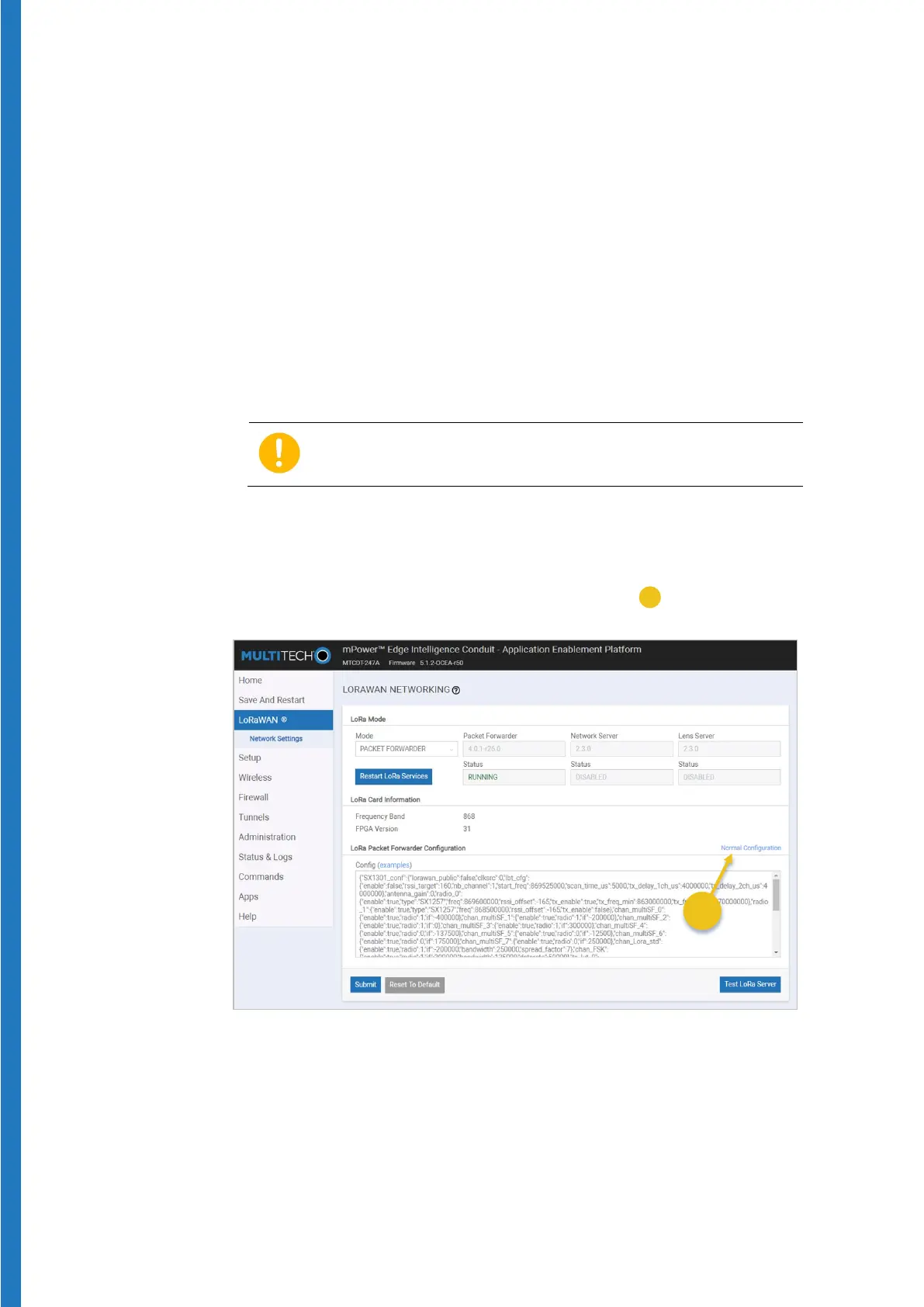
5. When upgrading from 1.x.x firmware, this process resets your previous
LoRaWAN configuration. You must then click on
LoRaWAN in the main
menu, then click on the
Normal Configuration link (
) on the right-hand
side of the screen to open
Manual Configuration.
6. You may then proceed with LoRaWAN configuration as described earlier.
This specific behavior is caused by the migration from firmware 1.x.x to 5.x.x
After this upgrade, you should not have to perform this procedure again in
the future.


 To Next Page