43502101TH Rev.1 140 /
Oki Data CONFIDENTIAL
4.3 Troubleshooting Method
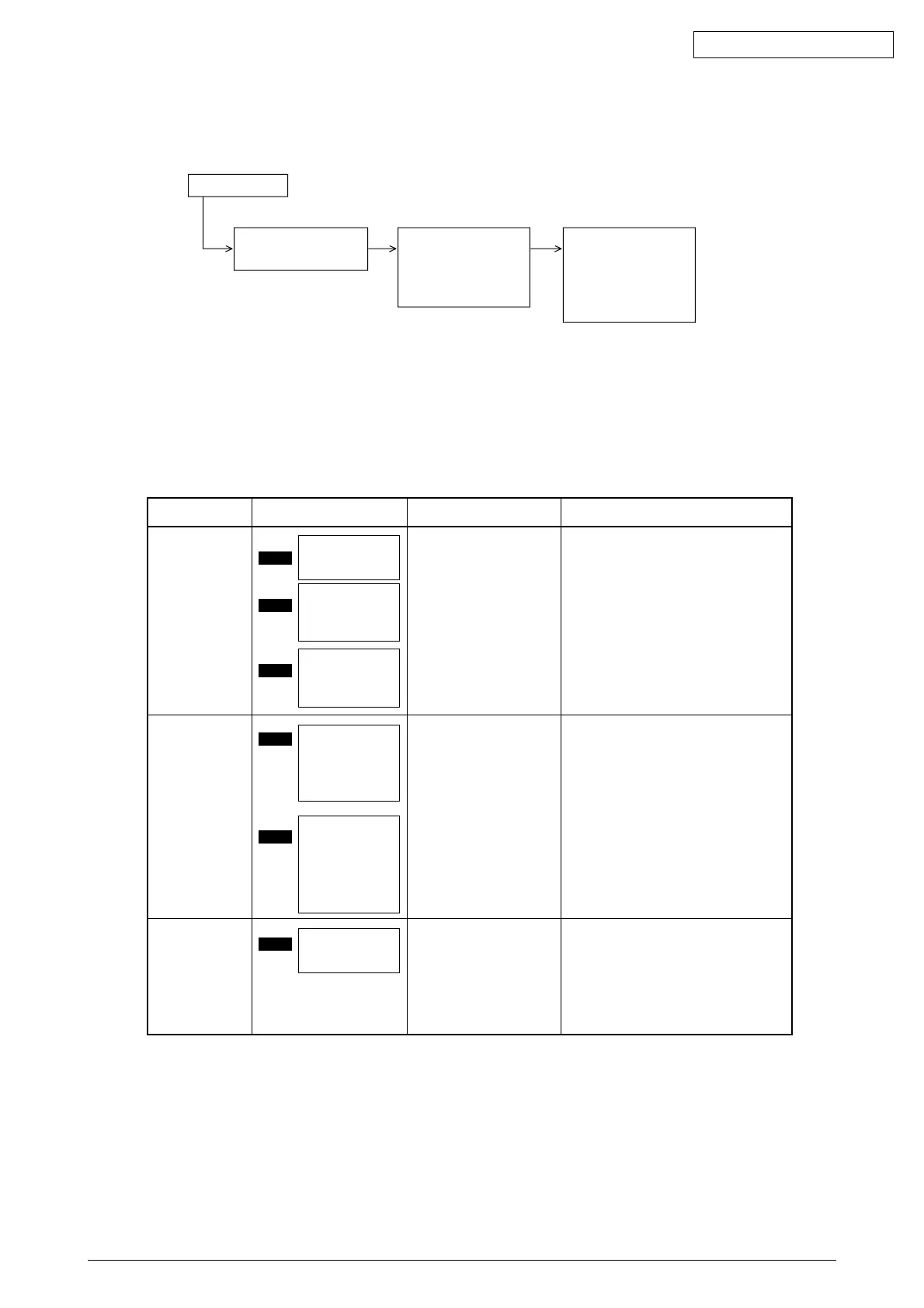
When a problem occurs, go through the troubleshooting according to the following procedure.
Problem occurs
Problem displayed by
the LCD message
Troubleshooting
according to the LCD
Status Message List
(see 4.3.1)
Carry out detailed
troubleshooting
according to the
Troubleshooting Flow
(see 4.3.1)
4.3.1 LCD Status Message List
The listing of the statuses and problems displayed in the form of messages on the LCD is provided in
Table 4-1.
CHECK MPF
PAPER JAM
OPEN UPPER
COVER
PAPER JAM
OPEN UPPER
COVER
EXIT JAM
OPEN UPPER
COVER
PAPER SIZE
ERROR
CHANGE
PAPER TO
mmmm/pppp
MPF SIZE
MISMATCH
LOAD mmmm
MPF EMPTY
mmmm : Papre size
(A4, Letter, etc.)
Jam error
Paper size error
Tray paper out
Notifies of occurrence of
jam while the paper is
being fed from Multi-
Purpose Feeder.
Scroll display.
Notifies of incorrect size
paper feeding from Multi-
Purpose Feeder.
Scroll display.
Notifies of no paper state of
the Multi-Purpose Feeder.
Scroll display.
• Check the paper in the Multi-Purpose
Feeder.
Carry out the recovery printing by
opening and closing the cover, and
turn the error display off.
• When the problem occurs frequently,
go through the Troubleshooting.
• Check the paper in the Multi-Purpose
Feeder.
Also check to see if there was a
feeding of multiple sheets.
Carry out the recovery printing by
opening and closing the cover, and
turn the error display off.
• Load the paper in Multi-Purpose
Feeder.
Classification LCD Status Message Description Recovery method
Table 4-1



 To Next Page