43502101TH Rev.1 31 /
Oki Data CONFIDENTIAL
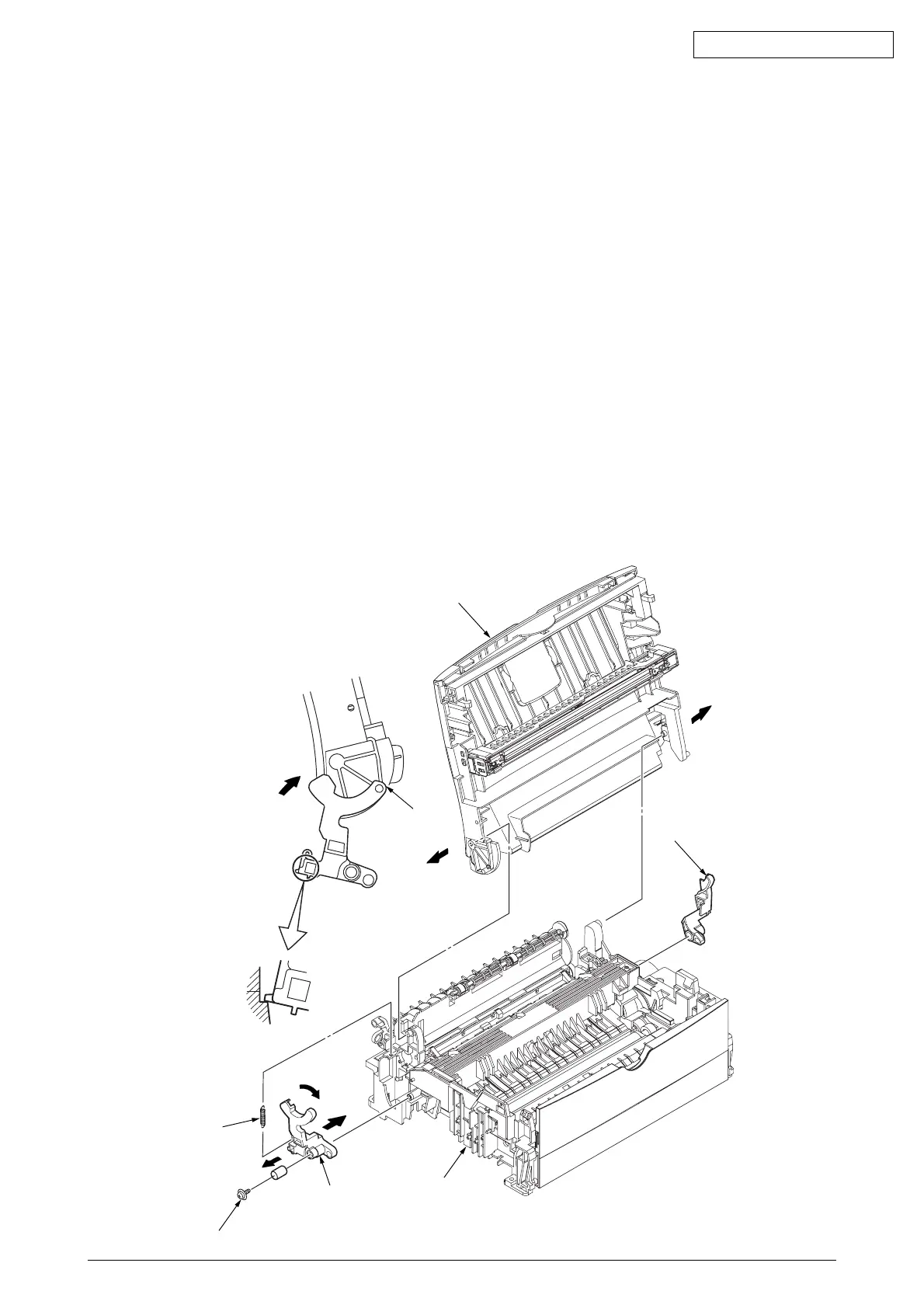
2.3.12 Stacker Cover Assy
(1) Remove the upper cover assy (see 2.3.1).
(2) Remove the operator panel assy (see 2.3.3).
(3) Remove the face-up stacker assy (see 2.3.8).
(4) Remove the motor assy (see 2.3.10).
(5) Remove the reset lever R 1.
(6) Remove the reset spring 2 from the lower base unit 3. Remove the screw 6, rotate the reset lever
L 4 fully in the direction of arrow A until it stops, and remove it in the direction of arrow B.
(7) Disengage the two latches from the lower base unit 3 and remove the stacker cover assy 5.
(8) For installation, perform the removal procedure in reverse order.
Note : 1.
When reinstalling the reset lever L 4, fit it onto the guide of the lower base unit 3, turn it
in the direction of arrow C while pressing down the shaft of back up roller, and engage the
reset lever L 4.
2.
Be careful not to touch (or rotate) the DC motor thoughtlessly. Rotating the DM motor
counterclockwise removes the eject spring. (Refer to 2.3.9.)
5
1
A
4
B
A
C
3
6
2
4



 To Next Page