43502101TH Rev.1 37 /
Oki Data CONFIDENTIAL
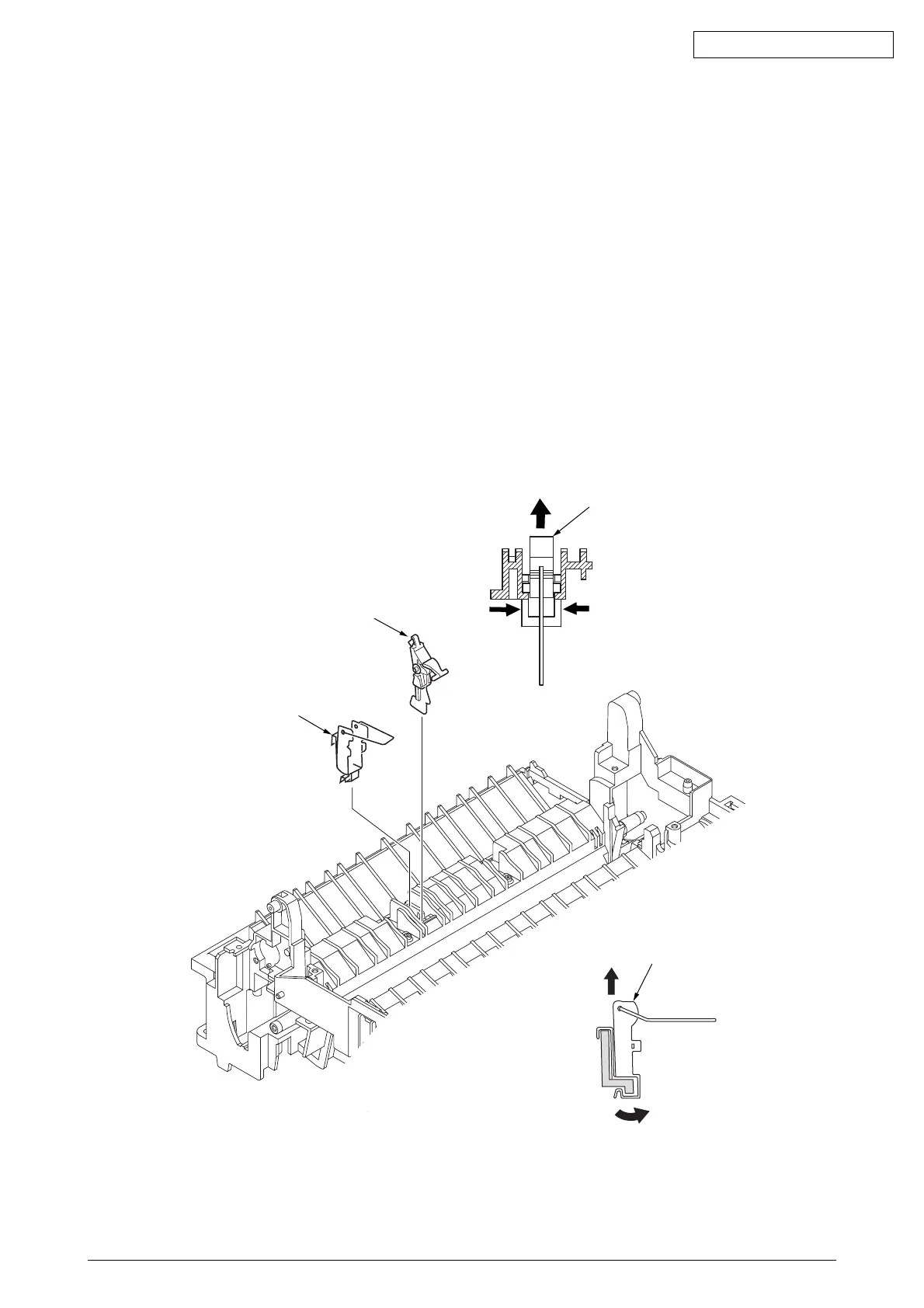
2.3.18 Sensor Plate (Outlet), Sensor Wire Assy
(1) Remove the upper cover assy (see 2.3.1).
(2) Remove the operator panel assy (see 2.3.3).
(3) Remove the eject roller assy (see 2.3.9).
(4) Remove the face up stacker assy (see 2.3.8).
(5) Remove the lower base unit (see 2.3.4).
(6) Remove the fusing unit assy (see 2.3.15).
(7) Press the clamps of the sensor plate (outlet) 1, and remove the sensor plate by pushing it up.
(8) Turn the clamps of the sensor wire assy 2 remove the sensor wire assy from the lower base unit.
Note :
Be careful not to touch (or rotate) the DC motor thoughtlessly. Rotating the DM motor
counterclockwise removes the eject spring. (Refer to 2.3.9.)
1
1
2
2



 To Next Page