43502101TH Rev.1 23 /
Oki Data CONFIDENTIAL
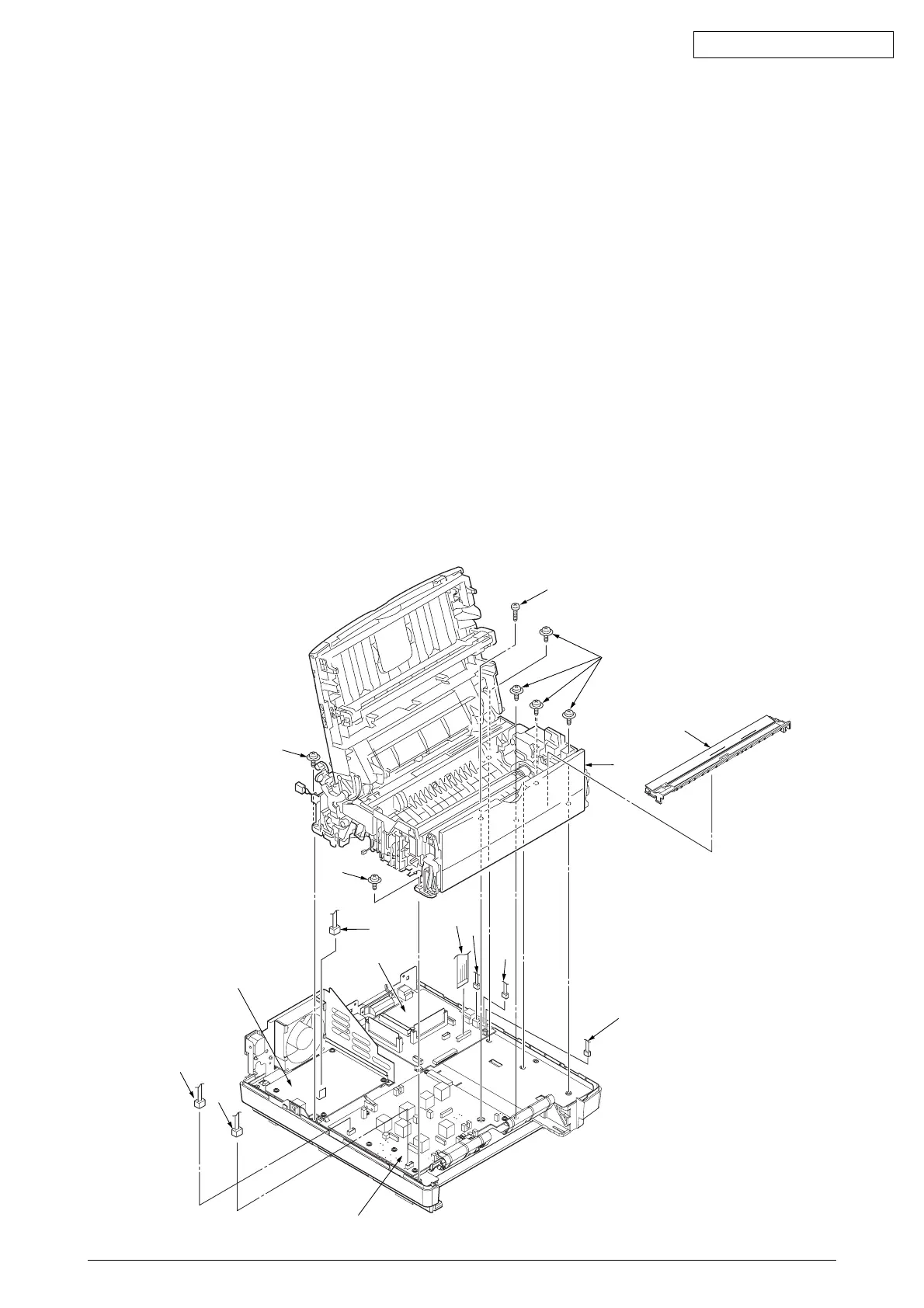
2.3.4 Lower Base Unit
(1) Remove the upper cover assy (see 2.3.1).
(2) Remove the operator panel assy (see 2.3.3).
(3) Remove the face up stacker assy (see 2.3.7).
(4) Disengage the latch from the paper guide R C and remove the paper guide R C.
(5) Remove the connecting cables 1, 2 and 3 of the motors and clutch from the connectors (DM, RM,
CLT) of the main control board 4.
(6) Remove the LED head cables 5 from the connector (HEAD) of the main control board 4.
(7) Remove the Thermistor cable 6 and TAG connecting cable 7 from the connector (CN2, CN101)
of the high voltage/sensor board.
(8) Remove the connecting cable 9 of the heater from the connector (CN2) of the power supply board 0.
(9) Open the manual feed guide assy, remove seven screws A, then remove the lower base unit B.
Note :
Be careful not to touch (or rotate) the DC motor thoughtlessly. Rotating the DM motor
counterclockwise removes the eject spring. (Refer to 2.3.9.)
7
6
0
B
3
1
A
C
A
2
5
9
A
A
8
4



 To Next Page