沖データ企業秘密・OkiDataCONFIDENTIAL
45530603TX - 76/130
Category1
Category2 Category3
Category4
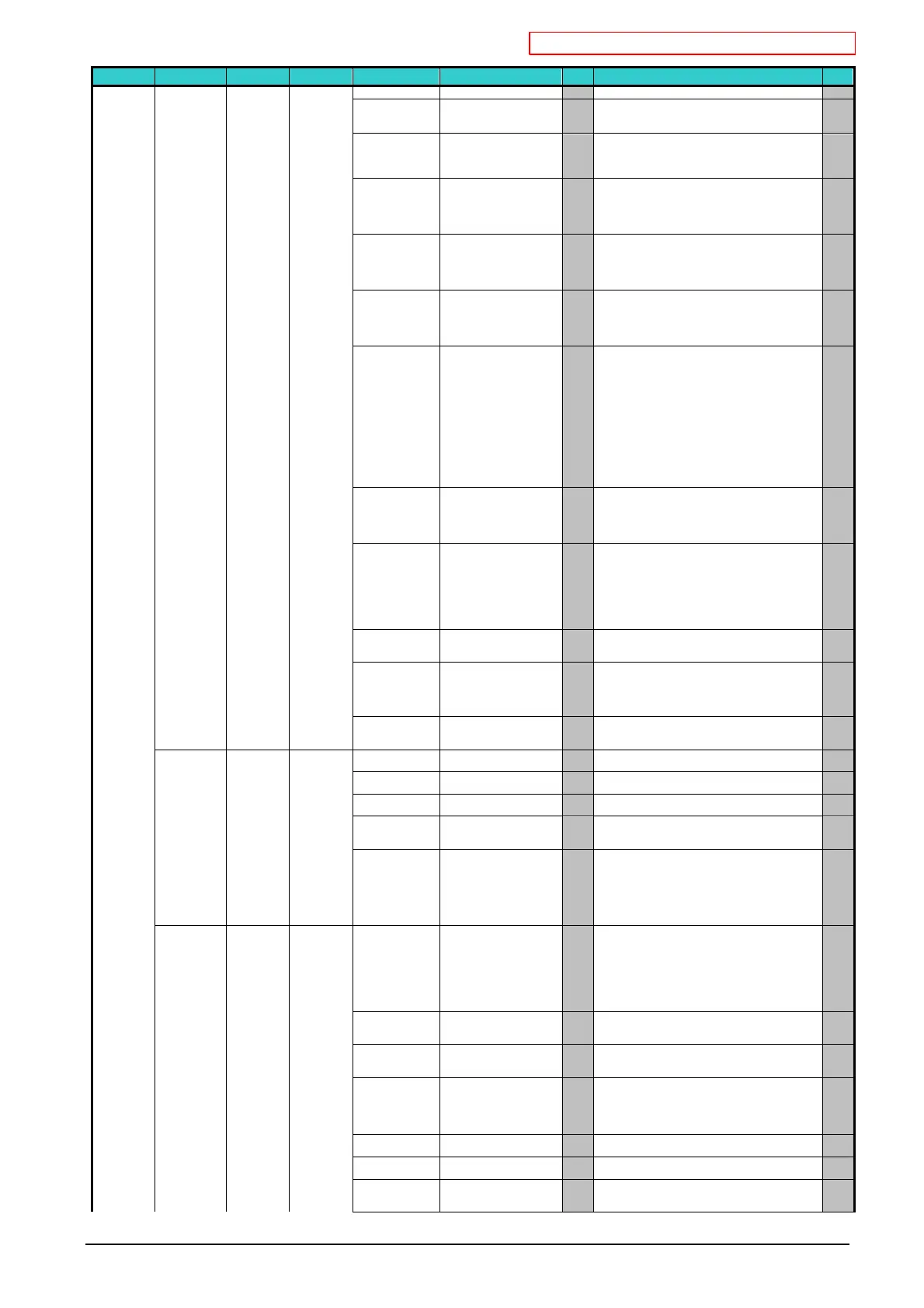
Item Value Default
機能
Valid
・ "Enable" is selected for "TCP/IP".
Subnet Mask xxx.xxx.xxx.xxx
Sets the subnet mask.
【Conditions for display】
"Enable" is selected in "TCP/IP."
JE
Gateway Address xxx.xxx.xxx.xxx
Sets the Gateway (default router) address.
0.0.0.0 means that there is no router.
【Conditions for display】
"Enable" is selected in "TCP/IP."
JE
Web Enable
Disable
* Sets Enable/Disable of Web.
Enable: Web/IPP is available.
Disable: Web/IPP is not available.
【Conditions for display】
"Enable" is selected in "TCP/IP."
JE
Telnet Enable
Disable
*
Sets Enable/Disable of Telnet.
Enable: Telnet is available.
Disable: Telnet is not available.
【Conditions for display】
"Enable" is selected in "TCP/IP."
JE
FTP Enable
Disable
*
Sets Enable/Disable of FTP.
Enable: FTP is available.
Disable: FTP is not available.
【Conditions for display】
"Enable" is selected in "TCP/IP."
JE
IPSec Enable
Disable
*
Displayed only when Enable is selected for TCP/IP and
allows a change only to Disable.
(It is because many settings besides this setting are
required to enable IPSec. Therefore, it is allowed to be
cleared only for restoration.)
If Enable is selected in IPSec,Enable/Disable is shown
in the panel.
If Disable is selected in IPSec,only Disable is shown in
the panel.
【Conditions for display】
"Enable" is selected in "TCP/IP."
JE
SNMP Enable
Disable
* Sets SNMP of FTP.
Enable: SNMP is available.
Disable: SNMP is not available.
【Conditions for display】
"Enable" is selected in "TCP/IP".
JE
Network Scale Normal
Small
* When Normal is selected, it can work effectively even
when it is connected to HUB that has a spanning tree
feature. However, printer start up time gets longer when
computers are connected with two or three small LANs.
When Small is selected, computers can cover from two
or three small LANs to a large LAN, but
effectively when it is connected to HUB with a spanning
tree feature.
JE
Gigabit Network Enable
Disable
*
Sets Enable/Disable of Gigabit network.
When this is Disabled, 1000Base-T Full/Half
connection is unavailable.
JE
Hub Link Setting Auto Negotiate
100Base-TX Full
100Base-TX Half
10Base-T Full
10Base-T Half
* Sets a method to link with HUB.
When Auto is set, a connection method to HUB is
selected automatically and attempts to connect.
If another method is selected, attempts to connect to
HUB only by the selected connection method.
JE
Network Factory
Defaults
Execute -
Specifies whether to initialize the network menu or not.
If Execute is selected, exit from the menu.
JE
USB Setup USB Enable
Disable
* Sets able/disable of USB I/F. PW
Speed 480Mbps
12Mbps
* Sets of the max. USB I/F transfer speed. PW
Soft Reset Enable
Disable
*
Sets Enable/Disable of Soft Reset command. PW
Serial Number Enable
Disable
* Specifies Enable/Disable of a USB serial number. A
USB serial number is used to identify a USB device to
PW
Offline Receive Enable
Disable
*
Sets Enable/Disable of a function that keeps
receive-
possible state without changing I/F signal even
though an alarm occurs. When this is set to Enable, I/F
keeps receive-possible state even while the printer is
moving to Off-line because you press operating panel
switch. I/F sends the BUSY signal only when the
reception buffer is full or service call occurs.
PW
Print Setup Personality Auto
PCL
XPS
IBM 5577
IBM PPR
EPSON FX
HP-GL2
PostScript
* Selects a printer language.
Selectable printer language which is selected to be
"Enable" in "Personality" of SystemMaintenance menu
is displayed as options.
The contents of the display varies according to a setting
of SystemMaintenance menu.
JE
Copies 1
~
999
* Sets the number of copies. This setting is disabled for
Local Print except for Demo Page
ET
Duplex On
Off
*
Specifies Duplex Print.
[Conditions for display]
A Duplex Unit is installed.
JE
Binding Long Edge
Short Edge
* Specifies Binding in Duplex Printing.
【Conditions for display】
・A Duplex Unit is installed.
"On" is selected in "Functions"-"Admin Setup"-"Print
Setup"-"Duplex".
JE
Job Offset On
Off
* Specifies Job Offset On/Off. JE
Output Bin Face Down
Face Up
* Specifies an output tray. JE
Media Check Enable
Disable
* Sets whether the printer checks the matching of paper
size of the print data and that of the tray. Only standard
sizes are subject to be checked.
JE



 To Next Page