9
ENGLISH
Foreign Currency Exchange Rates
You can program up to four different foreign currency
exchange rates. The foreign currency value is displayed
whenever
is pressed during a sales transaction.
1. Control key position: PRG.
2. Type the identification number
to
corresponding to the foreign currency exchange rate that
you wish to define and then press .
3. Type the [decimal point position] of the exchange
rate (0-8 digits after the decimal point).
4. Type the [decimal point position] of the converted
amount (0-3 digits after the decimal point).
5. Type the [exchange rate] using up to six digits without
specifying any decimal point.
6. Press
.
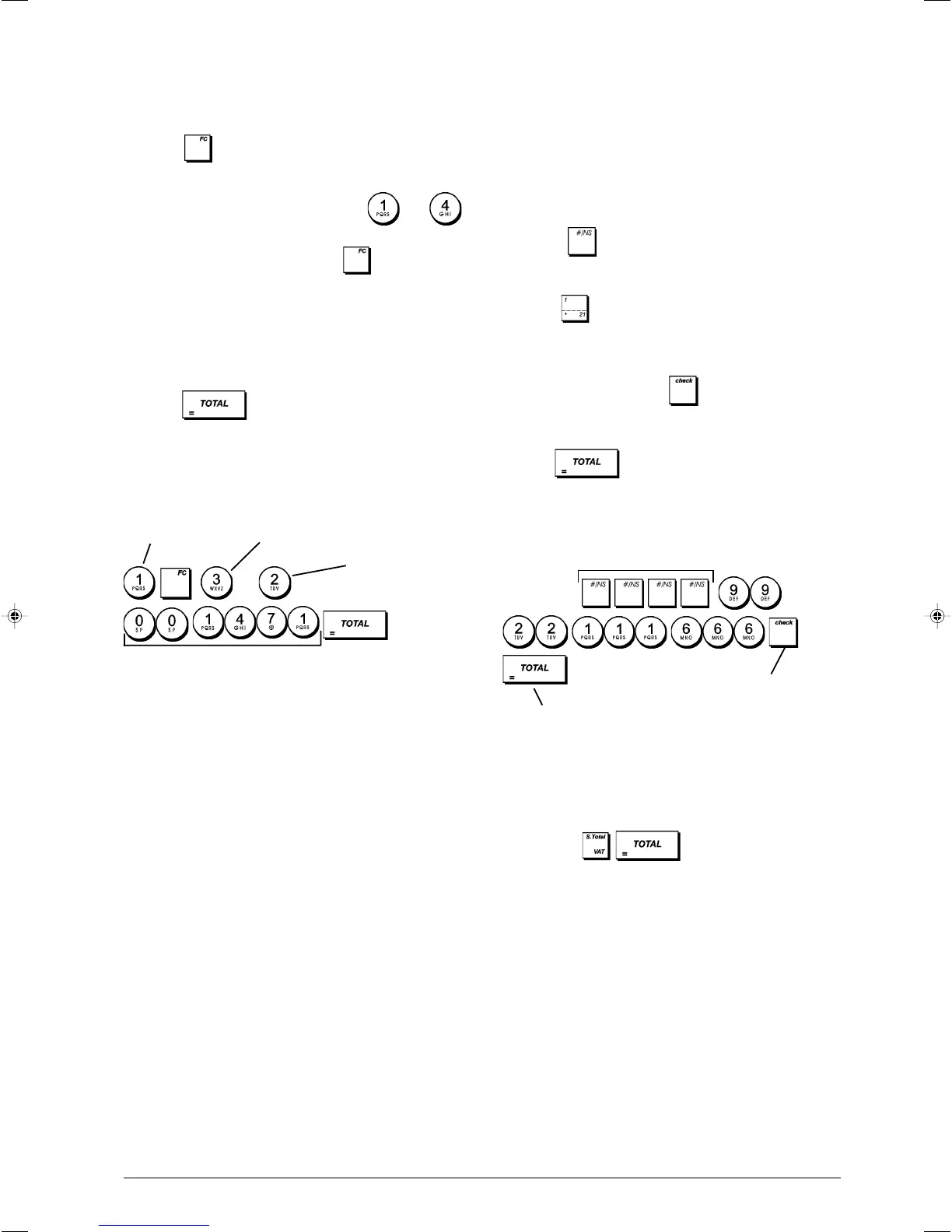
Example: Program the first exchange rate as:
1 GBP = 1.471 EURO.
Type/Press:
When the Foreign Currency conversion calculation system
option 15 is set to Divide, the converted amount is
calculated as follows:
Conversion Amount = Subt / FC rate
When the Foreign currency conversion calculation is set
to Multiply, the converted amount is calculated as follows:
Conversion Amount = Subt x FC rate.
Foreign Currency Descriptors
You can define a currency descriptor of up to 10 characters
long for each of the four exchange rates programmed. The
descriptor of the foreign currency used will be printed on
the customer receipt during sales transactions that are
finalized with payment in foreign currency, and on the
management reports.
1. Control key position: PRG.
2. Press
until displaying the message "FC1"
indicating the first of the four possible foreign currency
exchange rates.
3. Press repeatedly until the desired exchange rate
identification number is displayed on the left-hand side of
the operator display.
4. Enter the descriptor to assign to the selected foreign
currency and then press .
5. Repeat steps 3 and 4 if you wish to assign a descriptor
to the remaining foreign currencies, if defined.
6. Press
to exit.
Example: Name foreign currency 1 "EURO" using the
alphanumeric keypad.
Type/Press:
Rounding Option for Swiss, Danish and
Swedish Currencies
For the Swiss franc, Danish krone and Swedish krona
currencies, you can program the machine to so that the
amount of a transaction is automatically rounded accordingly
whenever the
, or a [tender] key is pressed.
The rounded result will be displayed on the operator and
client displays, printed on the customer receipt and journal
report. The total adjustments are indicated on the financial
reports.
Setting the Rounding Option
With reference to the section "System Options", by setting
system option 14 to the related value (1, 2 or 3), you can
program the machine to round off the subtotal or tender
values of the related currency.
Exchange rate
ID number
Dec. point position of
exchange rate
Dec. point position of
converted amount
Exchange rate (1.471 Euro)
Switch to foreign currency
definition mode
Confirm entered
foreign currency
descriptor
Exit















 To Next Page