10
Fraction Rounding for VAT Calculation
Fraction rounding is used to round figures with decimals up
or down to the nearest whole numbers, and is used for
percent tax calculations. Choose one of the following three
options to select the type of rounding needed:
Status Number Fraction Rounding
0 a fraction of a penny is rounded down
to the lower penny value
1 a fraction under half a penny is
rounded down to the lower penny
value, and a fraction above half a
penny is rounded up to the next higher
penny value (default setting)
2 a fraction of a penny is rounded up
to the next higher penny value
1. Control key position: PRG.
2. Type system option
followed by the status
number [0, 1 or 2] to select the desired fraction rounding.
3. Press
to store the new setting.
Example: Program the rounding code so that a fraction
under half a penny
is rounded down to the next lower
penny value, and a fraction over half a penny
is rounded
up to the next higher penny
value.
Type/Press:
Printing VAT Information on Customer
Receipts
You can program the cash register to print VAT information
on the customer receipt according to your business' or
country's requirements.
Programming the Cash Register to Print the
Required VAT Information
With reference to the section "System Options", by setting
system options 36, 37, 38, 39, 40 and 41 you program the
cash register to print the VAT information that you need.
1. Control key position: PRG.
2. Type the [system option number] followed by status
number , then press .
3. Slide the control key to the OFF position.
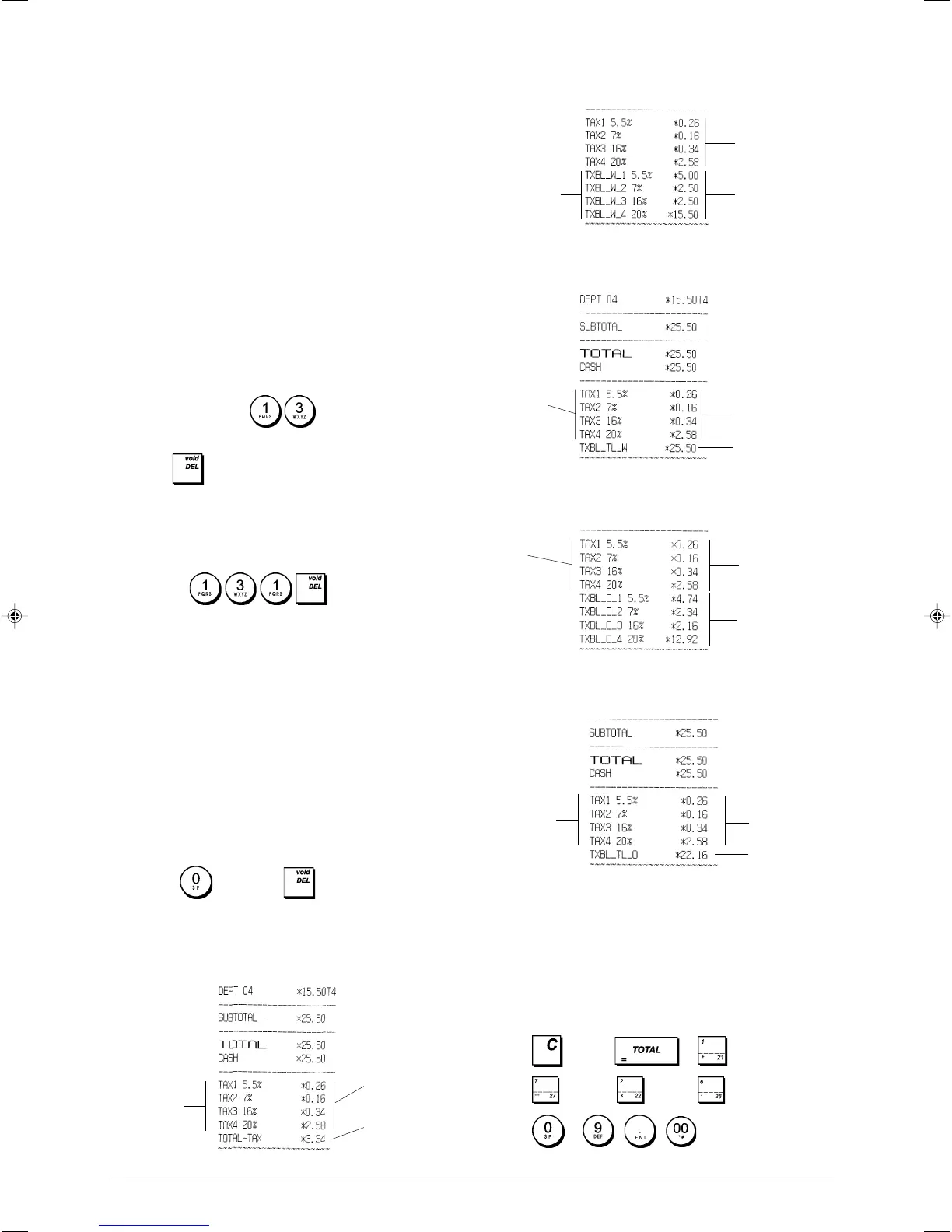
Receipt With Sum of all VAT Amounts Calculated
(TOTAL VAT) - System Option 37
Sum of the
individual VAT
totals
Receipt With Taxed Sales Totals Split per Rate
(AMT VAT INCL) - System Option 38
Receipt With Sum of the Taxed Sales Totals
(TOTAL INCL VAT) - System Option 39
Receipt with Taxable Sales Totals without VAT per
each Rate (AMT VAT EXCL) - System Option 40
Receipt With the Sum of Taxable Sales Totals without
VAT (TOT EXCL VAT) - System Option 41
Calculator Mode
The calculator mode is a non-print mode that can only be
accessed in the REG or JRNL position. A password must be
programmed for calculator mode.
The following keys can be used in calculator mode:
Key
to
VAT totals
per pro-
grammed rate
Programmed
VAT rates
Programmed
VAT rates
VAT totals
per pro-
grammed rate
Taxed sales
totals per rate
Programmed
VAT rates
VAT totals
per pro-
grammed rate
Taxable sales
totals without
VAT per each
rate
Programmed
VAT rates
Sum of the
taxable sales
totals without
VAT
VAT totals per
programmed
rate
VAT totals
per pro-
grammed rate
Programmed
VAT rates
Sum of taxed
sales totals















 To Next Page