18
2. If a manager password was defined type the
[4-digit password] and press .
3. Type a number between [001 and 999] indicating the
number of latest reports wanted and press
.
Daily Report
By entering the number of Z financial reports that you wish
to view, this report prints the receipts recorded before the
defined Z financial report along with the report itself.
1. Control lock key position: X1/X2 or Z1/Z2. Bear in mind
that in the Z position the journal report contents are
cleared. Make sure there is plenty of paper loaded in the
printer.
2. If a manager password was defined type the
[4-digit password] and press
.
3. Type a number between [01 and 99] indicating the
number of oldest end-of-day reports wanted and press
.
Sales Transactions
Entering and Exiting the Register Mode
1. Turn the control key to the REG or JRNL position.
Remember that the REG position registers all sales
transactions on the journal record, while the JRNL position
provides customer receipts.
2. If the Clerk System option was set to active and a clerk
code was programmed, enter the related Clerk number
assigned, press type the associated three-digit
secret code and then press
again. If the Clerk
System option was set to active and a secret code was
not programmed, type any Clerk number from
to
and then press .
Date and Time Display
You can display the current date and time outside of a sales
transaction by pressing
to display the date and
to display the time with the cash register in either
the REG or JRNL mode.
Electronic Journal Capacity Display
You can display the number of transaction data lines still
available in electronic journal memory outside of a transaction
by pressing
with the cash register in either
the REG or JRNL mode.
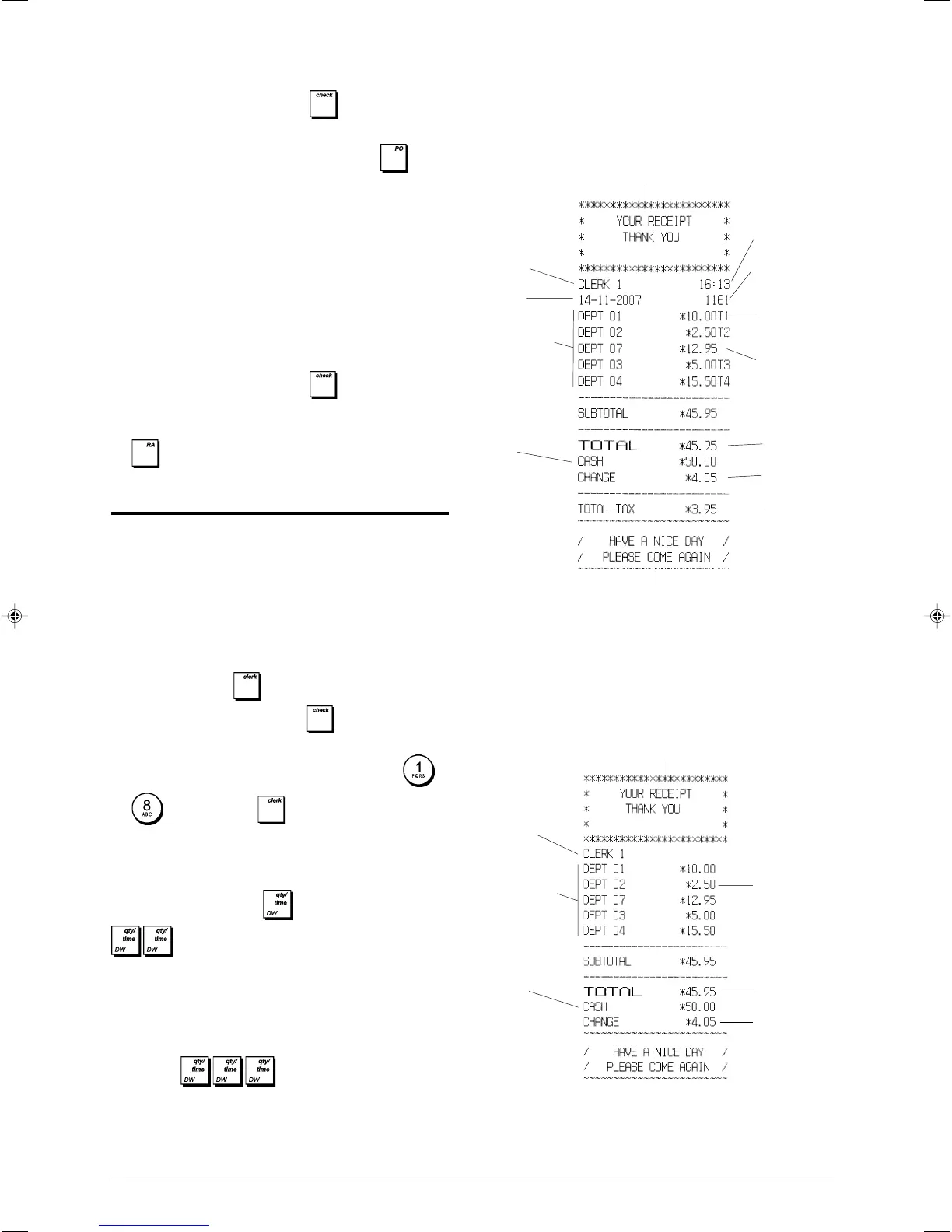
Sample Receipts
The following receipt is a typical receipt issued by the cash
register.
The following example receipt contains the least information
possible. To obtain this receipt, program system options 30,
31, 32, 34 and 37 accordingly. See "System Options" for
details.
Customer receipt header on 6 lines
with max. 24 characters per line
Item price
Total
balance due
Change due
Clerk number
or assigned
name
Departments
Cash
tendered
Customer receipt footer
Customer receipt header on 6 lines
with max. 24 characters per line
Item price
with
department
VAT rate
identifier
Total
balance due
Change due
Item price in
non-taxable
department
Time
Date
Clerk number
or assigned
name
Departments
Cash
tendered
Consecutive
receipt number
VAT total















 To Next Page