10
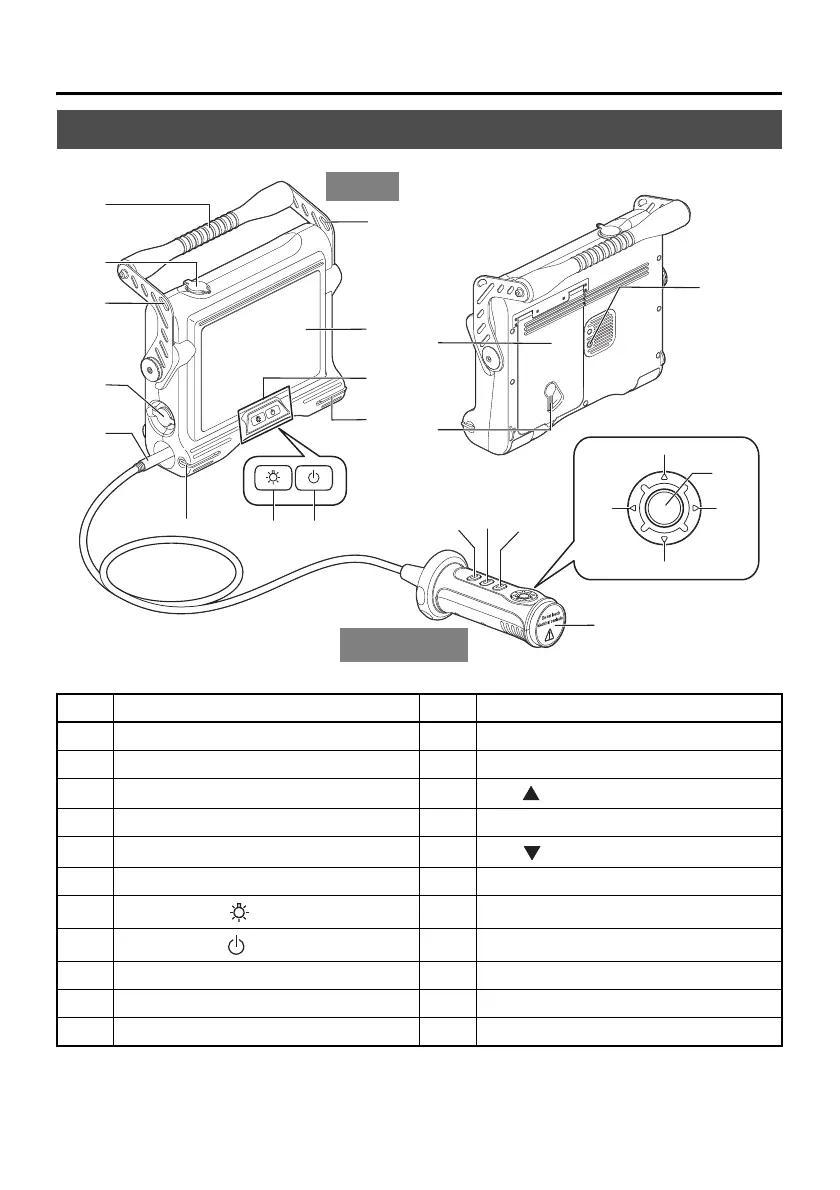
2 Nomenclature
2.1 Base unit nomenclature
* The functions of these buttons may be different when they are long-pressed. In this manual, the term "short-press"
is used to indicate pressing a button for a short duration, while "long-press" means holding down a button for at
least one second.
No. Name No. Name
1 Handle 12 Lock release lever
2 Video connector cap 13 Tripod screw hole
3 Belt holder
14
BRT button
4 AC adapter connector cap 15 T button
5
Universal cable
16
BRT button
6 Belt bracket 17 W button
7
LIGHT button ( )
18 ENT/MENU button*
8
Power button ( )
19 FRZ/REC button*
9 Front panel 20 VIEW button*
10 LCD monitor 21 LIVE/WiDER button
11 Battery cover 22 Protective cap
1
2
3
3
4
5
6
7
11
12
8
9
13
14
10
15
16
6
17
18
19
21
20
Button control
unit
22
Main




 To Next Page