22
4 Pre-observation/pre-operation preparation and inspection
Attaching the shoulder belt (option)
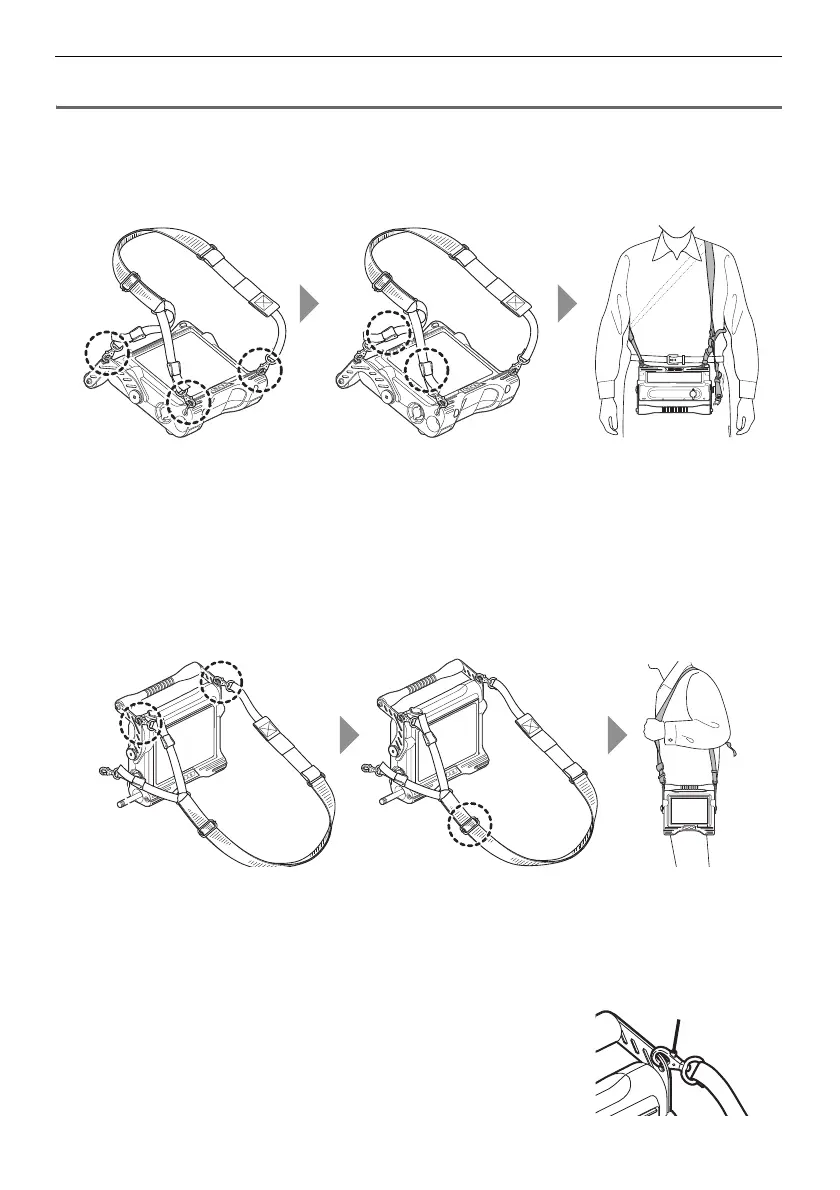
The shoulder belt lets you attach the main unit to your body to do observations or to carry it around
easily from your shoulder.
Attach the main unit to your body
1 Attach the shoulder belt hooks to the two belt brackets and one of the two belt
holders.
2 Adjust the length of the belt by the length adjuster buckle and adjust the
screen to an easy-to-view angle.
3 Hang the shoulder belt on your shoulder and do observations.
Hang the main unit from your shoulder
1 Attach the shoulder belt hooks to the two belt brackets.
2 Adjust the length of the belt by the length adjuster buckle.
3 Hang the shoulder belt on your shoulder.
Detaching the shoulder belt
To detach the shoulder belt, press the hook lever to remove the
hook from the main unit.




 To Next Page