19
4 Pre-observation/pre-operation preparation and inspection
Checking the remaining battery level
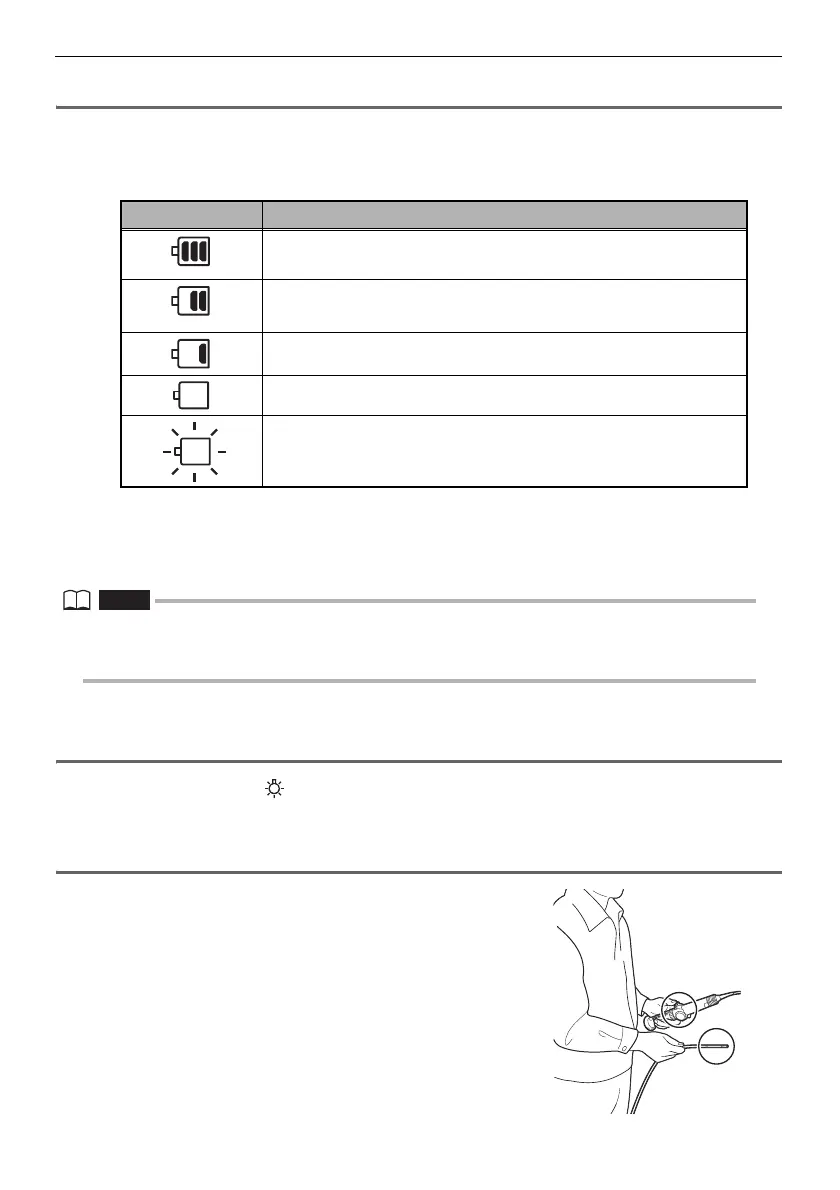
When operating the instrument under battery power, the battery indicator in the upper right corner
of the LCD monitor shows the remaining battery power. The table below shows general guidelines
for remaining battery power.
*1 Do not record or delete images, and do not format the USB flash drive. If power runs out during these
operations, data could be corrupted.
*2 Battery voltage has dropped. Continued use of the instrument in this condition will result in its shutting
down, which could cause it to malfunction.
• The remaining battery power can also be checked on the [POWER INDICATOR] of the battery itself.
(However, the remaining battery power shown on the LCD monitor is different from that shown on the
[POWER INDICATOR].) For details, refer to the instruction manual of your battery.
Checking lighting of illumination at the distal end of the
insertion tube
Press the LIGHT button ( ) to light illumination at the distal end of the insertion tube.
The light indicator at the bottom right of the LCD monitor also is displayed.
Checking the angulation of the angulation section
Extend the insertion tube straight out and operate the
angulation lever to check for smooth angulation section
operation.
Angulation movement matches the angle and direction of
angulation lever movement.
Indicator Battery condition
Remaining battery power about 50% or more.
Remaining battery power about 25% to 50%.
Remaining battery power about 5% to 25%.
*1
Remaining battery power about 2% to 5%.
*2
Remaining battery power about 1% to 2%.
Charge the battery, replace with a charged battery or connect the
AC adapter.




 To Next Page