33
5 Basic operation
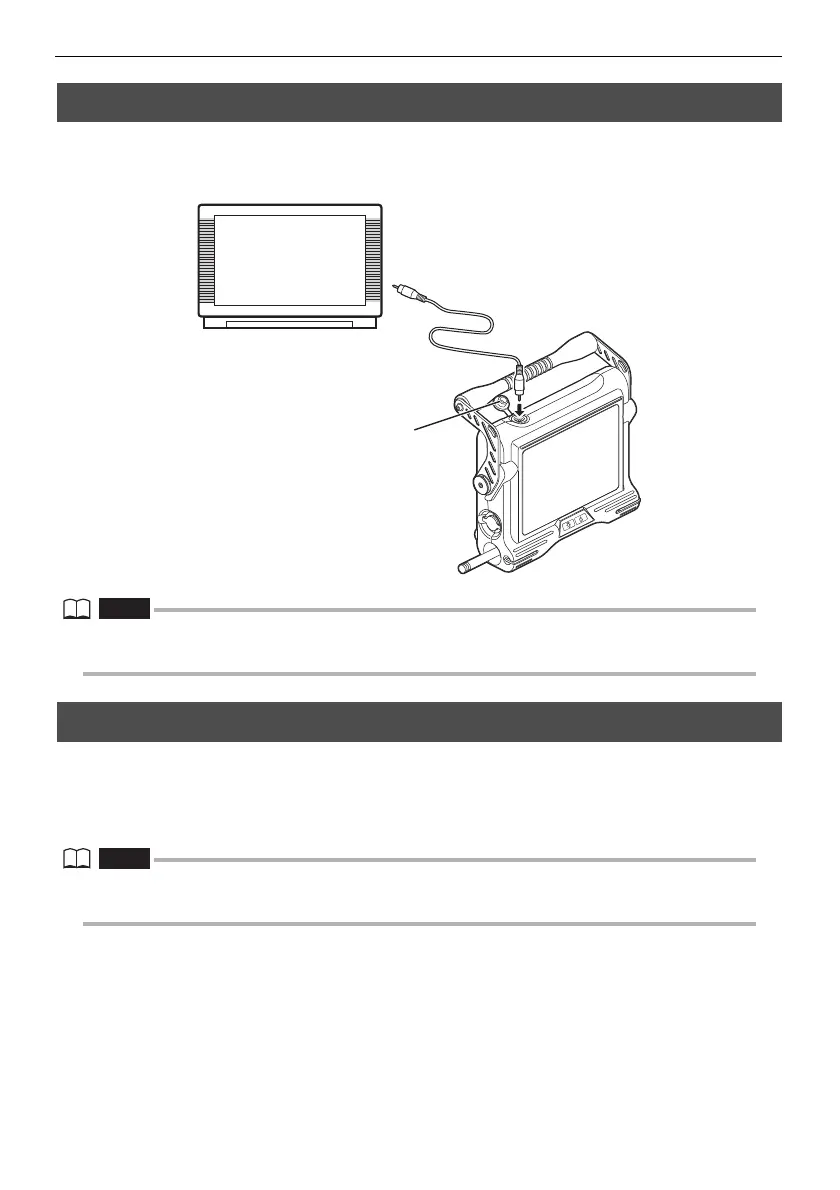
5.6 Displaying live images on an external monitor
The video output connector of the main unit enables connection of a commercially available video
cable with RCA pin plug for output of live images to a commercially available external monitor.
• Recorded images cannot be output through the video output connector. Menus and other information, and
audio also cannot be output to the monitor.
5.7 Using recorded images on a PC
IPLEX VIEWER PLUS can be used to make use of images recorded on this instrument.
Recorded images are loaded directly on the PC from the USB flash drive containing those images.
To use IPLEX VIEWER PLUS software, download it from the Olympus website (http://
www.olympus-ims.com/service-and-support/downloads/).
• For details on how to use IPLEX TX images on IPLEX VIEWER PLUS, refer to the manual that comes with
IPLEX VIEWER PLUS.




 To Next Page