38
6 Menu operations and functions
3 Select [EXECUTE] and then short-press the [ENT/MENU] button.
This displays the title you input on the LCD monitor.
• When all three digits of the serial number box are left blank "__ __ __", a numerical value for the serial
number is not displayed on the LCD monitor. The serial number also will not be updated even by recording
an image in this state.
• When a serial number is input to a title, that number will be incremented every time an image is recorded.
Selecting a preset title for input
With this procedure, you select a preset character string and use it to input a title.
For information about how to register frequently used text strings, see "Registering a character
string as a preset title" (P. 39).
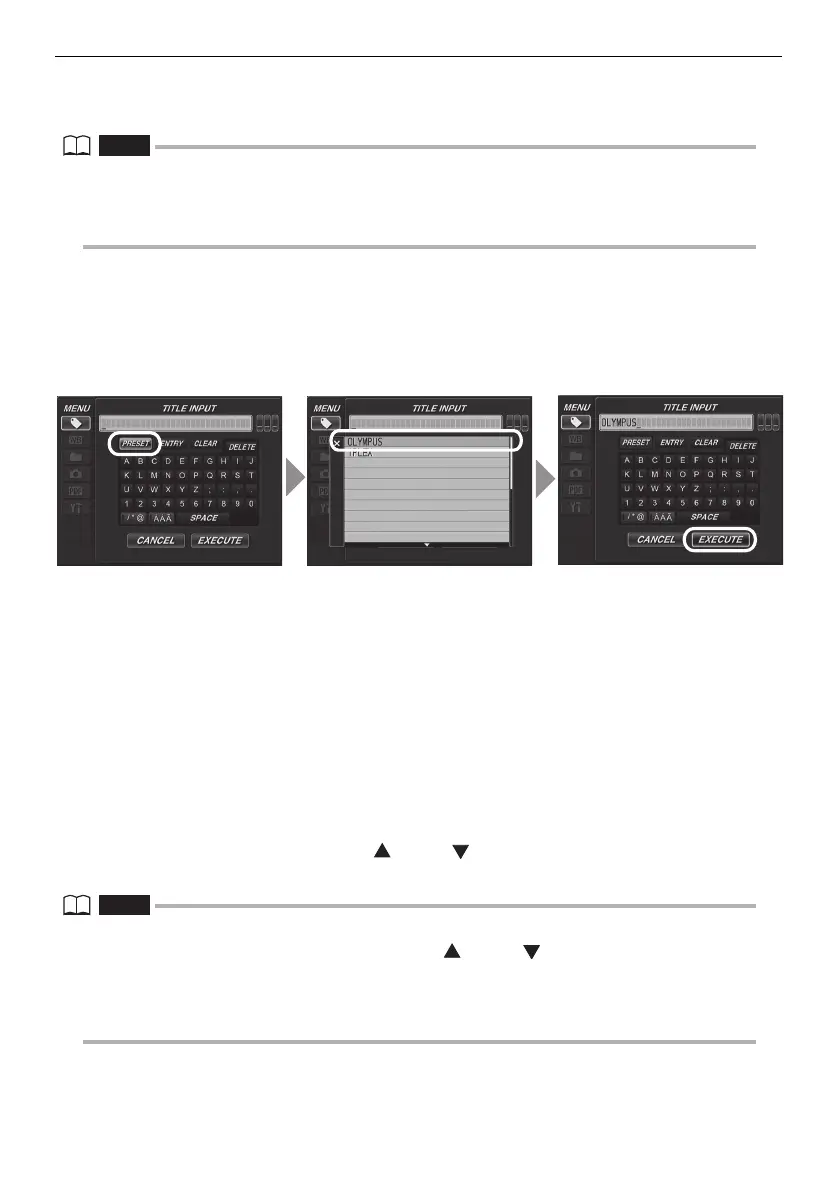
1 Select [PRESET] and then short-press the [ENT/MENU] button.
A list of preset titles is displayed.
2 Select the desired text string from the preset title list and then short-press the
[ENT/MENU] button.
The text string you select appears in the title input box. Repeat steps 1 and 2 to complete input
of the title.
To cancel selection of a preset title
Press the [T] button and select [x], then short-press the [ENT/MENU] button to close the
screen.
To input a serial number
Operate the [W] / [T] buttons to the left and right to move the cursor to the serial number input
box for each digit. Operate the [BRT ] / [BRT ] buttons up and down to enter the desired
numerical value for each digit.
• The preset title list has two pages. To toggle between the pages, select the text string in line 1 or line 10 of
the currently displayed page and then operate the [BRT ] or [BRT ] button.
• When all three digits of the serial number box are left blank "__ __ __", a numerical value for the serial
number is not displayed on the LCD monitor. The serial number also will not be updated even by recording
an image in this state.
• When a serial number is input to a title, that number will be incremented every time an image is recorded.
3 Select [EXECUTE] and then short-press the [ENT/MENU] button.
This displays the title you selected on the LCD monitor.




 To Next Page