Installation and Connection
2
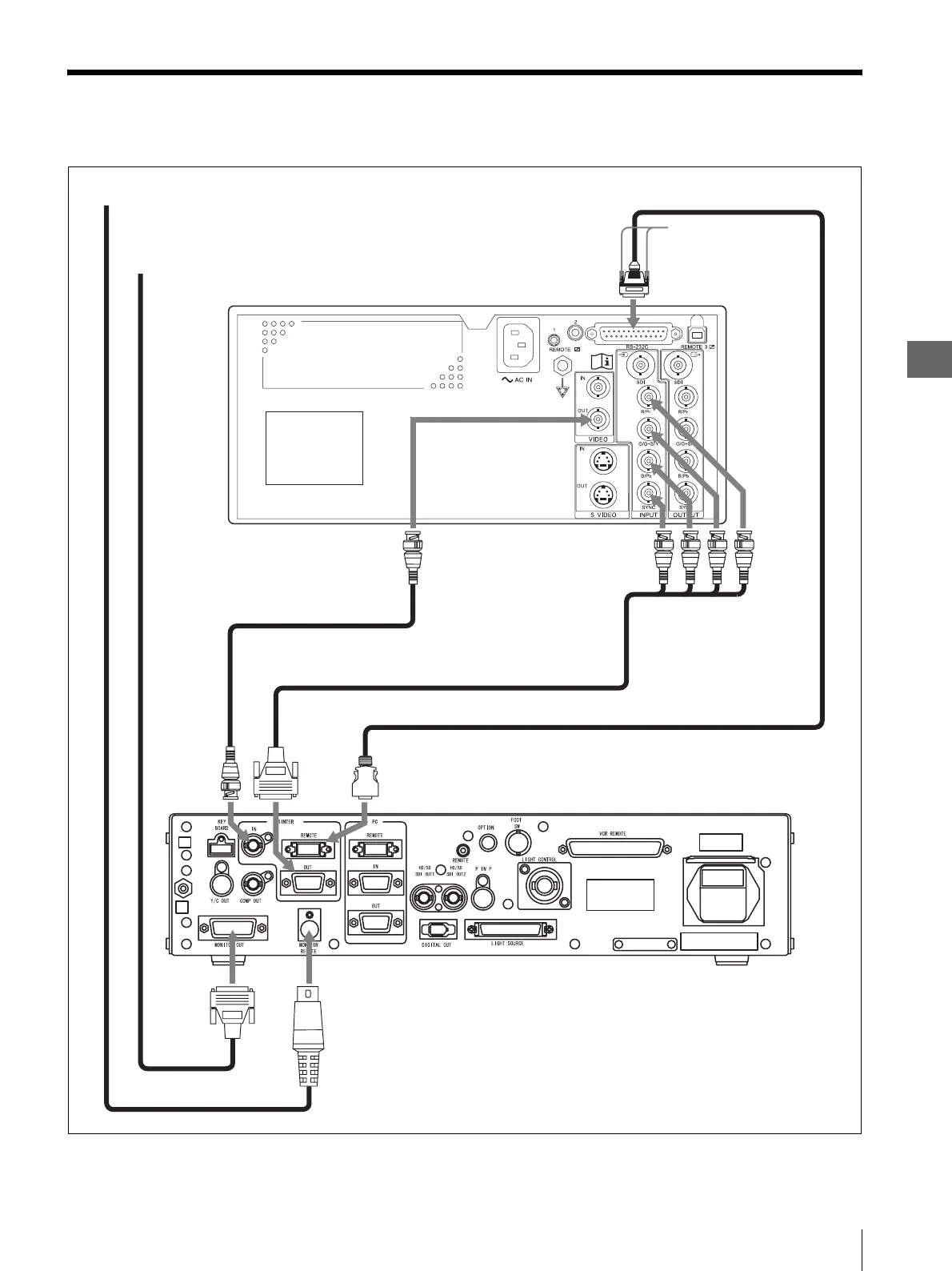
2.3 Connection of the VISERA Pro Video System Center (OTV-S7Pro)
19
2.3 Connection of the VISERA Pro Video System
Center (OTV-S7Pro)
Figure 2.2
Color video printer (OEP-5)
VIDEO OUT terminal
BNC cable (MB-677)
VISERA Pro Video System Center (OTV-S7Pro)
To remote terminal of a monitor
To RGB, Y/C, or VIDEO input
terminal of a monitor
PRINTER OUT
terminal
Attach the two black
screws, provided with the
remote cable (MH-995).
RS-232C terminal
MONITOR REMOTE
terminal
Monitor remote cable
INPUT
terminals
PRINTER REMOTE
terminal
Monitor Cable
SBGR
RGB cable (MH-984)
PRINTER IN
terminal
MONITOR
OUT
terminal
Remote Cable (MH-995)












 To Next Page