USING SIMPLECENTER
5 Using SimpleCenter
19
Add playlists to the Playlist Group by right-clicking on the Playlist Group.You can also
Delete or Rename a Playlist Group by right-clicking on the Playlist Group in the left
pane.
Making Playlists Using Right-Click Menus
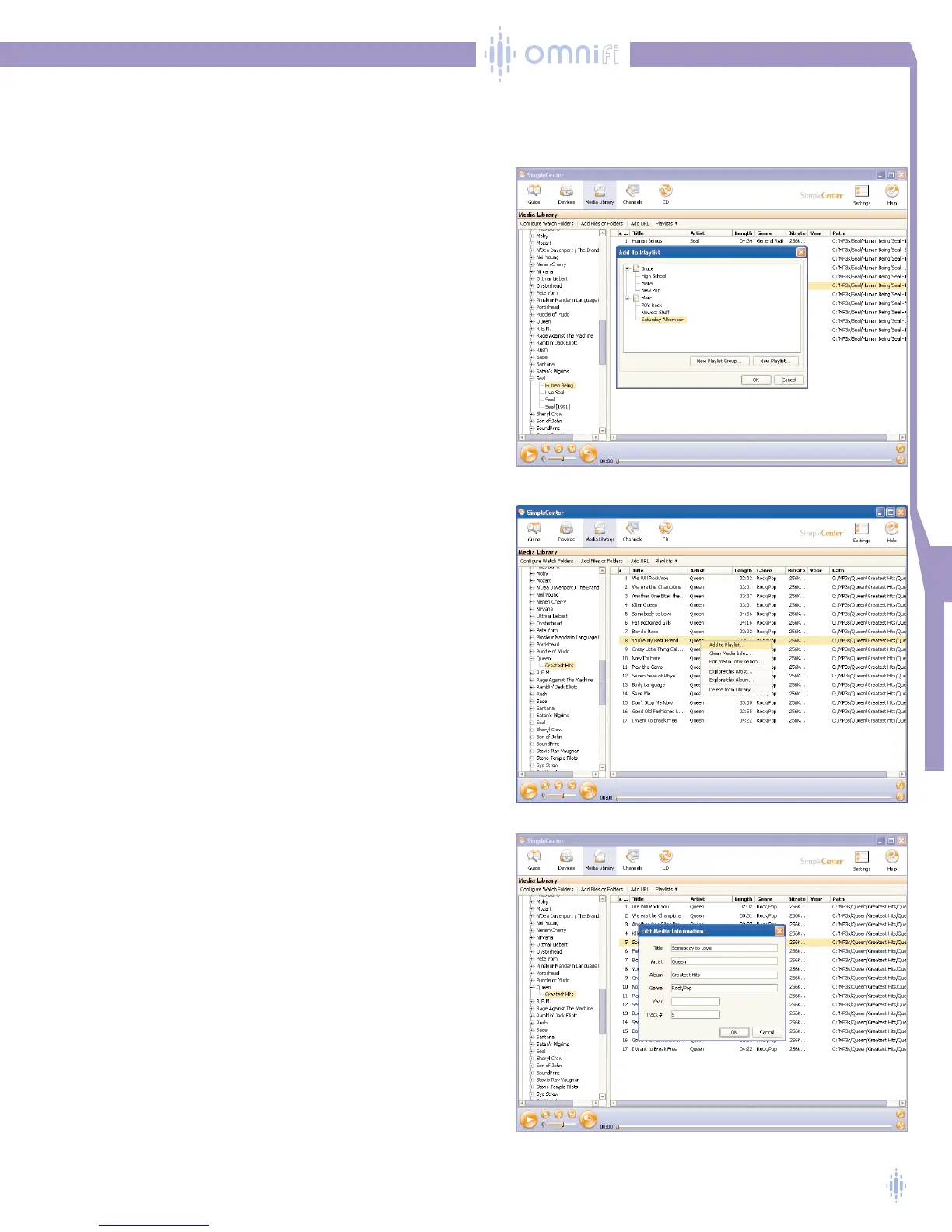
A convenient method for making playlists is to highlight the
track or tracks you want to add to a playlist and activate the
Add to Playlist function by clicking the right mouse button,
figure 28.
The Add to Playlist menu allows you to choose the playlist
to which you want to add the selected tracks.You can also
make a new playlist and playlist group at this point, and add
the tracks to this new playlist.
Media Management Features
SimpleCenter provides a number of convenient features in
the Media Library function, including media cleaning and
ID3 data editing.You access these features by highlighting a
track in the right pane of the Media Library and then
right-clicking.A menu will appear as shown in figure 29.
Editing ID3 Data
Compressed digital media files such as MP3s have text
information, called ID3 data, embedded within the files. ID3
data allows the song to provide the title, artist, album, year
published, and track number to any playback device.
SimpleCenter provides a powerful ID3 data editing tool.To
edit ID3 data, click on a track to highlight it in the right pane
of the music library, then click the right mouse button. A
menu will appear with several options. Click on Edit
Media Information .... A box will pop up, figure 30.
You can edit text in the fields listed in the window.When
you are finished, click the OK button and the changes will be
made to the digital media file.
You can also edit fields in multiple digital media files
simultaneously. For example, if you wanted to change the
Genre text for all songs in an album, highlight all the songs
in the right pane by clicking on the top line, and hold down
the shift key and click on the last song in the list.All the
lines will be highlighted. Select the Edit Media Information
option as described above. Edits made in this mode will be
applied to all of the highlighted tracks.
Figure 28
Figure 29
Figure 30



 To Next Page