13
4.
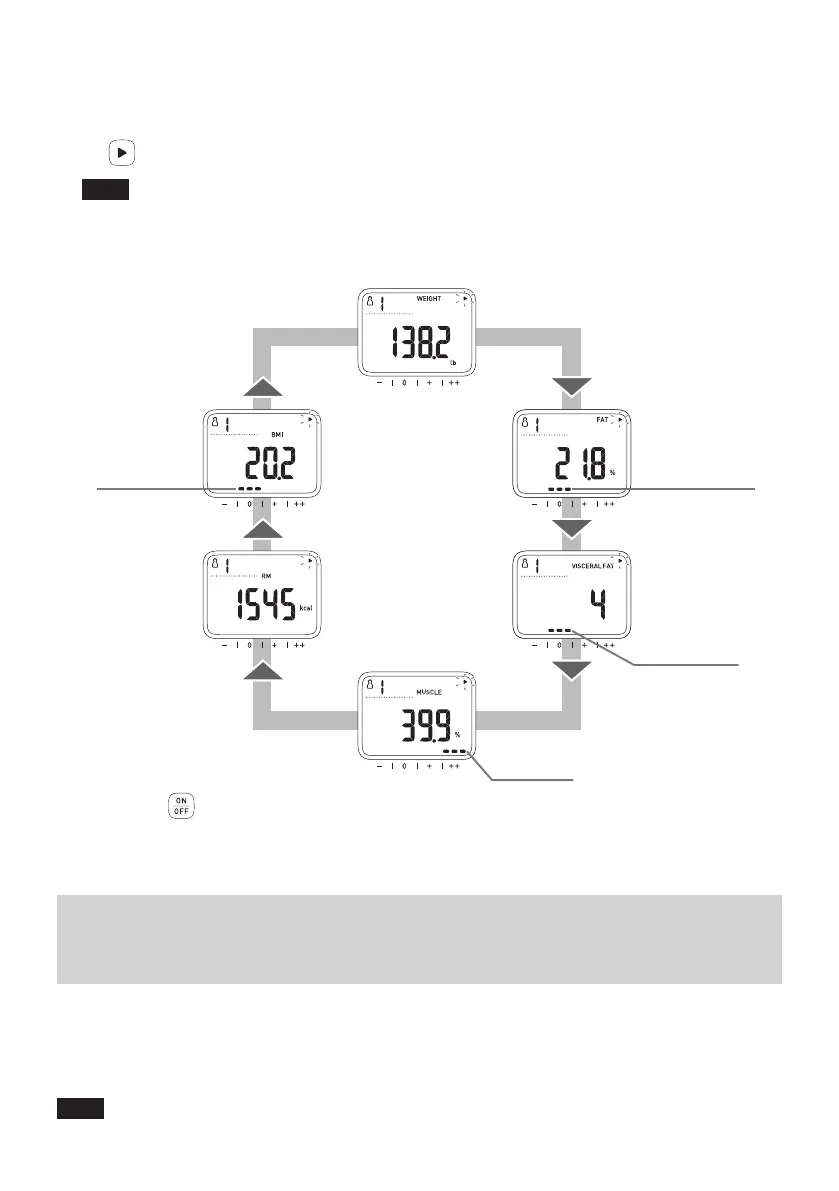
Check the measurement results.
Your results will automatically rotate in the order shown below.
OnceyouconrmyouruserID,youcanswitchittoameasurementresultyouwanttoviewwith
the button.
Note
•
Theclassicationindicatorcanbeusedasaguidetohelpunderstandyourmeasurementresults
for Body Fat Percentage, Visceral Fat Level, Skeletal Muscle Percentage and BMI.
• To better understand your measurement results, refer to the information and diagrams in
Section 20 and 21.
WEIGHT
SKELETAL
MUSCLE
PERCENTAGE
Skeletal Muscle
Percentage
Classification
BMI
RESTING
METABOLISM
BODY FAT
PERCENTAGE
Body Fat Percentage
Classification
VISCERAL
FAT LEVEL
BMI Classification
Visceral Fat Level
Classification
5.
Press the button (2 seconds or longer) to turn off the power.
The power turns off if your monitor is not used for 3 minutes
.
Operating instructions
8. View Your Measurement Results on
Your Smart Device
Follow the instructions from the “OMRON HeartAdvisor” app to view your
measurement results.
Thenyoucanconrmthevariationofyourweightandbodycompositionparametersonyoursmart
device.
Note
• The “OMRON HeartAdvisor” app must be installed on your smart device. (Refer to
Section 3.)



 To Next Page