Menu Tables
FQ2-S4 User’s Manual
461
Appendices
12
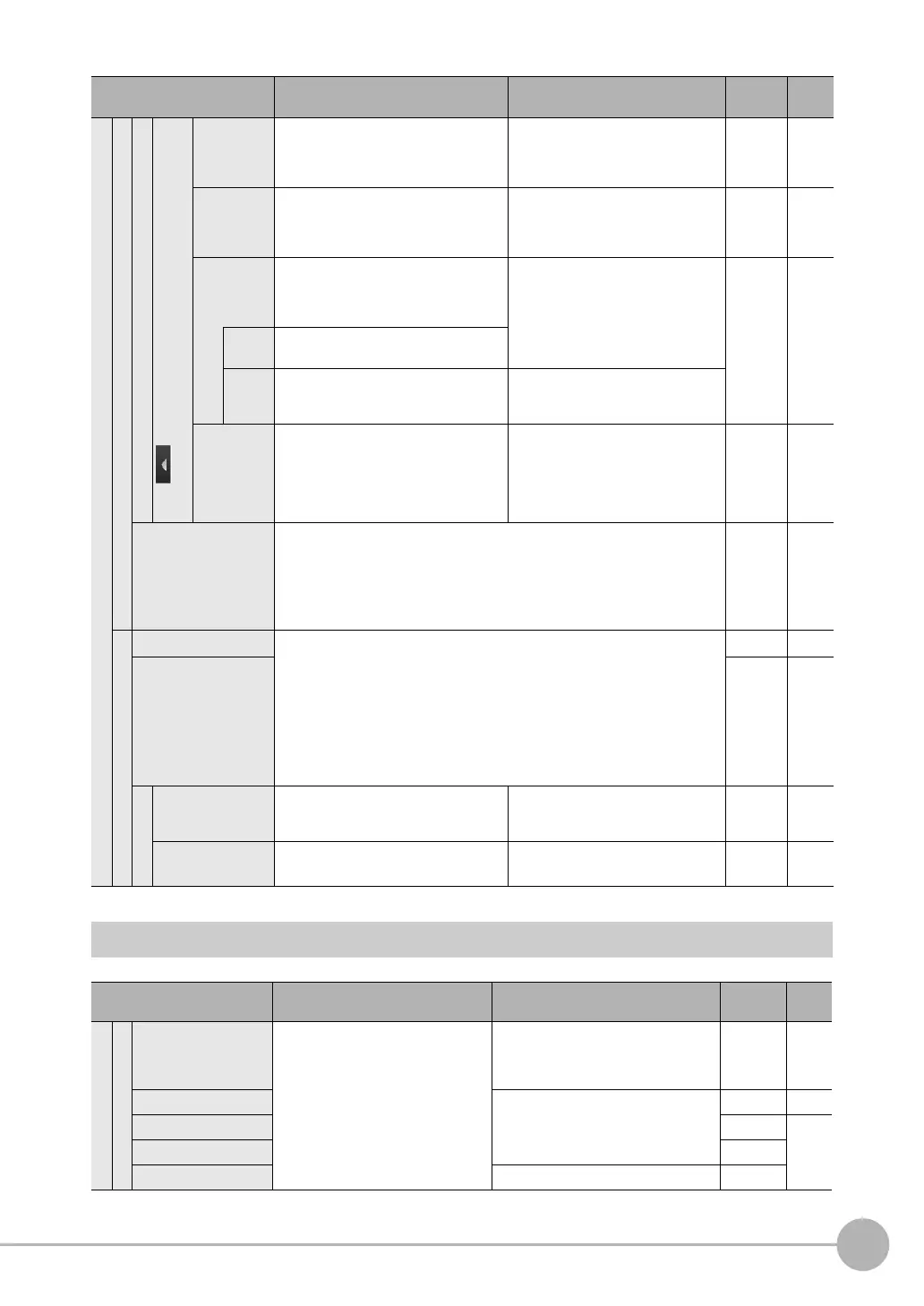
Inspect Tab Page
Image adjustment
Basic
Teach
for Two-edge Position Compensation, Two-edge Midpoint
Compensation, and Edge Rotation Position Compensation
Edge 0
region
Edge 1
region
Adjusts the size and position of the mea-
surement region, changes the measure-
ment direction, etc.
--- Scene ---
Edge 0 clr
ON/OFF
Edge 1 clr
ON/OFF
Sets whether to specify an edge color. ON or OFF (default) Scene ---
Edge 0 set
color.
Edge 1 set
color.
Specifies the color of the image for edge
detection (i.e., the border between the
measurement object and background).
R: 0 to 255
B: 0 to 255
G: 0 to 255
Scene ---
Color
palette
Displays a palette for color specification.
Detec-
tion
mode
Specifies whether to detect a change in
color as an edge.
Color IN (default), Color OUT
Edit Ref.
angle
(Edge Rota-
tion Position
Compensa-
tion only)
Set the reference angle. −180 to 180° (default:0) Scene ---
Judgement • Shape Search II Position Compensation Item and Search Position Compen-
sation Item
Almost the same as for the Search inspection item.
• Edge Position Compensation, Two-edge Position Compensation, Two-edge
Midpoint Compensation, and Edge Rotation Position Compensation
Almost the same as for the Edge Position inspection item.
Scene ---
Details
Meas. Parameter • Shape Search II Position Compensation Item and Search Position Compen-
sation Item
Almost the same settings as for the Search inspection item.
However, the [Sub-pixel] and [Multi-point output] settings of the Search
inspection item do not exist.
•
Edge Position Compensation, Two-edge Position Compensation, Two-edge Mid-
point Compensation, and Edge Rotation Position Compensation
The settings for the Edge Position Compensation item are almost the same as
those for the Edge Position inspection item.
Scene ---
Output parameter Scene ---
Scroll parameter
Source image You can select the image to which to
apply the results of position compensa-
tion processing.
Camera, Prev. (default) Scene p. 78
Interpolation You can select the precision of position
compensation.
Bilinear, None (default) Scene p. 78
Menu command Description Setting range Data Refer-
ence
Inspection
Item selected
Add item Used to add, modify, delete, copy, or
change the name of an inspection
item.
OCR, Bar code, 2D-code, 2D-code
(DPM), Search, Shape Search II, Sensi-
tive Search, Edge Position, Edge Width,
Edge Pitch, Color Data, Area, Labeling
--- p. 94
Modify --- --- p. 95
Delete --- p. 95
Copy ---
Rename 15 alphanumeric characters ---
Menu command Description Setting range Data Refer-
ence






 To Next Page