APPENDICES
A-12
APPENDICES
Func-
tion set-
ting
mode
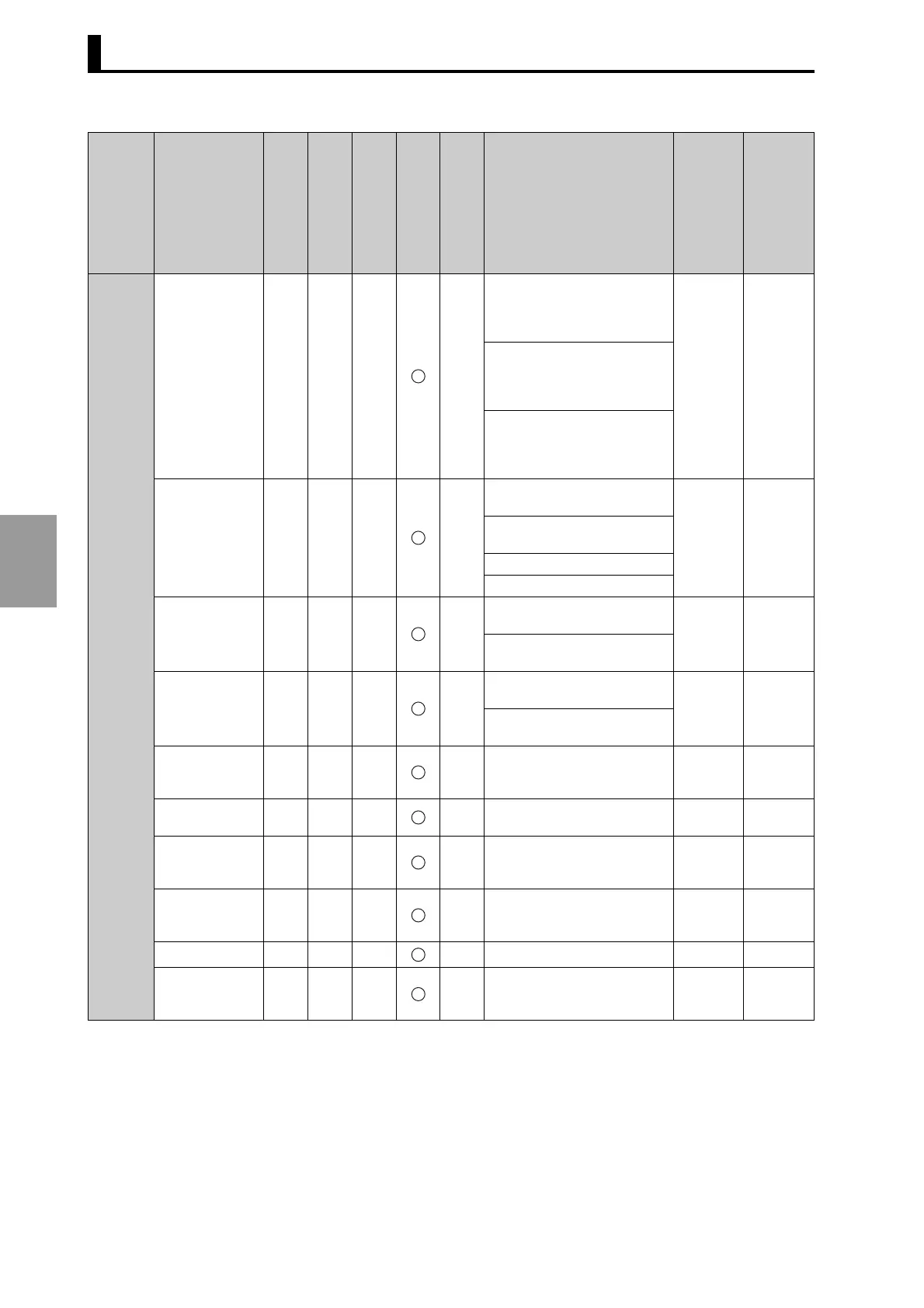
F1:
No. of pulse
outputs.
Select from 1, 2, 3, 4, 5, 6, 9,
10, 12, 15, 18, 20, 30, 36, 45,
60, 90 (at 256 resolution/rota-
tion)
60
4.4.1
Select from 1, 2, 3, 4, 5, 6, 9,
10, 12, 15, 18, 20, 30, 36, 45,
60, 90, 180 (at 360 resolution/
rotation)
Select from 1, 2, 3, 4, 5, 6, 8, 9,
10, 12, 15, 18, 20, 24, 30, 36,
40, 45, 60, 72, 90, 120, 180,
360 (at 720 resolution/rotation)
F2:
Pulse output
start angle
0 to 255 (256 resolution/256
display)
0°
4.4.2
0 to 359° (256 resolution/360
display)
0 to 359° (360 resolution)
0 to 359.5° (720 resolution)
F3:
Speed alarm
(upper limit)
"---" or 0 to 1600
(256/360 resolution)
---
4.5.1
"---" or 0 to 800
(720 resolution)
F4:
Speed alarm
(lower limit)
"---" or 0 to 1600
(256/360 resolution)
---
4.5.2
"---" or 0 to 800
(720 resolution
F5:
Step number
limit
1 to 10
10
4.6
F6:
Cam protection
Enable/disable
Disable
4.7
F7:
Bank enable/
disable
Enable/disable
Disable
4.8.5
F8: Bank switch-
ing method
in (terminals)/key (BANK key) in
(termi-
nals)
4.8.6
F9: Bank copy
4.8.7
F10: E24 detec-
tion enable/dis-
able
Enable/disable
Enable
4.9
Setting
RUN
TEST
PRGM
Function setting
Power OFF
Setting range
Factory setting
Refer to (Section No.)



 To Next Page