3-57
3-7 Parameter List
3
Operation
Absolute position control
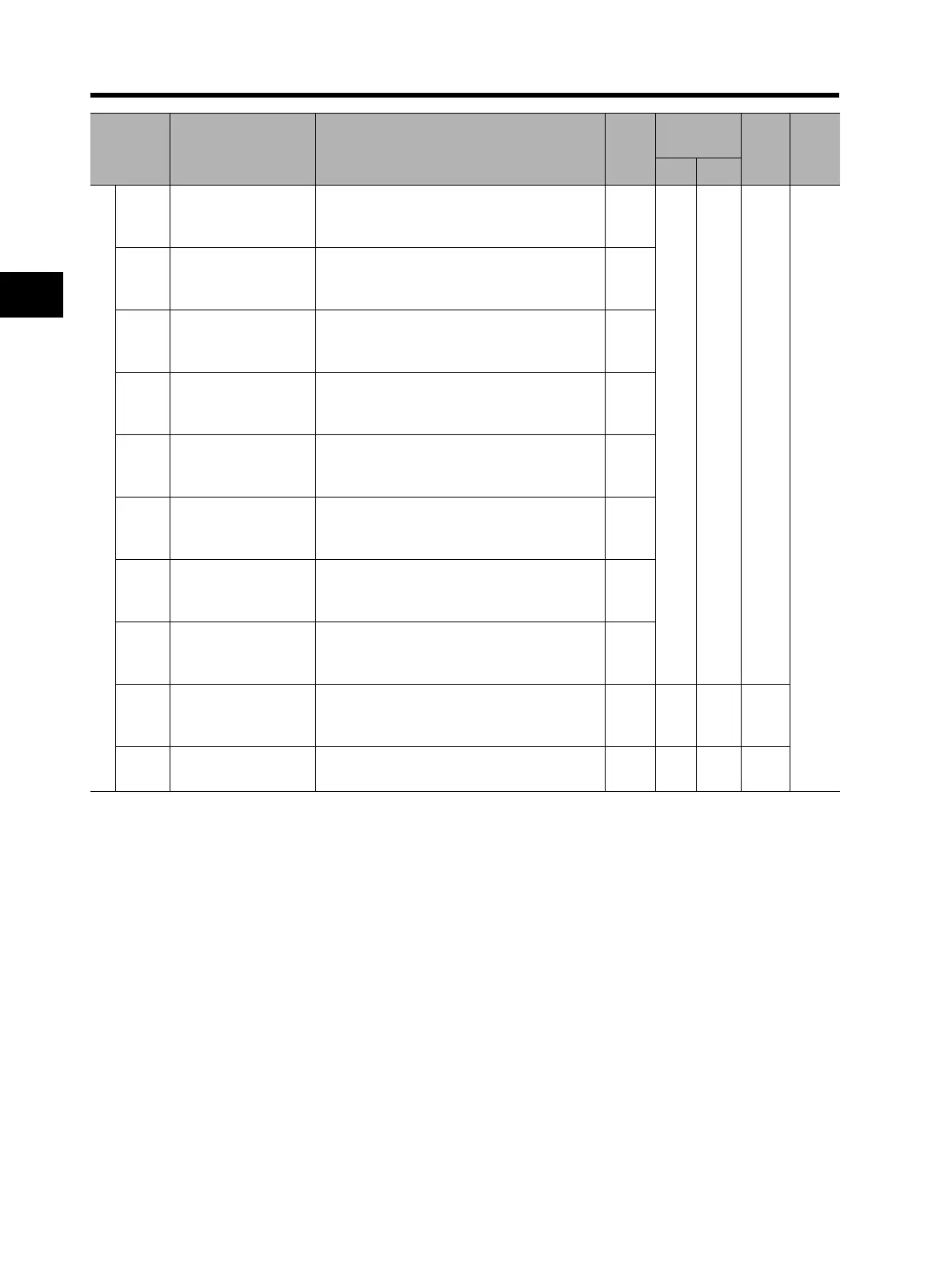
P060
Multi-step position
command 0
Position range specification (reverse side) to
Position range specification (forward
side)(Displays MSB 4 digits including "-")
0
Yes Yes
4-131
P061
Multi-step position
command 1
Position range specification (reverse side) to
Position range specification (forward
side)(Displays MSB 4 digits including "-")
0
P062
Multi-step position
command 2
Position range specification (reverse side) to
Position range specification (forward
side)(Displays MSB 4 digits including "-")
0
P063
Multi-step position
command 3
Position range specification (reverse side) to
Position range specification (forward
side)(Displays MSB 4 digits including "-")
0
P064
Multi-step position
command 4
Position range specification (reverse side) to
Position range specification (forward
side)(Displays MSB 4 digits including "-")
0
P065
Multi-step position
command 5
Position range specification (reverse side) to
Position range specification (forward
side)(Displays MSB 4 digits including "-")
0
P066
Multi-step position
command 6
Position range specification (reverse side) to
Position range specification (forward
side)(Displays MSB 4 digits including "-")
0
P067
Multi-step position
command 7
Position range specification (reverse side) to
Position range specification (forward
side)(Displays MSB 4 digits including "-")
0
P068 Zero return mode
00: Low
01: Hi1
02: Hi2
00 Yes Yes
P069
Zero return direction
selection
00: Forward side
01: Reverse side
00 Yes Yes
Parameter
No.
Function name Monitor or data range
Default
setting
Changes during
operation
Unit Page
Normal
b031 = 10
* 2nd/3rd control is displayed when "SET(08)/SET3(17)" is allocated to one of multi-function inputs from C001
to C008.












 To Next Page