4-25
4-2 Function Mode
4
Functions
DC Injection Braking Carrier Frequency
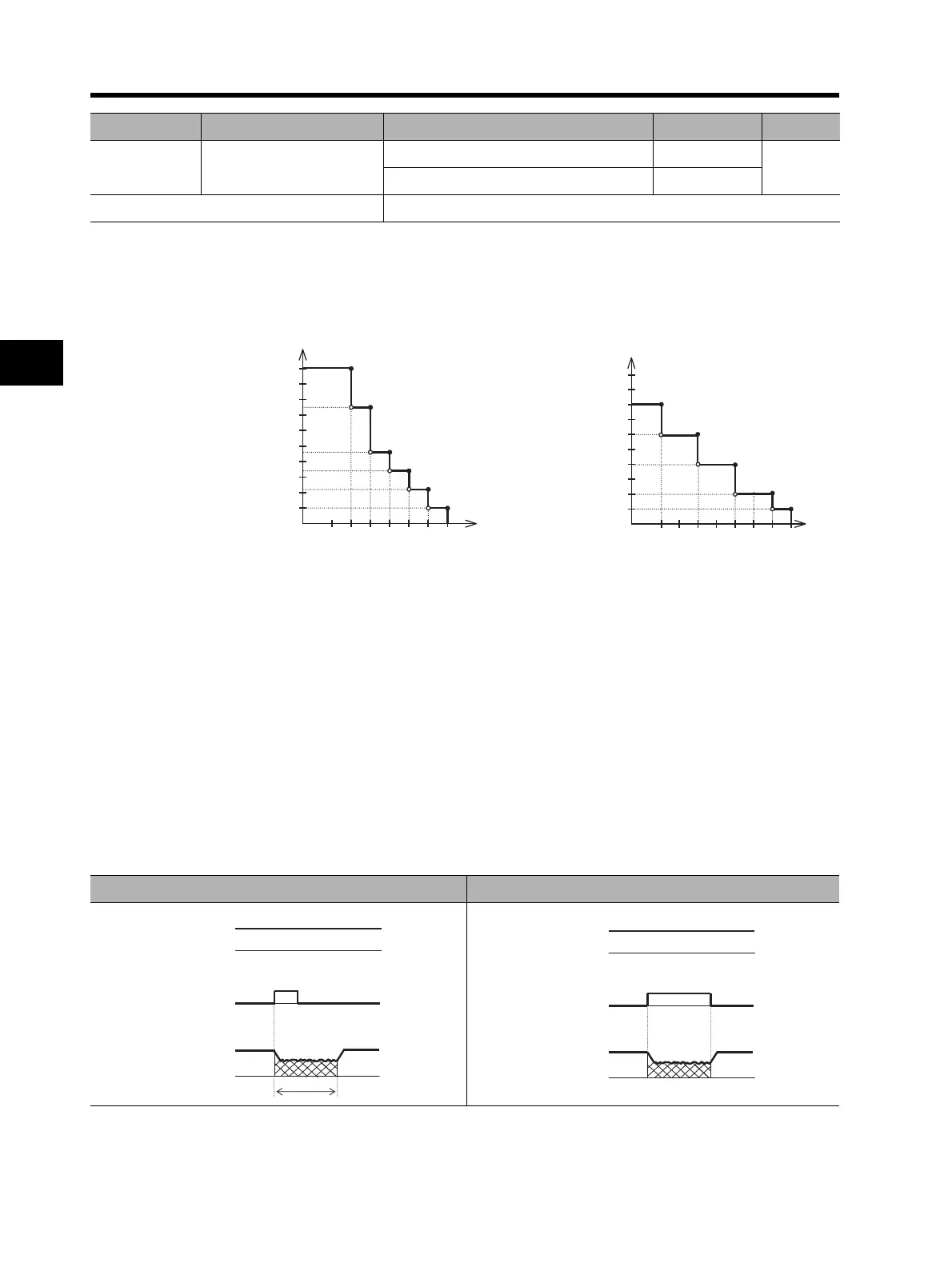
You can set a DC injection braking carrier frequency in A059. Note that setting a 5 kHz or higher
frequency automatically reduces the braking power. Refer to the following figure (DC injection
braking power limit).
External DC Injection Braking
•Allocate 07 (DB) to any of multi-function inputs C001 to C008.
•DC injection braking can be applied by turning on/off the DB terminal, regardless of DC injection
braking selection A051.
•Set a braking power level in DC injection braking power A054.
•If DC injection braking delay time A053 is set, the Inverter output is shut off during the set time
period and the motor goes into free-run status. After the set time elapses, DC injection braking
starts.
•Set DC injection braking time A055 via the Digital Operator or the DB terminal while taking into
account motor heat generation.
•Perform each setting according to your system after setting DC injection braking method selection
A056.
A059
DC injection braking
carrier frequency
0.5 to 15.0 (0.4 to 55 kW) 5.0
Hz
0.5 to 10.0 (75 to 132 kW) 3.0
Related functions C001 to C008
Parameter No. Function name Data Default setting Unit
DC Injection Braking Power Limit (55 kW max.)
DC Injection Braking Power Limit (75 to 132 kW)
10
9
8
7
6
5
4
3
2
1
3579111315
(75)
(46)
(34)
(22)
(10)
Max.
braking power
DC injection braking carrier frequency
Max.
braking power
(%)
80
100
70
60
50
40
30
20
10
90
10 9 8 7 6
(60)
(40)
(20)
(10)
543
DC injection braking carrier frequency (kHz)
(a) Edge operation (A056: 00) (b) Level operation (A056: 01)
(Example 1-a) (Example 1-b)












 To Next Page