4-28
4-2 Function Mode
4
Functions
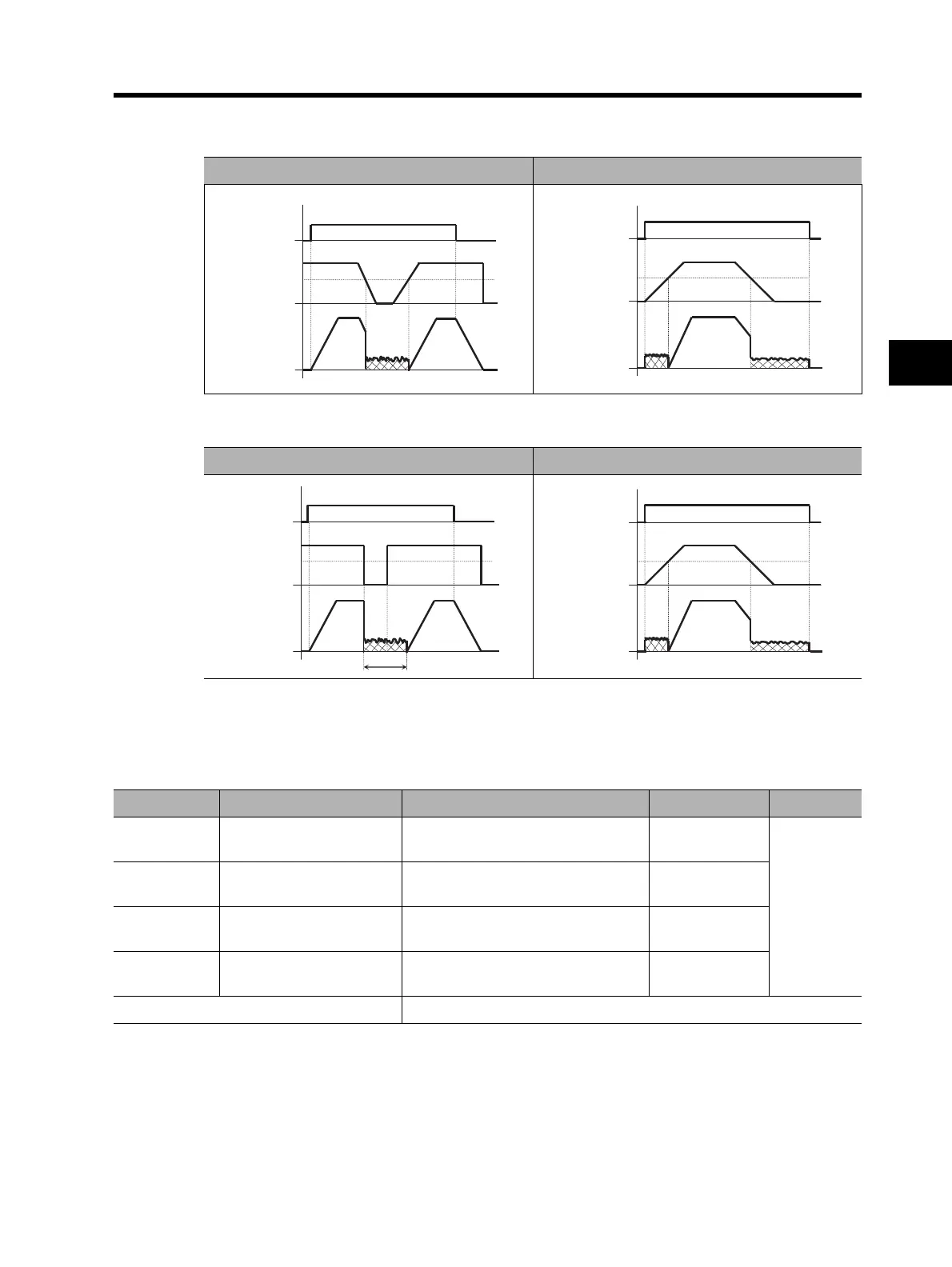
•If the RUN command is turned on with the frequency reference established (or a value larger than
the A052 setting is input), the initial operation is set to normal output.
•The operation to return to normal varies depending on the setting of DC injection braking power
A054.
Frequency Limit
•You can set both the upper/lower limits to the output frequency.
* To switch to the 2nd/3rd control, allocate 08 (SET)/17 (SET3) to the desired multi-function input and then turn it
on.
•Does not accept any frequency reference beyond the upper/lower limits.
•Set the upper limit first. Make sure that the upper limit (A061/A261) is larger than the lower limit
(A062/A262).
(Example 7-a) (Example 7-b)
ON
RUN
command
A052
Frequency
reference
Output
frequency
ON
RUN
command
A052
Frequency
reference
Output
frequency
(a) Edge operation (b) Level operation
ON
RUN
command
A052
Frequency
reference
Output
frequency
A053
ON
RUN
command
A052
Frequency
reference
Output
frequency
Parameter No. Function name Data Default setting Unit
A061 Frequency upper limit
0.0/Frequency lower limit [A062] to
Max. frequency [A004]
0.0
Hz
A261 *2nd frequency upper limit
0.0/2nd frequency lower limit [A262]
to 2nd max. frequency [A204]
0.0
A062 Frequency lower limit
0.0/Starting frequency to Frequency
upper limit [A061]
0.0
A262 *2nd frequency lower limit
0.0/Starting frequency to 2nd
frequency upper limit [A261]
0.0
Related functions C001 to C008












 To Next Page