4-88
4-2 Function Mode
4
Functions
•If control gain switching is selected in the multi-function input selection, turning off the signal
selects the gain setting of H050, H250, H051, H251, H052, or H252. Turning on the signal selects
the gain setting of H070, H071, or H072.
•If control gain switching is not selected in multi-function inputs 1 to 8 (C001 to C008), the gain
setting conforms to the status in which the signal is turned off.
UP/DOWN Function
•This function allows you to change the Inverter output frequency using the UP and DWN terminals
of the multi-function inputs.
Note: Do not turn on/off the UP/DWN terminal after shutting off the power. Otherwise, the Inverter may not store
data correctly.
•Allocate "27" (UP) and "28" (DWN) to any of multi-function inputs 1 to 8 (C001 to C008).
•This function is enabled only when frequency reference selection A001 is set to "01" or "02". If "01"
(terminal) is selected, however, this function is enabled for multi-step speed operation only.
•When you use an external analog input as frequency reference input, or when you set the jogging
operation frequency, this function is disabled.
•While the UP/DWN terminal is turned on, the acceleration/deceleration time depends on F002,
F003/F202, F203/F302, and F303. To switch between the 1st/2nd/3rd controls, allocate 08 (SET)/
17 (SET3) to the desired multi-function input and then turn on/off the SET terminal.
•You can store a frequency set value after UP/DWN adjustment. Choose whether to store the value
with C101.
Also, you can clear the stored frequency set value.
By allocating "29" (UDC) to a multi-function input and turning on/off the UDC terminal, you can
clear or store the frequency reference setting adjusted at UP/DOWN.
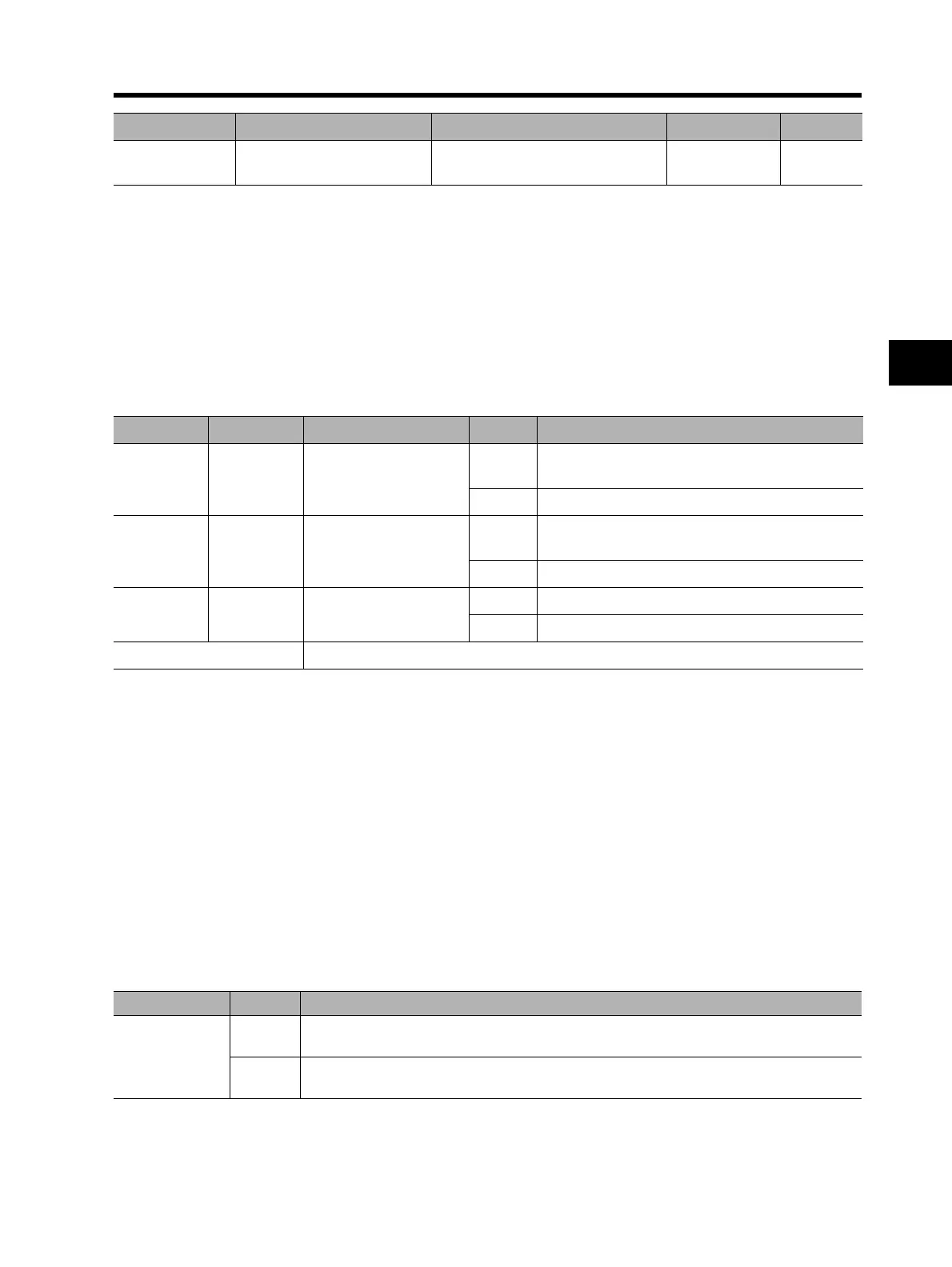
H073 Gain switching time
0. to 9999. (ms):
Taper time during gain switching
100. ms
Parameter No. Function name Data Default setting Unit
Data Symbol Function name Status Description
27 UP
UP/DWN function
accelerated
ON
Increases the current speed during the signal
input period.
OFF Keeps the current speed.
28 DWN
UP/DWN function
decelerated
ON
Decreases the current speed during the signal
input period.
OFF Keeps the current speed.
29 UDC
UP/DWN function
data clear
ON Clears the stored UP/DWN speed.
OFF Keeps the stored UP/DWN speed.
Available input terminals C001 to C008
Parameter No. Data Description
C101
00
Does not store the frequency reference adjusted at UP/DWN.
After restoring the power, returns to the value set before UP/DWN adjustment.
01
Stores the frequency reference adjusted at UP/DWN.
After restoring the power, maintains the set value after UP/DWN adjustment.












 To Next Page