EasyManua.ls Logo

Omron SYSMAC CQM1-ID212 - Page 127

Omron SYSMAC CQM1-ID212
157 pages
Print Icon
To Next Page IconTo Next Page
To Previous Page IconTo Previous Page
Loading...
115
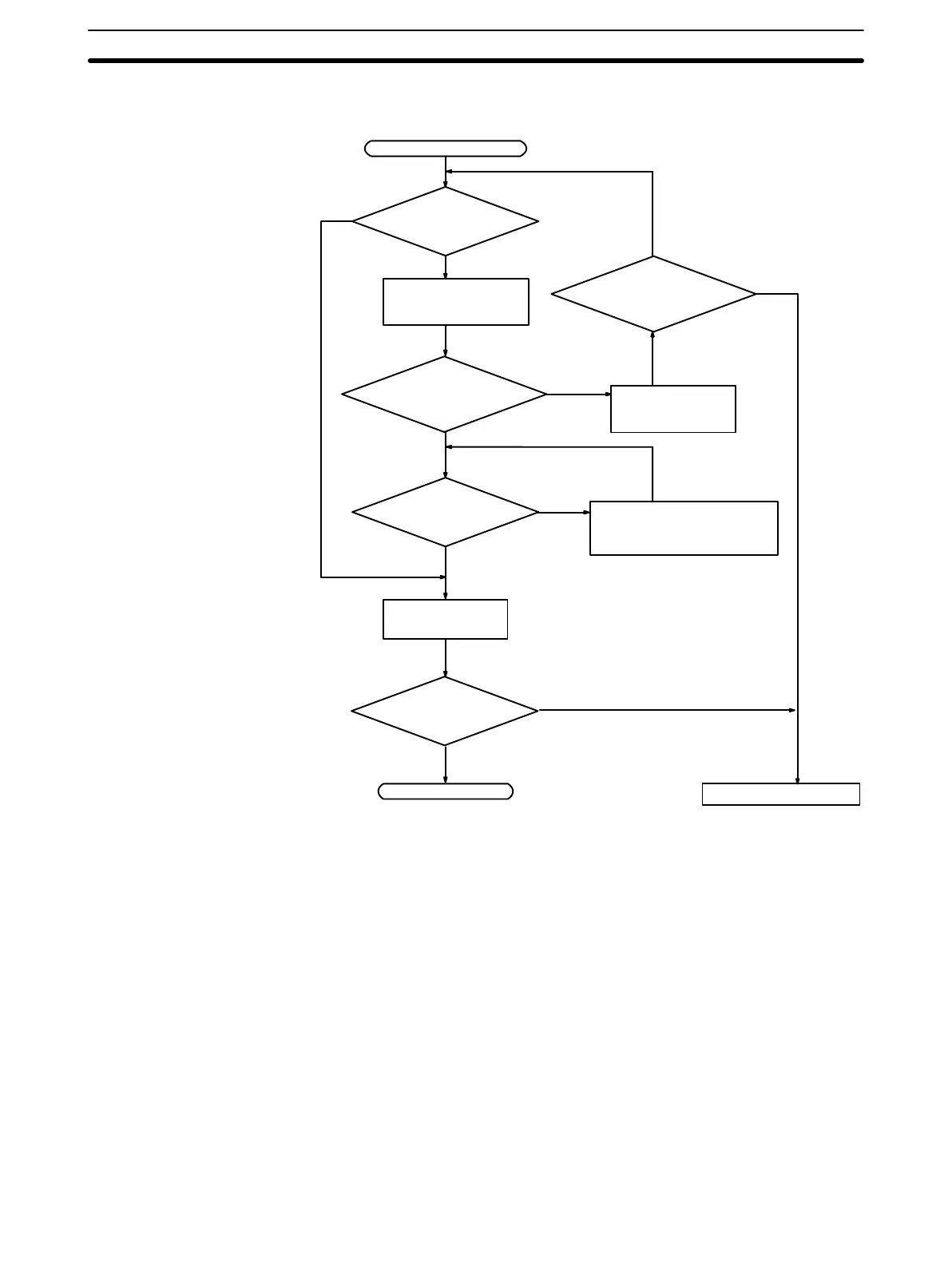
Fatal Error Check The following flowchart can be used to troubleshoot fatal errors that occur while
the Power indicator is lit.
Identify the error, eliminate
its cause, and clear the
error.
Is the ERR/ALM
indicator lit?
Determine the cause
of the error with a
Peripheral Device.
End
RUN indicator not lit.
Replace the CPU Unit.
Is PC mode displayed
on Peripheral Device?
Turn the power
supply OFF, and
then ON again.
Switch to RUN or
MONITOR mode.
No
Yes
Is a fatal error
displayed?
Is PC mode displayed
on Peripheral Device?
No
Yes
Yes
No
Is the RUN indi-
cator lit?
No
Yes
Yes
No
Troubleshooting Flowcharts
Section 4-6
Artisan Technology Group - Quality Instrumentation ... Guaranteed | (888) 88-SOURCE | www.artisantg.com

Table of Contents

Related product manuals