32
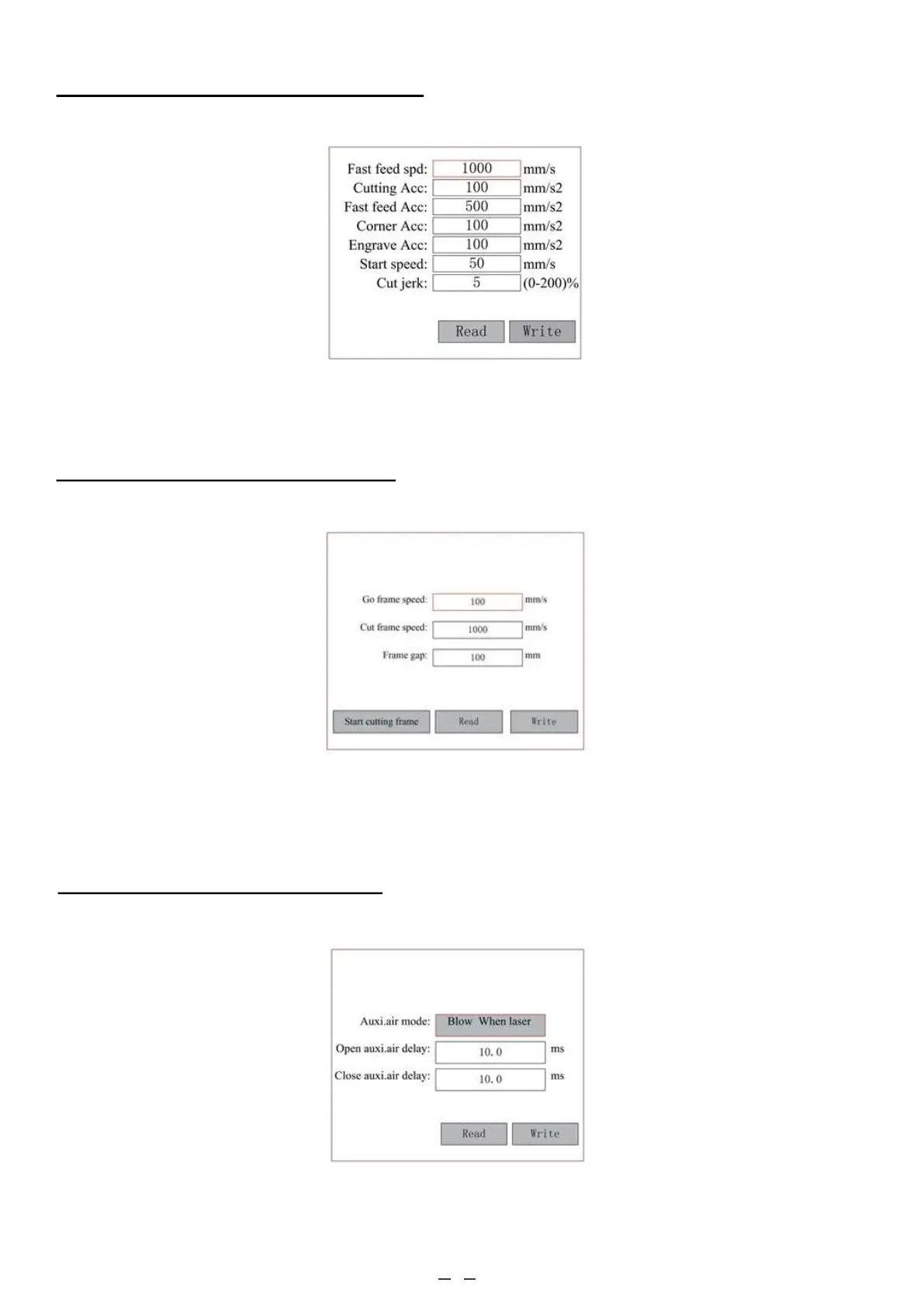
4.4.18 Adjusting Movement Parameters
In the Para Setting submenu, select Movement Parameters to display the following interface.
4.4.19 Setting the Frame Parameters
In the Para Setting submenu, select Frame Setting to display the following interface:
Select and adjust the parameters by pushing the arrows. When you finish your adjustments, move the cursor to Write
and press ENT to save the parameter change or ESC to exit without saving. Read can load saved parameters. Start
cutting frame will cut the frame according to the current parameters.
Select and adjust the parameters by pushing the arrows. When you finish your adjustments, move the cursor to Write
and press ENT to save the parameter change or ESC to exit without saving. Read can load saved parameters.
In the Para Setting submenu, select Blow Setting to display the following interface:
Select and adjust the parameters by pushing the arrows. When you finish your adjustments, move the cursor to Write
and press ENT to save the parameter change or ESC to exit without saving. Read can load saved parameters.
4.4.20 Setting the Blow Parameters



 To Next Page