5
Rear View
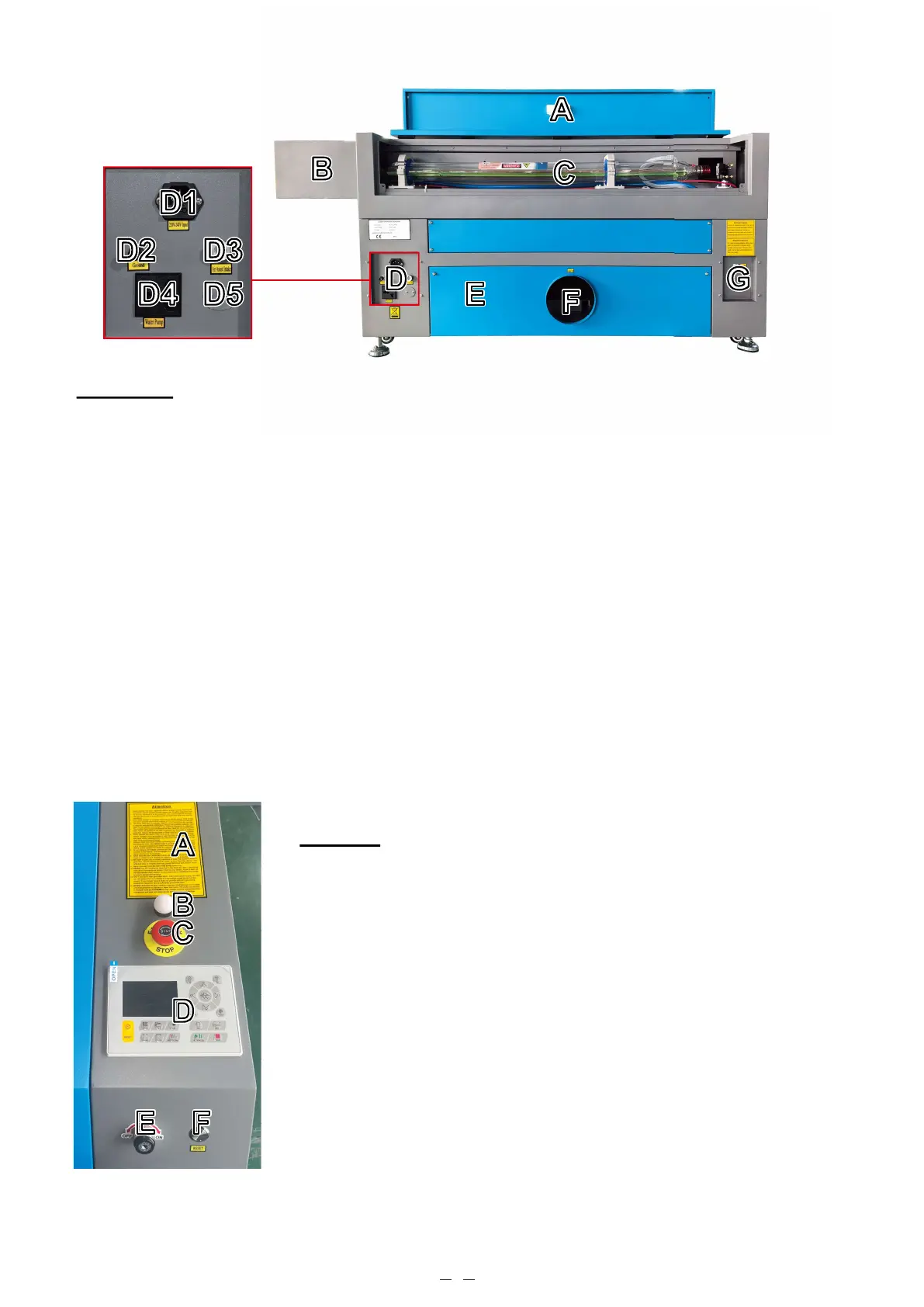
A. Top Rear Access Door—This door opens to the laser bay, holding the laser tube and its connections.
B. Extension Box—This box allows your laser tube to be longer and more powerful without wasted space or greater
expense. Do not place things on this box and protect it from any collisions.
C. Laser Tube—This long glass tube is filled with helium, nitrogen, and CO₂ gas and water cooled to safely produce
your engraving laser. Its connection to the laser power supply is extremely high voltage and extremely dangerous.
D1. Main Power Socket—The socket connects to your main power supply.
D2. Ground—Grounds the machine.
D3. Air Assist Intake—This port connects to your air assist to provide its pressurized air. Periodically check its filter
to keep it clear of any obstruction.
D4. Power Outlet—This outlet powers the water pump.
D5. Air Assist Pump Port—If additional air assist is needed, remove the cover and connect your additional air assist
through this port.
E. Bottom Rear Access Door—This door provides access to the air pump for easier maintenance.
F. Exhaust Fan Port—Use this port to connect your exhaust fan (not included).
G. Water Ports—These ports connect to your water pump or chiller to keep your laser tube cool and stable.
Controls
A. Warnings—This notice supplements the Safety Information chapter of this
manual. Read it carefully before using the machine.
B. Indicator Light—This light indicates the laser status. When the laser tube is
receiving current during normal operation, the light shows a green color. In
standby mode, it switches to yellow, and in case of a fault, it turns red.
C. Emergency Stop—This button immediately cuts all power to the laser tube in the
event of an emergency.
D. Control Panel—The control panel offers hands-on control of the engraving
process, including manual movement of the laser head and firing of the laser.
E. Laser Key—This key controls the power supply to your laser tube.
F. Reset Button—Press this button after the emergency is over to restore power to
your machine. You also need to press this button if the laser is turned off by the
interlocks when the cover or one of the doors is opened during engraving.
AA
BB
CC
EE FF
DD



 To Next Page