18
SETUP & CONFIGURATION
CONNECTING TO THE CAMERA
1. Locate the camera on the IP Finder list.
2. Double-click the camera to open the Viewer software in your web browser.
3. Log in to the camera with the appropriate User Name and Password.
Note The default User name is Admin and the default Password is1234. The
username and password are case sensitive
Administrator/User Privileges
The Administrator account has the authority to configure the IP camera and authorize
users’ access to the camera. The User accounts have access to the camera with limited
authority.
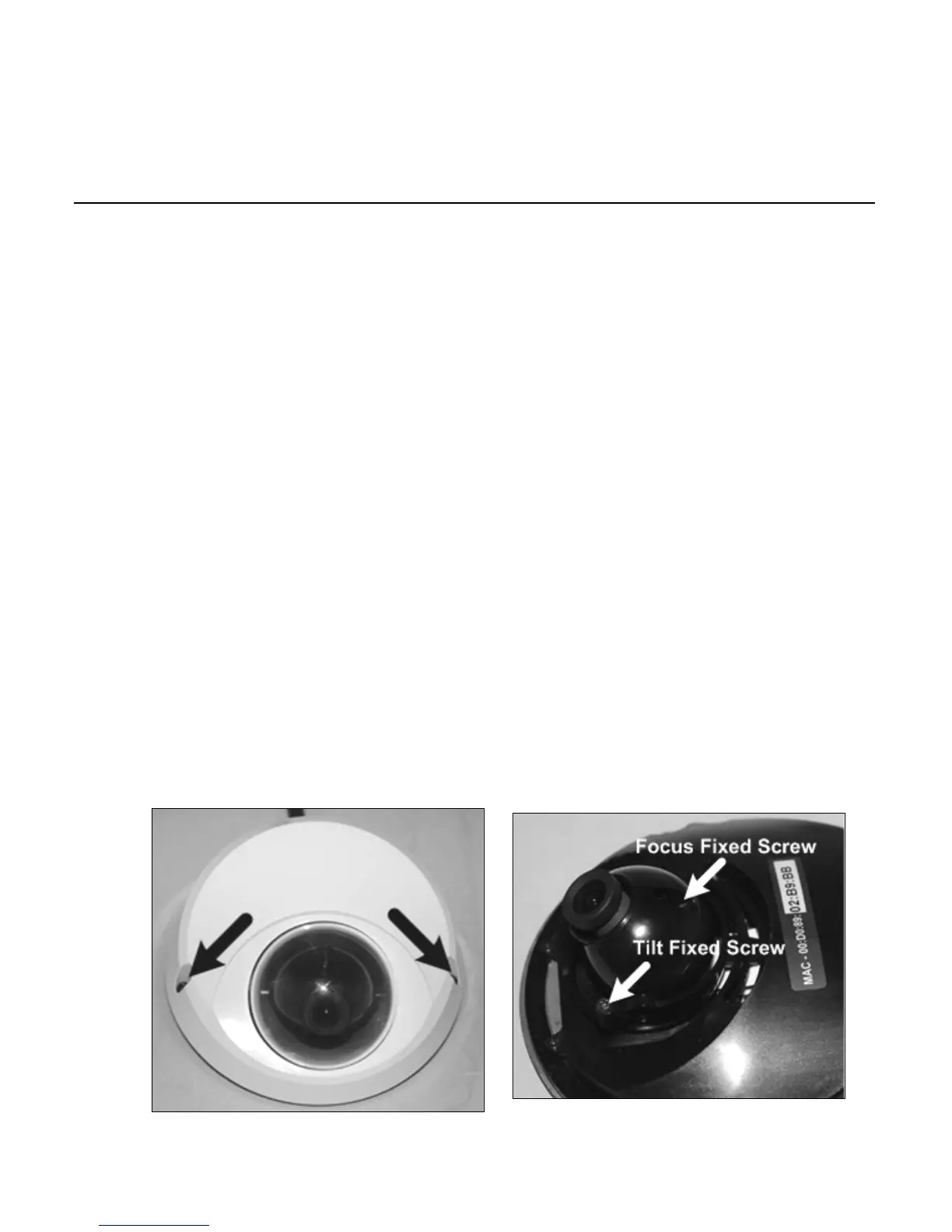
Lens Adjustment
The Viewer software will display an image from the camera on the Home tab. Adjust the
camera’s focus to produce a clear image.
1. Remove the screws from the camera
dome cover.
2. Loosen the focus fixed screw and
rotate the lens counter clockwise to
adjust the focus. Loosen the tilt fixed
screw and adjust the camera’s tilt
angle.



 To Next Page