26
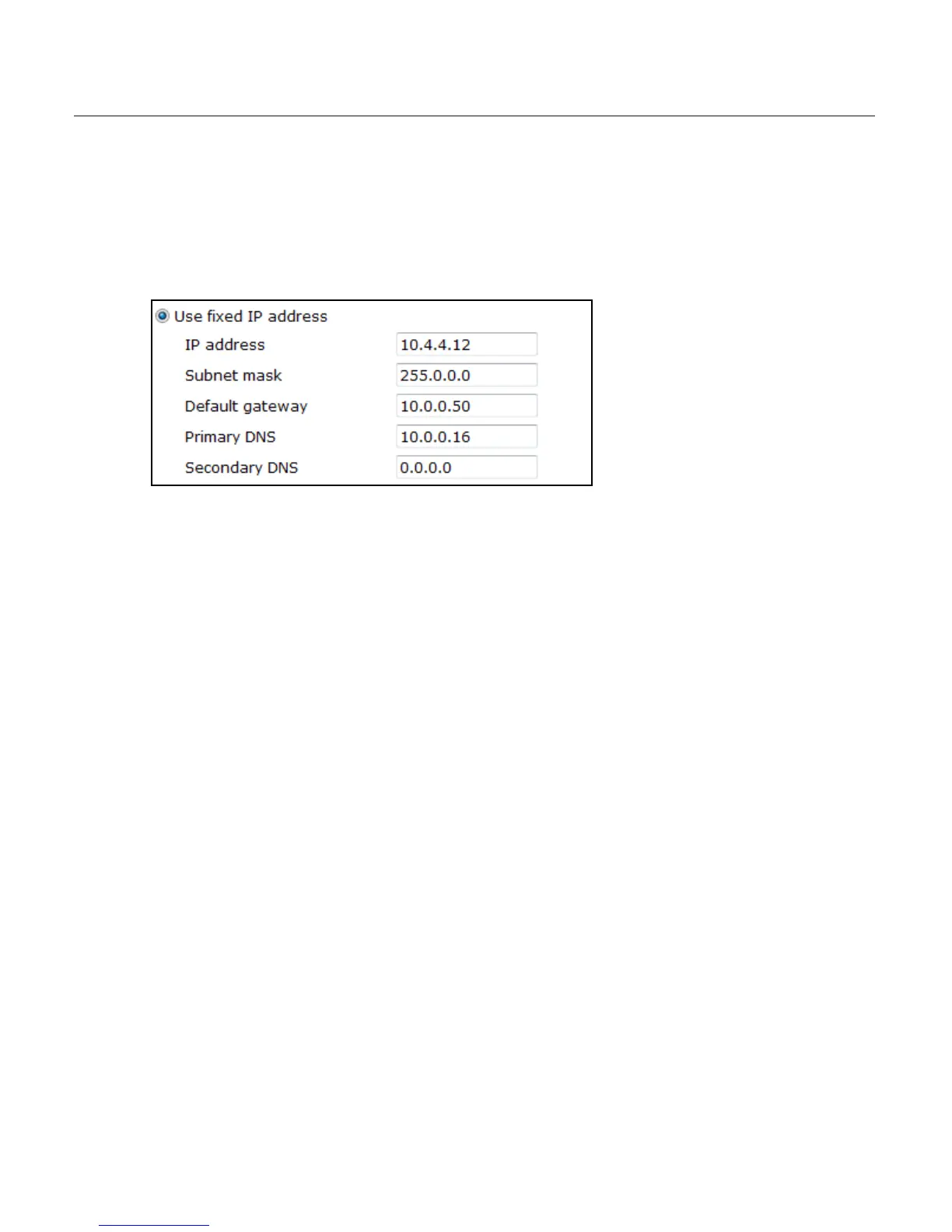
Use fixed IP address
To set up a new static IP address:
1. Select the Use fixed IP address option.
2. Type a new IP address in the IP address box.
3. Type a new address in the Default Gateway box.
4. Click Save to confirm the new setting.
When using static IP address to log in to the IP Camera, you can access it either through
OpenEye IP Finder software or type the IP address directly in the Address bar of your
internet browser.
General
• IP address – The IP Address is necessary for network identification.
• Subnet mask – Used to determine if the destination is in the same subnet. The
default value is 255.255.255.0.
• Default gateway – Used to forward frames to destinations in different subnets or for
internet access.
• Primary DNS – The primary domain name server that translates hostnames into IP
addresses. This is usually the gateway or router address.
• Secondary DNS – A secondary domain name server that backups the primary DNS.
• Web Server port – Defines the port that Internet Explorer uses to connect over the
web and view video. If this port is changed then the new port must be defined when
attempting to web connect (ex: if your camera’s IP address is 192.168.0.100 and you
change the web port to 8001, then you must type http://192.168.0.100:8001 in your
browser).
Advanced
• RTSP port – The default RTSP port is 554; setting range: 1024 ~65535.
• MJPEG over HTTP port – The default HTTP Port is 8008; setting range: 1024
~65535.
Note The MJPEG over HTTP port must not be the same as the web server port.



 To Next Page