18
Accessories
Remote Control – Bluetooth for Android/iOS
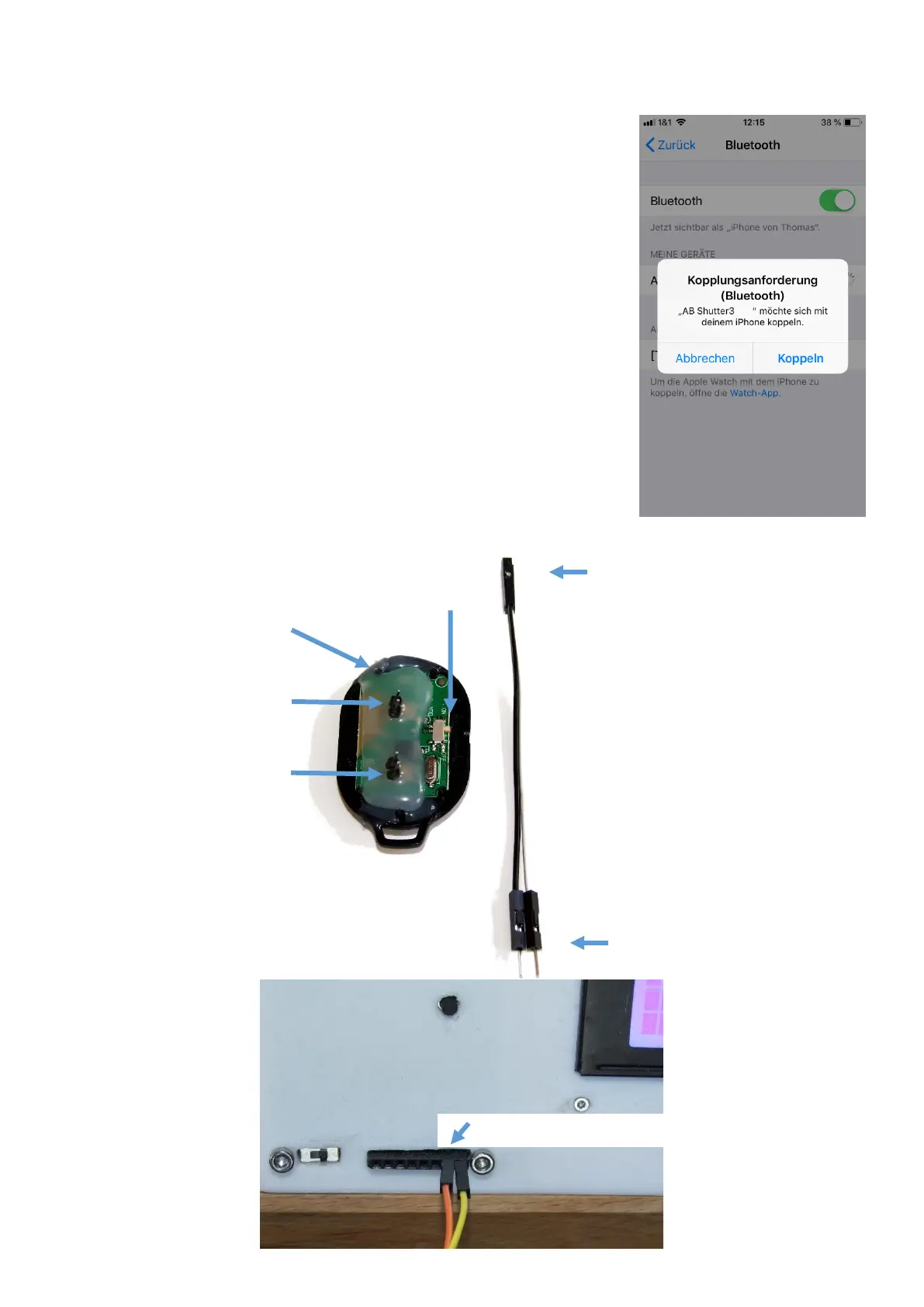
A modified Bluetooth trigger can be used to trigger most smartphone
cameras. The shown module is operated with a CR2032 button cell, which
must be inserted on the back. As soon as the On / Off switch has been
flipped, the blue LED lights up at regular intervals. The device must then be
paired with the smartphone via Bluetooth. This can be done in the
smartphone’s setting menu. The device should be visible as “AB Shutter 3”
and has to be coupled accordingly
To connect the Bluetooth module to the control unit, the enclosed cables
are used. The female DuPont plugs are plugged into the Bluetooth module.
Attention: The upper connectors are for iOS, the lower for Android! (See
picture below). You can test the functionality of the trigger by shorting the
male ends of the cables.
The male DuPont plugs are then plugged into the outer-right two sockets
on the control unit (Opto). Be careful choosing the right pins, as the wrong
pins might destroy the bluetooth device!
Important: See Set Camera Mode / Trigger Mechanism to "direct"



 To Next Page